
| Logo |
|
|---|---|
| Info | CAPN: American Express |
| Type | Payments by Credit Card |

Introduction
Acquirers and connection
Computop Paygate supports many different credit card connections to various acquirers / processors with different protocols.
You can find an overview of all different credit card interfaces here: Payments by Credit Card.
Additional features (e.g. AVS (Address Verification Service), refund, 3-D Secure, ...) may depend on the specific integration and acquirer.
Integration with Computop Paygate
In general we offer two different ways of integration:
| Payment page (payssl.aspx) | Direct integration (direct.aspx) | |
|---|---|---|
| Credit card number (PAN) handling |
|
|
| 3-D Secure handling |
|
|
| Additional data |
| |
| Shop-/System integration |
|
|
| Further actions |
| |
| Conclusion | Recommended for standard integrations - due to easy integration and simplified compliance.
| Recommended if you need full control and you do not want a redirect of the consumer.
|
 The documentation below is therefore always devided into two sections:
- integration via payment page (payment form)
- with common parameters to integrate Computop Paygate payment form
- with parameters to customize the payment form
- with specific parameters for the desired acquirer / processor
- integration via Server-2-Server (direct) integration
- with common parameters to integrate Computop Paygate payment form
- with specific parameters for the desired acquirer / processor
Implementation of 3-D Secure (2.x)
Common notes to 3-D Secure
3-D Secure is a process that authenticates the card holder to ensure that the consumer using the credit card data really is the card holder.
3-D Secure shall provide abuse of credit card data - specially in ecommerce environment.
3-D Secure 1.x has been implemented and asks the card holder typically for a password with each card usage.
3-D Secure 2.x has been implemented to:
- enable strong customer authentication (SCA) by authenticate the card holder with 2 independent factors of these 3 factors:
- something the card holder knows, e.g. a password
- something the card holder owns, e.g. a device (like phone to receive a token via SMS or using other OTP, token generator, ...)
- something the card holder is, e.g. biometrics (like finger print, face-id, ...)
- enable seemless authentication where the consumer is not authenticated and not asked to authenticate himself.
3-D Secure with Computop Paygate
Prepare yourself / your integration to be 3-D Secure 2.x ready - here a short overview with some technical details.
| 3-D Secure 1.x | 3-D Secure 2.x | 3-D Secure 2.x Sample | ||||||||||
|---|---|---|---|---|---|---|---|---|---|---|---|---|
| Depend on your integration: Payment Form ./. Server-2-Server | ||||||||||||
| Payment Page / Payment Form | Your existing integration. | Just add API parameter "MsgVer=2.0", the rest is handled automatically by Computop Paygate | Add parameter "MsgVer=2.0" to your existing API call to start Payment Form. | |||||||||
| URL-processing | URLFailure and URLSuccess work with http-GET | URLFailure and URLSuccess work with http-POST (due to amount of data). So pls. prepare to handle both (GET + POST) | ||||||||||
| Server-2-Server integration | Use KVP:
| e.g.:
card=ewogICAgInNlY3VyaXR5Q29kZSI6ICI1NjkiLAogICAgImV4cGlyeURhdGUiOiAiMjAyNTA4IiwKICAgICJjYXJkaG9sZGVyTmFtZSI6ICJXaWxsaWFtIFRob21hcyIsCiAgICAibnVtYmVyIjogIjQxMTExMTExMTExMTExMTEiLAogICAgImJyYW5kIjogIlZJU0EiCn0= | ||||||||||
| For specific use cases, find other use cases here: 3DS 2.0 Merchant Use-Cases | ||||||||||||
| Use case | 3-D Secure 1.x | 3-D Secure 2.x | 3-D Secure 2.x Sample | |||||||||
| Recurring payments (initial) | Use parameter "RTF=I" you may receive TransactionID as Card scheme specific transaction ID | Change "RTF" to parameter "credentialOnFile"-JSON with "recurring" and "initial=true" you may receive schemeReferenceID as Card scheme specific transaction ID | e.g.: The JSON needs to be base64-encoded and then used as value for parameter credentialOnFile (pls. be aware to use the full base64-encoded string, including "=" at the end) credentialOnFile=ewogICAgInR5cGUiOiB7CiAgICAgICAgInJlY3VycmluZyI6IHsKICAgICAgICAgICAgInJlY3VycmluZ0ZyZXF1ZW5jeSI6IDMwLAogICAgICAgICAgICAicmVjdXJyaW5nU3RhcnREYXRlIjogIjIwMjEtMDktMTQiLAogICAgICAgICAgICAicmVjdXJyaW5nRXhwaXJ5RGF0ZSI6ICIyMDIyLTA5LTE0IgogICAgICAgIH0KICAgIH0sCiAgICAiaW5pdGlhbFBheW1lbnQiOiB0cnVlCn0= | |||||||||
| Recurring payments (subsequent) | Use parameter "RTF=R" and send TransactionID as Card scheme specific transaction ID | Change "RTF" to parameter "credentialOnFile"-JSON with "recurring" and "initial=false" and send schemeReferenceID as Card scheme specific transaction ID | e.g. After base64-encoding: credentialOnFile=ewogICAgInR5cGUiOiB7CiAgICAgICAgInJlY3VycmluZyI6IHsKICAgICAgICAgICAgInJlY3VycmluZ0ZyZXF1ZW5jeSI6IDMwLAogICAgICAgICAgICAicmVjdXJyaW5nU3RhcnREYXRlIjogIjIwMjEtMDktMTQiLAogICAgICAgICAgICAicmVjdXJyaW5nRXhwaXJ5RGF0ZSI6ICIyMDIyLTA5LTE0IgogICAgICAgIH0KICAgIH0sCiAgICAiaW5pdGlhbFBheW1lbnQiOiBmYWxzZQp9 | |||||||||
| Customer Initiated (initial) | Use parameter "RTF=E" you may receive TransactionID as Card scheme specific transaction ID | Change "RTF" to parameter "credentialOnFile"-JSON with "CIT" and "initial=true" you may receive schemeReferenceID as Card scheme specific transaction ID | e.g. After base64-encoding (again: don't miss "=" at the end; it has to be part of the value): credentialOnFile=ewogICAgInR5cGUiOiB7CiAgICAgICAgInVuc2NoZWR1bGVkIjogIkNJVCIKICAgIH0sCiAgICAiaW5pdGlhbFBheW1lbnQiOiB0cnVlCn0= | |||||||||
| Merchant Initiated (subsequent) | Use parameter "RTF=M" and send TransactionID as Card scheme specific transaction ID | Change "RTF" to parameter "credentialOnFile"-JSON with "MIT" and "initial=false" and send schemeReferenceID as Card scheme specific transaction ID | e.g. After base64-encoding: credentialOnFile=ewogICAgInR5cGUiOiB7CiAgICAgICAgInVuc2NoZWR1bGVkIjogIk1JVCIKICAgIH0sCiAgICAiaW5pdGlhbFBheW1lbnQiOiBmYWxzZQp9 | |||||||||
Address Verification Service (AVS) (depending on acquirer / processor) | Use parameter
| Change address data to "address"-JSON | e.g. billingAddress=ewogICAgImNpdHkiOiAiTmV3IFlvcmsiLAogICAgImNvdW50cnkiOiB7CiAgICAgICAgImNvdW50cnlBMyI6ICJVU0EiCiAgICB9LAogICAgImFkZHJlc3NMaW5lMSI6IHsKICAgICAgICAic3RyZWV0IjogIlBhcmsgQXZlbnVlIiwKICAgICAgICAic3RyZWV0TnVtYmVyIjogIjI3MCIKICAgIH0sCiAgICAicG9zdGFsQ29kZSI6ICIxMDAxNy0yMDcwIiwKICAgICJzdGF0ZSI6ICJOWSIKfQ== | |||||||||
| Apply for frictionless payment processing |
| Provide additional data as JSON-KVP: JSON Objects | e.g.: After base64-encoding (again: don't miss "=" at the end; it has to be part of the value): threeDSPolicy=ewogICAgImNoYWxsZW5nZVByZWZlcmVuY2UgIjogIm1hbmRhdGVDaGFsbGVuZ2UiCn0= | |||||||||
Specific parameters for CAPN: American Express
Besides the general parameters described below for the credit card connection, CAPN requires the following additional parameters. An authorisation with 3-D Secure is possible.
Notice: For security reasons, Computop Paygate rejects all payment requests with formatting errors. Therefore, please use the correct data type for each parameter. The following table describes the additional encrypted payment request parameters described below for "interface via form" and "interface via Server-to-Server" :
Key | Format | CND | Description |
|---|---|---|---|
RefNr | ans..30 | M | Merchant’s unique reference number, which serves as payout reference in the acquirer EPA file. Please note, without the own shop reference delivery you cannot read out the EPA transaction and regarding the additional Computop settlement file (CTSF) we cannot add the additional payment data. Notice: RefNr has different format restrictions depending on the AMEX EPA/settlement file: CAPN --> AMEX GRRCN EPA = 30-characters alphanumeric Notice: Please note that AMEX reference numbers can only be reported in GRRCN format accounting files. With CAPN, EPA files do not receive any references for assignment. Details on the EPA-format are provided to you by your acquirer. Only ASCII characters allowed, special characters ("Umlaute", diacritics) are not allowed and must be replaced by their ASCII-representation (e.g. ü → ue, é → e, ...). |
OrderDesc | ans..768 | M | Description of purchased goods, unit prices etc. |
AmountAuth | n..10 | O | Prepaid card: Actually authorised amount in the smallest currency unit. Please contact Computop Helpdesk as this function must also be activated at the Paygate. |
| ContractID | n..8 | O | Further reference which can be used to retrieve the combination TerminalID/Contract partner number |
| Key | Format | CND | Contact data/Address verification (AVS) |
FirstName | ans..15 | O | First name of the customer (for AVS) |
LastName | ans..30 | O | Last name of the customer (for AVS) |
AddrStreet | ans..20 | O | Street name and street number, e.g. 18850~N~56~ST~#301 (for AVS) |
AddrZip | n..9 | O | Postcode (for AVS) |
ans..60 | O | Email address of the customer (for AVS) | |
Phone | n..10 | O | Phone number of the customer: for countries which do not use this system, please send the last 10 digits (for AVS) |
sdFirstName | ans..15 | O | First name in the delivery address (for AVS) |
sdLastName | ans..30 | O | Last name in the delivery address (for AVS) |
sdStreet | ans..50 | O | Street name and street number in th delivery address, e.g. 4102~N~289~ST~#301 (for AVS) |
sdZip | n..9 | O | Postcode in the delivery address |
sdCountryCode | n3 | O | Country code of the delivery address according to ISO-3166-1 numeric (3-digits) (for AVS) |
sdPhone | ans..10 | O | Phone number in the delivery address: for countries which do not use this system, please send the last 10 digits (for AVS) |
The following table describes the result parameters with which the Computop Paygate responds to your system. these result parameters are additional to the standard parameters for "interface via form" and "interface via Server-to-Server" described below pls. be prepared to receive additional parameters at any time and do not check the order of parameters the key (e.g. mid, RefNr) should not be checked case-sentive
Key | Format | CND | Description |
|---|---|---|---|
RefNr | ans..30 | O | Merchant’s unique reference number, which serves as payout reference in the acquirer EPA file. Please note, without the own shop reference delivery you cannot read out the EPA transaction and regarding the additional Computop settlement file (CTSF) we cannot add the additional payment data. Only ASCII characters allowed, special characters ("Umlaute", diacritics) are not allowed and must be replaced by their ASCII-representation (e.g. ü → ue, é → e, ...). |
CodeExt | n..10 | O | Error code from CAPN, if agreed with Computop Helpdesk |
ApprovalCode | n..6 | O | Approval code of the transaction |
TransactionID | ans..48 | O | Transaction ID from CAPN |
AmountAuth | n..10 | M | Authorised amount in the smallest currency unit. For prepaid cards this can be less than the initially requested amount. |
Match | a1 | O | Total result of address check (American Express via CAPN): For possible values see A3 AVS match parameters |
| cvcmatch | a1 | C | Result of CVC check. Possible values: M = Match, N = No match, U = Issuer unable to process request |
| PAR | ans..999 | O | Payment Account Reference data provided mainly by VISA/MC or AMEX, which is a non-financial reference number assigned to each unique Primary Account Number (PAN) and mapped to all its affiliated payment tokens. |
Card processing - Credit Card Form
When requesting card payments via Computop hosted forms the complexity of 3-D Secure is completely removed from the merchant implementation.
From a merchant point of view the sequence itself does not differ between 3DS authenticated and non-authenticated payments though 3DS requires consideration of additional data elements in the request and response.
Notice about Cookie-/Session Handling
Please note that some browsers might block necessary cookies when returning to Your shop. Here you will find additional information and different solution approaches.
Simplified Sequence Diagram
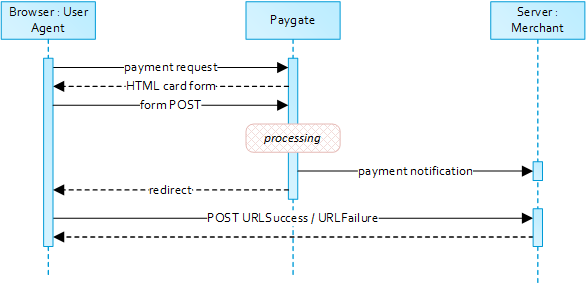
When requesting card payments via Computop hosted forms the complexity of 3-D Secure is completely removed from the merchant implementation.
From a merchant point of view the sequence itself does not differ between 3DS authenticated and non-authenticated payments though 3DS requires consideration of additional data elements in the request and response.
Notice about Cookie-/Session Handling
Please note that some browsers might block necessary cookies when returning to Your shop. Here you will find additional information and different solution approaches.
Payment Request
To retrieve a Computop card form please submit the following data elements via HTTP POST request method to https://www.computop-paygate.com/payssl.aspx.
Notice: For security reasons, Computop Paygate rejects all payment requests with formatting errors. Therefore, please use the correct data type for each parameter.
The following table describes the encrypted payment request parameters:
| Key | Format | CND | Description |
|---|---|---|---|
ans..30 | M | MerchantID, assigned by Computop. Additionally this parameter has to be passed in plain language too. |
| Key | Format | CND | Description | ||||
|---|---|---|---|---|---|---|---|
| msgver | ans..5 | M | Computop Paygate Message version. Valid values:
|
| Key | Format | CND | Description |
|---|---|---|---|
| ReqId | ans..32 | O | To avoid double payments or actions (e.g. by ETM), enter an alphanumeric value which identifies your transaction and may be assigned only once. If the transaction or action is submitted again with the same ReqID, Computop Paygate will not carry out the payment or new action, but will just return the status of the original transaction or action. Please note that the Computop Paygate must have a finalized transaction status for the first initial action (authentication/authorisation). This does not apply to 3-D Secure authentications that are terminated by a timeout. The 3-D Secure Timeout status does not count as a completed status in which the ReqID functionality on Paygate does not take effect. Submissions with identical ReqID for an open status will be processed regularly. Notice: Please note that a ReqID is only valid for 12 month, then it gets deleted at the Paygate. |
| Key | Format | CND | Description |
|---|---|---|---|
| TransID | ans..64 | M | TransactionID provided by you which should be unique for each payment |
| Key | Format | CND | Description |
|---|---|---|---|
| RefNr | O | Merchant’s unique reference number, which serves as payout reference in the acquirer EPA file. Please note, without the own shop reference delivery you cannot read out the EPA transaction and regarding the additional Computop settlement file (CTSF) we cannot add the additional payment data.
Only ASCII characters allowed, special characters ("Umlaute", diacritics) are not allowed and must be replaced by their ASCII-representation (e.g. ü → ue, é → e, ...). |
| Key | Format | CND | Description |
|---|---|---|---|
an64 | M | Hash Message Authentication Code (HMAC) with SHA-256 algorithm. Details can be found here: |
| Key | Format | CND | Description |
|---|---|---|---|
| Amount | n..10 | M | Amount in the smallest currency unit (e.g. EUR Cent). Please contact the Computop Helpdesk, if you want to capture amounts <100 (smallest currency unit). |
| Key | Format | CND | Description |
|---|---|---|---|
| Currency | a3 | M | Currency, three letters DIN / ISO 4217, e.g. EUR, USD, GBP. Please find an overview here: A1 Currency table |
| Key | Format | CND | Description | ||||||||
|---|---|---|---|---|---|---|---|---|---|---|---|
| Capture | an..6 | OM | Determines the type and time of capture.
|
| Key | Format | CND | Description |
|---|---|---|---|
| PayTypes | ans..256 | O | With this parameter you can override the accepted schemes, i.e. you can decide within this parameter separated by pipe which of the available credit card schemes are displayed. The template must support this function like for example the "Cards_v1". Example: PayTypes=VISA|MasterCard |
ans..22 | O | A descriptor to be printed on a card holder’s statement. Please also refer to the additional comments made elsewhere for more information about rules and regulations. | |
OrderDesc | ans..768 | O | Description of purchased goods, unit prices etc. |
a3 | O | Indicator to request an account verification (aka zero value authorization). If an account verification is requested the submitted amount will be optional and ignored for the actual payment transaction (e.g. authorization). Values accepted
| |
JSON | O | Object specifying authentication policies and exemption handling strategies | |
JSON | O | Prior Transaction Authentication Information contains optional information about a 3DS cardholder authentication that occurred prior to the current transaction | |
JSON | O | The account information contains optional information about the customer account with the merchant | |
JSON | C | The customer that is getting billed for the goods and / or services. Required for EMV 3DS unless market or regional mandate restricts sending this information. | |
JSON | C | The customer that the goods and / or services are sent to. Required if different from billToCustomer. | |
JSON | C | Billing address. Required for EMV 3DS (if available) unless market or regional mandate restricts sending this information. | |
JSON | C | Shipping address. If different from billingAddress, required for EMV 3DS (if available) unless market or regional mandate restricts sending this information. | |
JSON | C | Object specifying type and series of transactions using payment account credentials (e.g. account number or payment token) that is stored by a merchant to process future purchases for a customer. Required if applicable. | |
JSON | O | The Merchant Risk Indicator contains optional information about the specific purchase by the customer. If no | |
| subMerchantPF | JSON | O | Object specifying SubMerchant (Payment Facilitator) details.
|
| Key | Format | CND | Description |
|---|---|---|---|
| URLSuccess | ans..256 | M | Complete URL which calls up Paygate if payment has been successful. The URL may be called up only via port 443. This URL may not contain parameters: In order to exchange values between Paygate and shop, please use the parameter UserData.
|
| Key | Format | CND | Description |
|---|---|---|---|
| URLFailure | ans..256 | M | Complete URL which calls up Paygate if payment has been unsuccessful. The URL may be called up only via port 443. This URL may not contain parameters: In order to exchange values between Paygate and shop, please use the parameter UserData.
|
| Key | Format | CND | Description |
|---|---|---|---|
| URLBack | ans..256 | O | Complete URL which Paygate calls in case that Cancel is clicked by the customer. The parameter "URLBack" can be sent
In order to exchange values between Paygate and shop you may use something like this:
When user cancels payment this URL is called exactly like this and you may use URL Decode to extract parameter and values. |
| Key | Format | CND | Description |
|---|---|---|---|
| Response | a7 | O | Status response sent by Paygate to URLSuccess and URLFailure, should be encrypted. For this purpose, transmit Response=encrypt parameter. |
| Key | Format | CND | Description |
|---|---|---|---|
| URLNotify | ans..256 | M | Complete URL which Paygate calls up in order to notify the shop about the payment result. The URL may be called up only via port 443. It may not contain parameters: Use the UserData parameter instead.
|
| Key | Format | CND | Description |
|---|---|---|---|
| UserData | ans..1024 | O | If specified at request, Paygate forwards the parameter with the payment result to the shop. |
| Key | Format | CND | Description |
|---|---|---|---|
| Plain | ans..50 | O | A single value to be set by the merchant to return some information unencrypted in response/notify, e.g. the MID. "Plain"-parameter is part of encrypted "Data" in Computop Paygate and therefore protected against manipulation. |
| Key | Format | CND | Description |
|---|---|---|---|
| Custom | ans..1024 | O | "Custom"-parameter is added to the request data before encryption and is part of encrypted "Data" in Computop Paygate request. By this they are protected against manipulation by a consumer. The Custom-value is added to the Computop Paygate response in plain text and the "|" is replaced by a "&". By this you can put a single value into Custom-parameter and get multiple key-value-pairs back in response for your own purpose. |
| Key | Format | CND | Description |
|---|---|---|---|
| expirationTime | ans..19 | O | timestamp for the end time of the transaction processing, specified in UTC. Format: YYYY-MM-ddTHH:mm:ss |
Computop Paygate will return an HTML document in the response body representing the requested card form. The form may be included in the merchant checkout page or used as a standalone page to redirect the card holder to.
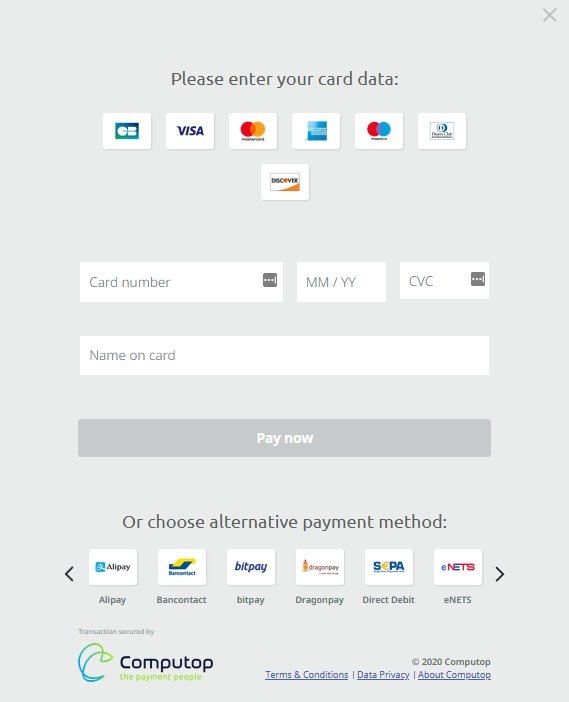
Card holder authentication and payment authorization will take place once the the cardholder entered all required card details and submitted the form data to Computop Paygate.
Note: In case you are using your own templates (Corporate Payment Page), please make sure you include Cardholder name on your custom template. Cardholder name is mapped to Paygate API parameter "CreditCardHolder". Cardholder name field must not contain any special characters and must have minimal length of 2 characters and maximum length of 45 characters.
When the payment is completed Computop Paygate will send a notification to the merchant server (i.e. URLNotify) and redirect the browser to the URLSuccess respectively to the URLFailure.
The blowfish encrypted data elements as listed in the following table are transferred via HTTP POST request method to the URLNotify and URLSuccess/URLFailure.
The credit card form can be highly customized by using your own template.
Details are available here: Corporate PayPage and templates
HTTP POST to URLSuccess / URLFailure / URLNotify
The following table gives the result parameters which Computop Paygate transmits to URLSuccess or URLFailure and URLNotify. If you have specified the Response=encrypt parameter, the following parameters are sent Blowfish encrypted to your system:
pls. be prepared to receive additional parameters at any time and do not check the order of parameters
the key (e.g. mid, RefNr) should not be checked case-sentive
| Key | Format | CND | Description |
|---|---|---|---|
ans..30 | M | MerchantID, assigned by Computop |
| Key | Format | CND | Description | ||||
|---|---|---|---|---|---|---|---|
| msgver | ans..5 | M | Computop Paygate Message version. Valid values:
|
| Key | Format | CND | Description |
|---|---|---|---|
| PayID | an32 | M | ID assigned by Paygate for the payment, e.g. for referencing in batch files as well as for capture or credit request. |
| Key | Format | CND | Description |
|---|---|---|---|
| XID | an32 | M | ID for all single transactions (authorisation, capture, credit note) for one payment assigned by Paygate |
| Key | Format | CND | Description |
|---|---|---|---|
| TransID | ans..64 | M | TransactionID provided by you which should be unique for each payment |
| Key | Format | CND | Description |
|---|---|---|---|
| schemeReferenceID | ans..64 | C | Card scheme specific transaction ID required for subsequent credential-on-file payments, delayed authorizations and resubmissions. Mandatory: CredentialOnFile – initial false – unscheduled MIT / recurring schemeReferenceID is returned for 3DS2-payments. In case of fallback to 3DS1 you will also need to check for TransactionId. The schemeReferenceID is a unique identifier generated by the card brands and as a rule Computop merchants can continue to use the SchemeReferenceIDs for subscription plans that were created while using another PSP environment / Paygate MerchantID / Acquirer ContractID / Acquirer. |
| Key | Format | CND | Description |
|---|---|---|---|
| refnr | O | Reference number taken from request | |
| Status | a..20 | M | Status of the transaction. Values accepted:
In case of Authentication-only the Status will be either |
| Key | Format | CND | Description |
|---|---|---|---|
| Description | ans..1024 | M | Further details in the event that payment is rejected. Please do not use the Description but the Code parameter for the transaction status analysis! |
| Key | Format | CND | Description |
|---|---|---|---|
| Code | an8 | M | Error code according to Paygate Response Codes (A4 Error codes) |
| Key | Format | CND | Description |
|---|---|---|---|
JSON | M | Card data | |
JSON | O | Object containing IP information | |
JSON | M | Authentication data | |
JSON | C | In case the authentication process included a cardholder challenge additional information about the challenge result will be provided. | |
| externalPaymentData | JSON | O | Optional additional data from acquirer/issuer/3rd party for authorization. |
| TimeStamp | Date/Time | O | Timestamp of this action if activated by Computop Helpdesk, e.g. 30.05.2023 08:47:57 or 30.05.2023 10:03:01.633 |
| CardHolder | ans..50 | O | Card holder name if activated by Computop Helpdesk, e.g. John Doe |
| bin | n..6 | O | BIN of credit card if activated by Computop Helpdesk, e.g. 40001 |
| maskedpan | an..19 | O | Masked number of credit card if activated by Computop Helpdesk, e.g. 400001XXXXXX8323 |
| cardinfo | JSON | O | JSON containing data of credit card type and issuer if activated by Computop Helpdesk, e.g. {"BIN":"400001","Brand":"VISA","Product":"","Source":"CREDIT","Type":"","Country":{"A3":"USA","N3":"840"},"Issuer":""} |
| CCBrand | an..20 | O | Brand / card scheme of credit card, e.g. VISA |
| Key | Format | CND | Description |
|---|---|---|---|
| PCNr | n16 | O | Pseudo Card Number: Random number generated by Computop Paygate which represents a genuine credit card number. The pseudo card number (PCN) starts with 0 and the last 3 digits correspond to those of the real card number. The PCN can be used like a genuine card number for authorisation, capture and credits. PCNr is a response value from Computop Paygate and is sent as CCNr in Request or part of card-JSON. |
| Key | Format | CND | Description |
|---|---|---|---|
| PCNr | n16 | O | Pseudo Card Number: Random number generated by Computop Paygate which represents a genuine credit card number. The pseudo card number (PCN) starts with 0 and the last 3 digits correspond to those of the real card number. The PCN can be used like a genuine card number for authorisation, capture and credits. PCNr is a response value from Computop Paygate and is sent as CCNr in Request or part of card-JSON. |
| Key | Format | CND | Description |
|---|---|---|---|
| CCExpiry | n6 | OC | Optional in combination with PCNr: Expiry date of the credit card in the format YYYYMM (202207). |
| Key | Format | CND | Description |
|---|---|---|---|
| Plain | ans..50 | O | A single value to be set by the merchant to return some information unencrypted in response/notify, e.g. the MID. "Plain"-parameter is part of encrypted "Data" in Computop Paygate and therefore protected against manipulation. |
| Key | Format | CND | Description |
|---|---|---|---|
| Custom | ans..1024 | O | "Custom"-parameter is added to the request data before encryption and is part of encrypted "Data" in Computop Paygate request. By this they are protected against manipulation by a consumer. The Custom-value is added to the Computop Paygate response in plain text and the "|" is replaced by a "&". By this you can put a single value into Custom-parameter and get multiple key-value-pairs back in response for your own purpose. |
| Key | Format | CND | Description |
|---|---|---|---|
| UserData | ans..1024 | O | If specified at request, Paygate forwards the parameter with the payment result to the shop. |
| Key | Format | CND | Description |
|---|---|---|---|
an64 | M | Hash Message Authentication Code (HMAC) with SHA-256 algorithm. Details can be found here: |
Credit card payments with separate authorisation
For credit card payments the ORDER can be separated from the subsequent authorisation and the following steps. Therefore initially the SSL credit card payment is initiated via Paygate form or via Server-to-Server-connection like in the chapters above with an additional parameter. Later it is authorised using the interface authorize.aspx via server-to-server connection. For initialising visit the following URL:
https://www.computop-paygate.com/payssl.aspx |
For Server-to-Server-connection it is the following URL:
https://www.computop-paygate.com/direct.aspx |
The following table describes the encrypted payment request parameters:
Key | Format | CND | Description |
|---|---|---|---|
TxType | ans..20 | M | Submit “Order” to initialize a payment which later will be authorised via interface authorize.aspx. Please note that in combination with the used 3-D Secure method a separate setting is necessary. Please contact directly Computop Helpdesk. |
In order to authorise a previously with TxType=Order initiated SSL credit card payment, please use the following URL:
https://www.computop-paygate.com/authorize.aspx |
Notice: Please note, that for an initial order KPN/CVC/CVV-check is not possible. For the subsequent reservation request this ID also cannot be passed on.
Notice: For security reasons, Computop Paygate rejects all payment requests with formatting errors. Therefore, please use the correct data type for each parameter.
The following table describes the encrypted payment request parameters:
| Key | Format | CND | Description |
|---|---|---|---|
ans..30 | M | MerchantID, assigned by Computop. Additionally this parameter has to be passed in plain language too. |
| Key | Format | CND | Description |
|---|---|---|---|
| PayID | an32 | M | ID assigned by Paygate for the payment, e.g. for referencing in batch files as well as for capture or credit request. |
| Key | Format | CND | Description |
|---|---|---|---|
| TransID | ans..64 | M | TransactionID provided by you which should be unique for each payment |
| Key | Format | CND | Description |
|---|---|---|---|
| Amount | n..10 | M | Amount in the smallest currency unit (e.g. EUR Cent). Please contact the Computop Helpdesk, if you want to capture amounts <100 (smallest currency unit). |
| Key | Format | CND | Description |
|---|---|---|---|
| Currency | a3 | M | Currency, three letters DIN / ISO 4217, e.g. EUR, USD, GBP. Please find an overview here: A1 Currency table |
Key | Format | CND | Description |
|---|---|---|---|
OrderDesc | ans..768 | O | Description of purchased goods, unit prices etc. |
| Key | Format | CND | Description |
|---|---|---|---|
an64 | M | Hash Message Authentication Code (HMAC) with SHA-256 algorithm. Details can be found here: |
| Key | Format | CND | Description | ||||||||
|---|---|---|---|---|---|---|---|---|---|---|---|
| Capture | an..6 | OM | Determines the type and time of capture.
|
The following table describes the result parameters with which the Computop Paygate responds to your system
pls. be prepared to receive additional parameters at any time and do not check the order of parameters
the key (e.g. mid, RefNr) should not be checked case-sentive
| Key | Format | CND | Description |
|---|---|---|---|
ans..30 | M | MerchantID, assigned by Computop |
| Key | Format | CND | Description |
|---|---|---|---|
| PayID | an32 | M | ID assigned by Paygate for the payment, e.g. for referencing in batch files as well as for capture or credit request. |
| Key | Format | CND | Description |
|---|---|---|---|
| XID | an32 | M | ID for all single transactions (authorisation, capture, credit note) for one payment assigned by Paygate |
| Key | Format | CND | Description |
|---|---|---|---|
| TransID | ans..64 | M | TransactionID provided by you which should be unique for each payment |
| Key | Format | CND | Description |
|---|---|---|---|
| Status | a..50 | M | OK (URLSuccess) or FAILED (URLFailure) |
| Key | Format | CND | Description |
|---|---|---|---|
| Description | ans..1024 | M | Further details in the event that payment is rejected. Please do not use the Description but the Code parameter for the transaction status analysis! |
| Key | Format | CND | Description |
|---|---|---|---|
| Code | an8 | M | Error code according to Paygate Response Codes (A4 Error codes) |
| Key | Format | CND | Description |
|---|---|---|---|
| RefNr | O | Merchant’s unique reference number, which serves as payout reference in the acquirer EPA file. Please note, without the own shop reference delivery you cannot read out the EPA transaction and regarding the additional Computop settlement file (CTSF) we cannot add the additional payment data.
Only ASCII characters allowed, special characters ("Umlaute", diacritics) are not allowed and must be replaced by their ASCII-representation (e.g. ü → ue, é → e, ...). |
Extended Sequence Diagram

Card processing - Server-2-Server integration
A 3-D Secure 2.0 payment sequence may comprise the following distinct activities:
- Versioning
- Request ACS and DS Protocol Version(s) that correspond to card account range as well as an optional 3-D Secure Method URL
3-D Secure Method
Connect the cardholder browser to the issuer ACS to obtain additional browser data
Authentication
Submit authentication request to the issuer ACS
Challenge
Challenge the card holder if mandated
Authorization
Authorize the authenticated transaction with the acquirer
Server-2-Server Sequence Diagram
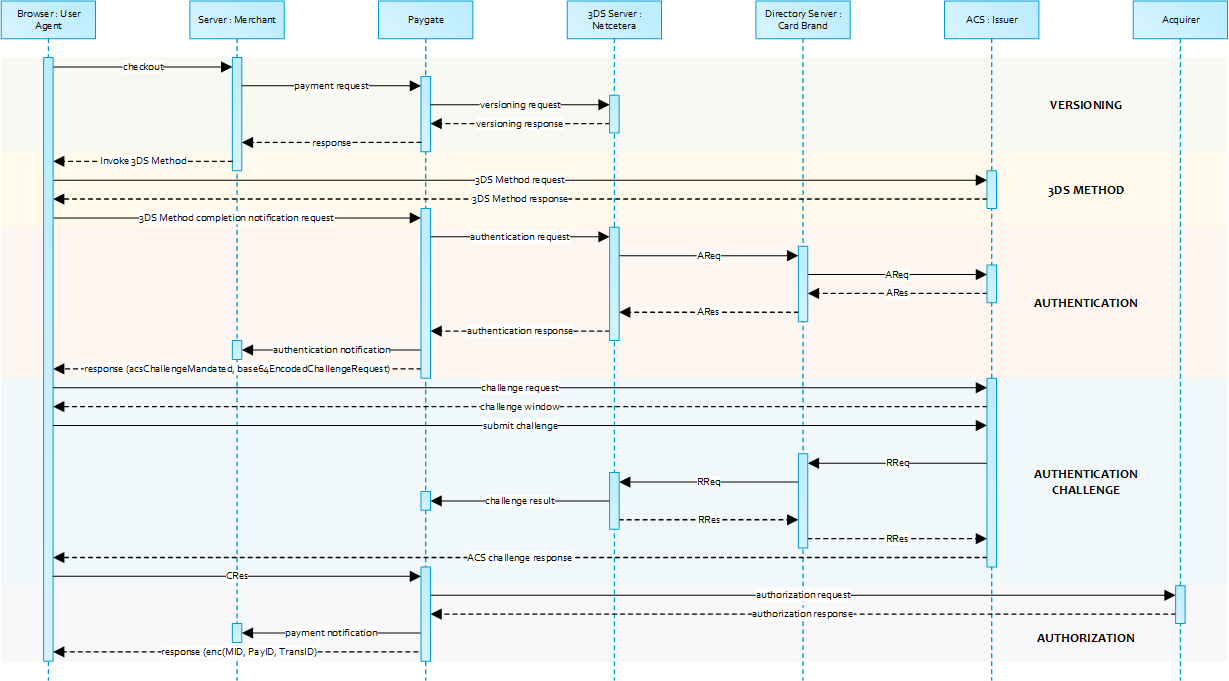
Please note that the the communication between client and Access Control Server (ACS) is implemented through iframes. Thus, responses arrive in an HTML subdocument and you may establish correspondent event listeners in your root document.
Alternatively you could solely rely on asynchronous notifications delivered to your backend. In those cases you may have to consider methods such as long polling, SSE or websockets to update the client.
Payment Initiation
The initial request to Computop Paygate will be the same regardless of the underlying 3-D Secure Protocol.
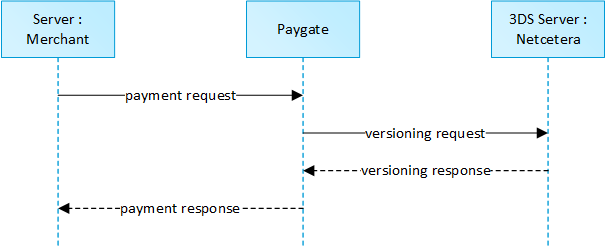
In order to start a server-to-server 3-D Secure card payment sequence please post the following key-value-pairs to https://www.computop-paygate.com/ direct.aspx.
Call of interface: general parameters
Notice: For credit card payments with 3-D Secure, please note the different cases as explained separately in the chapter at the start of the handbook. If the credit card is registered for Verified or SecureCode or SafeKey, the next phase is divided into two steps of authentication and payment. However it always begins in the same way via the direct.aspx interface. The first response however is the receipt of Javascript code or other parameters in order to carry out a second call up of the direct3d.aspx interface. Only after that, do you receive the listed parameter as a response.
To carry out a credit card payment via a Server-to-Server connection, please use the following URL:
https://www.computop-paygate.com/direct.aspx |
Request elements
Notice: For security reasons, Computop Paygate rejects all payment requests with formatting errors. Therefore, please use the correct data type for each parameter.
The following table describes the encrypted payment request parameters:
Notice: In case of a merchant initiated recurring transaction the JSON objects (besides credentialOnFile and card), the URLNotify and TermURL are not mandatory parameters, because no 3-D Secure and no risk evaluation is done by the card issuing bank and the payment result is directly returned within the response.
| Key | Format | CND | Description |
|---|---|---|---|
ans..30 | M | MerchantID, assigned by Computop. Additionally this parameter has to be passed in plain language too. |
| Key | Format | CND | Description | ||||
|---|---|---|---|---|---|---|---|
| msgver | ans..5 | M | Computop Paygate Message version. Valid values:
|
| Key | Format | CND | Description |
|---|---|---|---|
| TransID | ans..64 | M | TransactionID provided by you which should be unique for each payment |
| Key | Format | CND | Description |
|---|---|---|---|
| ReqId | ans..32 | O | To avoid double payments or actions (e.g. by ETM), enter an alphanumeric value which identifies your transaction and may be assigned only once. If the transaction or action is submitted again with the same ReqID, Computop Paygate will not carry out the payment or new action, but will just return the status of the original transaction or action. Please note that the Computop Paygate must have a finalized transaction status for the first initial action (authentication/authorisation). This does not apply to 3-D Secure authentications that are terminated by a timeout. The 3-D Secure Timeout status does not count as a completed status in which the ReqID functionality on Paygate does not take effect. Submissions with identical ReqID for an open status will be processed regularly. Notice: Please note that a ReqID is only valid for 12 month, then it gets deleted at the Paygate. |
| Key | Format | CND | Description |
|---|---|---|---|
| RefNr | O | Merchant’s unique reference number, which serves as payout reference in the acquirer EPA file. Please note, without the own shop reference delivery you cannot read out the EPA transaction and regarding the additional Computop settlement file (CTSF) we cannot add the additional payment data.
Only ASCII characters allowed, special characters ("Umlaute", diacritics) are not allowed and must be replaced by their ASCII-representation (e.g. ü → ue, é → e, ...). |
| Key | Format | CND | Description |
|---|---|---|---|
| schemeReferenceID | ans..64 | C | Card scheme specific transaction ID required for subsequent credential-on-file payments, delayed authorizations and resubmissions. Mandatory: CredentialOnFile – initial false – unscheduled MIT / recurring schemeReferenceID is returned for 3DS2-payments. In case of fallback to 3DS1 you will also need to check for TransactionId. The schemeReferenceID is a unique identifier generated by the card brands and as a rule Computop merchants can continue to use the SchemeReferenceIDs for subscription plans that were created while using another PSP environment / Paygate MerchantID / Acquirer ContractID / Acquirer. |
| Key | Format | CND | Description | ||||||||||
|---|---|---|---|---|---|---|---|---|---|---|---|---|---|
| industrySpecificTxType | ans..20 | C | This parameter is required whenever an industry specific transaction is processed according to the card brands MIT (Merchant Initiated Transactions) Framework, i.e.: specific use cases like described below.
Values accepted:
Note: It is always submitted in conjunction with the "schemeReferenceID" parameter. Please contact Computop Helpdesk for the supported Acquirer and card brands. |
| Key | Format | CND | Description |
|---|---|---|---|
| Amount | n..10 | M | Amount in the smallest currency unit (e.g. EUR Cent). Please contact the Computop Helpdesk, if you want to capture amounts <100 (smallest currency unit). |
| Key | Format | CND | Description |
|---|---|---|---|
| Currency | a3 | M | Currency, three letters DIN / ISO 4217, e.g. EUR, USD, GBP. Please find an overview here: A1 Currency table |
| Key | Format | CND | Description | Beschreibung |
|---|---|---|---|---|
| card | JSON | M | Card data | Kartendaten |
| Key | Format | CND | Description | ||||||||
|---|---|---|---|---|---|---|---|---|---|---|---|
| Capture | an..6 | OM | Determines the type and time of capture.
|
| Key | Format | CND | Description |
|---|---|---|---|
| billingDescriptor | ans..22 | O | A descriptor to be printed on a card holder’s statement. Please also refer to the additional comments made elsewhere for more information about rules and regulations. |
| OrderDesc | ans..768 | O | Order description |
| AccVerify | a3 | O | Indicator to request an account verification (aka zero value authorization). If an account verification is requested the submitted amount will be optional and ignored for the actual payment transaction (e.g. authorization). Values accepted:
|
JSON | O | Object specifying authentication policies and exemption handling strategies | |
JSON | C | Object detailing authentication data in case authentication was performed through a third party or by the merchant | |
JSON | O | Prior Transaction Authentication Information contains optional information about a 3-D Secure cardholder authentication that occurred prior to the current transaction | |
JSON | C | Accurate browser information are needed to deliver an optimized user experience. Required for 3-D Secure 2.0 transactions. | |
JSON | O | The account information contains optional information about the customer account with the merchant. Optional for 3-D Secure 2.0 transactions. | |
JSON | C | The customer that is getting billed for the goods and / or services. Required unless market or regional mandate restricts sending this information. | |
JSON | C | The customer that the goods and / or services are sent to. Required (if available and different from billToCustomer) unless market or regional mandate restricts sending this information. | |
JSON | C | Billing address. Required for 3-D Secure 2.0 (if available) unless market or regional mandate restricts sending this information. | |
JSON | C | Shipping address. If different from billingAddress, required for 3-D Secure 2.0 (if available) unless market or regional mandate restricts sending this information. | |
JSON | C | Object specifying type and series of transactions using payment account credentials (e.g. account number or payment token) that is stored by a merchant to process future purchases for a customer. Required if applicable. | |
JSON | O | The Merchant Risk Indicator contains optional information about the specific purchase by the customer | |
| subMerchantPF | JSON | O | Object specifying SubMerchant (Payment Facilitator) details
|
| Key | Format | CND | Description |
|---|---|---|---|
| TermURL | ans..256 | C | Only for 3-D Secure: URL of the shop which has been selected by the Access Control Server (ACS) of the bank to transmit the result of the authentication. The bank transmits the parameters PayID, TransID and MerchantID via GET and the PAResponse parameter via POST to the TermURL. In case of a merchant initiated recurring transaction the JSON objects (besides credentialOnFile and card), the URLNotify and TermURL are not mandatory parameters, because no 3-D Secure and no risk evaluation is done by the card issuing bank and the payment result is directly returned within the response. |
| Key | Format | CND | Description |
|---|---|---|---|
| URLNotify | ans..256 | C | Complete URL which Paygate calls up in order to notify the shop about the payment result. The URL may be called up only via port 443. It may not contain parameters: Use the UserData parameter instead. In case of a merchant initiated recurring transaction the JSON objects (besides credentialOnFile and card), the URLNotify and TermURL are not mandatory parameters, because no 3-D Secure and no risk evaluation is done by the card issuing bank and the payment result is directly returned within the response.
|
| Key | Format | CND | Description |
|---|---|---|---|
| UserData | ans..1024 | O | If specified at request, Paygate forwards the parameter with the payment result to the shop. |
| Key | Format | CND | Description |
|---|---|---|---|
an64 | M | Hash Message Authentication Code (HMAC) with SHA-256 algorithm. Details can be found here: |
Please note the additional parameter for a specific credit card integration in the section "Specific parameters"
Response elements (authentication)
The following table describes the result parameters with which the Computop Paygate responds to your system
pls. be prepared to receive additional parameters at any time and do not check the order of parameters
the key (e.g. mid, RefNr) should not be checked case-sentive
| Key | Format | CND | Description |
|---|---|---|---|
ans..30 | M | MerchantID, assigned by Computop |
| Key | Format | CND | Description |
|---|---|---|---|
| PayID | an32 | M | ID assigned by Paygate for the payment, e.g. for referencing in batch files as well as for capture or credit request. |
| Key | Format | CND | Description |
|---|---|---|---|
| XID | an32 | M | ID for all single transactions (authorisation, capture, credit note) for one payment assigned by Paygate |
| Key | Format | CND | Description |
|---|---|---|---|
| TransID | ans..64 | M | TransactionID provided by you which should be unique for each payment |
| Key | Format | CND | Description |
|---|---|---|---|
| refnr | O | Reference number as given in request | |
Status | a..20 | M | Status of the transaction. Values accepted:
|
| Key | Format | CND | Description |
|---|---|---|---|
| Description | ans..1024 | M | Further details in the event that payment is rejected. Please do not use the Description but the Code parameter for the transaction status analysis! |
| Key | Format | CND | Description |
|---|---|---|---|
| Code | an8 | M | Error code according to Paygate Response Codes (A4 Error codes) |
| Key | Format | CND | Description |
|---|---|---|---|
| UserData | ans..1024 | O | If specified at request, Paygate forwards the parameter with the payment result to the shop. |
| Key | Format | CND | Description |
|---|---|---|---|
| card | JSON | M | Card data |
JSON | M | The Card Range Data data element contains information that indicates the most recent EMV 3-D Secure version supported by the ACS that hosts that card range. It also may optionally contain the ACS URL for the 3-D Secure Method if supported by the ACS and the DS Start and End Protocol Versions which support the card range. | |
JSON | C | Object containing the data elements required to construct the Payer Authentication request in case of a fallback to 3-D Secure 1.0. |
versioningData
The
versioningData
object will indicate the EMV 3-D Secure protocol versions (i.e. 2.1.0 or higher) that are supported by Access Control Server of the issuer.
If the corresponding protocol version fields are NULL it means that the BIN range of card issuer is not registered for 3-D Secure 2.0 and a fallback to 3-D Secure 1.0 is required for transactions that are within the scope of PSD2 SCA.
When parsing versioningData please also refer to the subelement errorDetails which will specify the reason if some fields are not pupoluated (e.g. Invalid cardholder account number passed, not available card range data, failure in encoding/serialization of the 3-D Secure Method data etc).
BASEURL= https://www.computop-paygate.com/
{
	"threeDSServerTransID": "14dd844c-b0fc-4dfe-8635-366fbf43468c",
	"acsStartProtocolVersion": "2.1.0",
	"acsEndProtocolVersion": "2.1.0",
	"dsStartProtocolVersion": "2.1.0",
	"dsEndProtocolVersion": "2.1.0",
	"threeDSMethodURL": "http://www.acs.com/script",
	"threeDSMethodDataForm": "eyJ0aHJlZURTTWV0aG9kTm90aWZpY2F0aW9uVVJMIjoiaHR0cHM6Ly93d3cuY29tcHV0b3AtcGF5Z2F0ZS5jb20vY2JUaHJlZURTLmFzcHg_YWN0aW9uPW10aGROdGZuIiwidGhyZWVEU1NlcnZlclRyYW5zSUQiOiIxNGRkODQ0Yy1iMGZjLTRkZmUtODYzNS0zNjZmYmY0MzQ2OGMifQ==",
	"threeDSMethodData": {
		"threeDSMethodNotificationURL": "BASEURL/cbThreeDS.aspx?action=mthdNtfn",
		"threeDSServerTransID": "14dd844c-b0fc-4dfe-8635-366fbf43468c"
	}
}
3-D Secure Method
The 3-D Secure Method allows for additional browser information to be gathered by an ACS prior to receipt of the authentication request message (AReq) to help facilitate the transaction risk assessment. Support of 3-D Secure Method is optional and at the discretion of the issuer.
The versioningData object contains a value for
threeDSMethodURL. The merchant is supposed to invoke the 3-D Secure Method via a hidden HTML iframe in the cardholder browser and send a form with a field named threeDSMethodData via HTTP POST to the ACS 3-D Secure Method URL.
3-D Secure Method: threeDSMethodURL
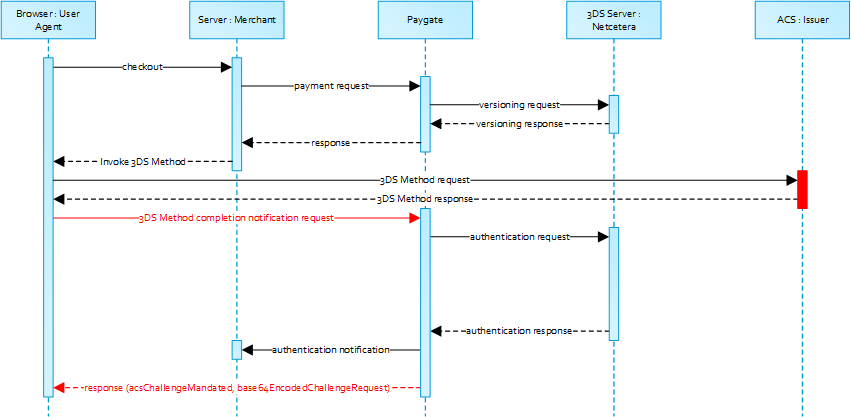
Please note that the threeDSMethodURL will be populated by Computop Paygate if the issuer does not support the 3-D Secure Method. The 3-D Secure Method Form Post as outlined below must be performed independently from whether it is supported by the issuer. This is necessary to facilitate direct communication between the browser and Computop Paygate in case of a mandated challenge or a frictionless flow.
3-D Secure Method: No issuer threeDSMethodURL
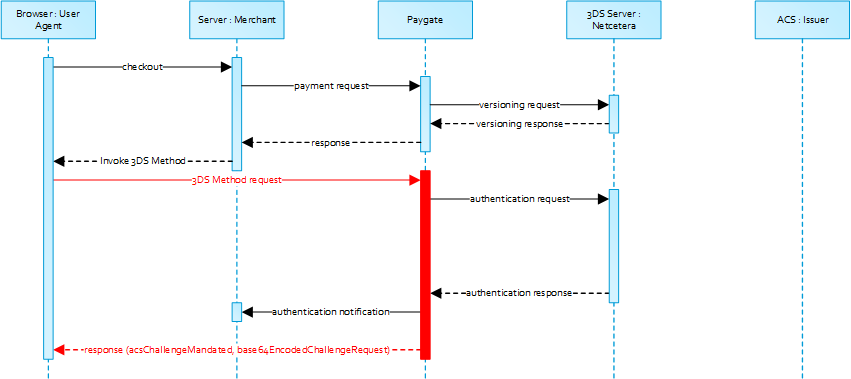
3-D Secure Method Form Post
<form name="frm" method="POST" action="Rendering URL">
    <input type="hidden" name="threeDSMethodData" value="eyJ0aHJlZURTU2VydmVyVHJhbnNJRCI6IjNhYzdjYWE3LWFhNDItMjY2My03OTFiLTJhYzA1YTU0MmM0YSIsInRocmVlRFNNZXRob2ROb3RpZmljYXRpb25VUkwiOiJ0aHJlZURTTWV0aG9kTm90aWZpY2F0aW9uVVJMIn0">
</form>
Netcetera 3DS Web SDK
You may use the operations init3DSMethod or createIframeAndInit3DSMethod at your discreation from the nca3DSWebSDK in order to iniatiate the 3-D Secure Method. Please refer to the Integration Manual at https://mpi.netcetera.com/3dsserver/doc/current/integration.html#Web_Service_API.
Once the 3-D Secure Method is concluded the ACS will instruct the cardholder browser through the iFrame response document to submit threeDSMethodData as a hidden form field to the 3-D Secure Method Notification URL.
ACS Response Document
<!DOCTYPE html>
<html lang="en">
<head>
    <meta charset="UTF-8"/>
    <title>Identifying...</title>
</head>
<body>
<script>
    var tdsMethodNotificationValue = 'eyJ0aHJlZURTU2VydmVyVHJhbnNJRCI6ImUxYzFlYmViLTc0ZTgtNDNiMi1iMzg1LTJlNjdkMWFhY2ZhMiJ9';

    var form = document.createElement("form");
    form.setAttribute("method", "post");
    form.setAttribute("action", "notification URL");

    addParameter(form, "threeDSMethodData", tdsMethodNotificationValue);

    document.body.appendChild(form);
    form.submit();

    function addParameter(form, key, value) {
        var hiddenField = document.createElement("input");
        hiddenField.setAttribute("type", "hidden");
        hiddenField.setAttribute("name", key);
        hiddenField.setAttribute("value", value);
        form.appendChild(hiddenField);
    }
</script>
</body>
</html>
3-D Secure Method Notification Form
<form name="frm" method="POST" action="3DS Method Notification URL">
    <input type="hidden" name="threeDSMethodData" value="eyJ0aHJlZURTU2VydmVyVHJhbnNJRCI6ImUxYzFlYmViLTc0ZTgtNDNiMi1iMzg1LTJlNjdkMWFhY2ZhMiJ9">
</form>
Please note that the threeDSMethodNotificationURL as embedded in the Base64 encoded threeDSMethodData value points to Computop Paygate and must not be modified. The merchant notification is delivered to the URLNotify as provided in the original request or as configured for the MerchantID in Computop Paygate.
Authentication
If 3-D Secure Method is supported by the issuer ACS and was invoked by the merchant Computop Paygate will automatically continue with the authentication request once the 3-D Secure Method has completed (i.e. 3-D Secure Method Notification).
The authentication result will be transferred via HTTP POST to the URLNotify. It may indicate that the Cardholder has been authenticated, or that further cardholder interaction (i.e. challenge) is required to complete the authentication.
In case a cardholder challenge is deemed necessary Computop Paygate will transfer a JSON object within the body of HTTP browser response with the elements acsChallengeMandated , challengeRequest , base64EncodedChallengeRequest and acsURL . Otherwise, in a frictionless flow, Computop Paygate will automatically continue and respond to the cardholder browser once the authorization completed.
Cardholder Challenge: Browser Response
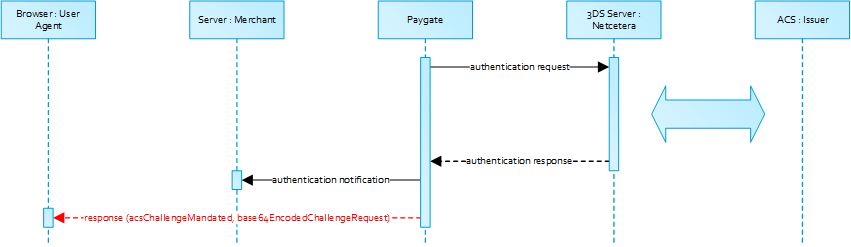
Browser Challenge Response
Data elements
| Key | Format | CND | Description |
|---|---|---|---|
acsChallengeMandated | boolean | M | Indication of whether a challenge is required for the transaction to be authorised due to local/regional mandates or other variable:
|
object | M | Challenge request object | |
base64EncodedChallengeRequest | string | M | Base64-encoded Challenge Request object |
acsURL | string | M | Fully qualified URL of the ACS to be used to post the Challenge Request |
Schema: Browser Challenge Response
{
	"$schema": "http://json-schema.org/draft-07/schema#",
	"type": "object",
	"properties": {
		"acsChallengeMandated": {"type": "boolean"},
		"challengeRequest": {"type": "object"},
		"base64EncodedChallengeRequest": {"type": "string"},
		"acsURL": {"type": "string"}
	},
	"required": ["acsChallengeMandated", "challengeRequest", "base64EncodedChallengeRequest", "acsURL"],
	"additionalProperties": false
}
Sample: Browser Challenge Response
{
	"acsChallengeMandated": false,
	"challengeRequest": {
		"threeDSServerTransID": "8a880dc0-d2d2-4067-bcb1-b08d1690b26e",
		"acsTransID": "d7c1ee99-9478-44a6-b1f2-391e29c6b340",
		"messageType": "CReq",
		"messageVersion": "2.1.0",
		"challengeWindowSize": "01",
		"messageExtension": [
			{
				"name": "emvcomsgextInChallenge",
				"id": "tc8Qtm465Ln1FX0nZprA",
				"criticalityIndicator": false,
				"data": "messageExtensionDataInChallenge"
			}
		]
	},
	"base64EncodedChallengeRequest": "base64-encoded-challenge-request",
	"acsURL": "acsURL-to-post-challenge-request"
}
Authentication Notification
The data elements of the authentication notification are listed in the table below.
| Key | Format | CND | Description |
|---|---|---|---|
ans..30 | M | MerchantID, assigned by Computop |
| Key | Format | CND | Description |
|---|---|---|---|
| PayID | an32 | M | ID assigned by Paygate for the payment, e.g. for referencing in batch files as well as for capture or credit request. |
| Key | Format | CND | Description |
|---|---|---|---|
| TransID | ans..64 | M | TransactionID provided by you which should be unique for each payment |
| Key | Format | CND | Description |
|---|---|---|---|
| Code | an8 | M | Error code according to Paygate Response Codes (A4 Error codes) |
| Key | Format | CND | Description |
|---|---|---|---|
an64 | M | Hash Message Authentication Code (HMAC) with SHA-256 algorithm. Details can be found here: |
| Key | Format | CND | Description |
|---|---|---|---|
JSON | M | Response object in return of the authentication request with the ACS |
Browser Challenge
If a challenge is deemed necessary (see challengeRequest) the browser challenge will occur within the cardholder browser. To create a challenge it is required to post the value base64EncodedChallengeRequest via an HTML iframe to the ACS URL.
Challenge request
<form name="challengeRequestForm" method="post" action="acsChallengeURL">
	<input type="hidden" name="creq" value="ewogICAgInRocmVlRFNTZXJ2ZXJUcmFuc0lEIjogIjhhODgwZGMwLWQyZDItNDA2Ny1iY2IxLWIwOGQxNjkwYjI2ZSIsCiAgICAiYWNzVHJhbnNJRCI6ICJkN2MxZWU5OS05NDc4LTQ0YTYtYjFmMi0zOTFlMjljNmIzNDAiLAogICAgIm1lc3NhZ2VUeXBlIjogIkNSZXEiLAogICAgIm1lc3NhZ2VWZXJzaW9uIjogIjIuMS4wIiwKICAgICJjaGFsbGVuZ2VXaW5kb3dTaXplIjogIjAxIiwKICAgICJtZXNzYWdlRXh0ZW5zaW9uIjogWwoJCXsKCQkJIm5hbWUiOiAiZW12Y29tc2dleHRJbkNoYWxsZW5nZSIsCgkJCSJpZCI6ICJ0YzhRdG00NjVMbjFGWDBuWnByQSIsCgkJCSJjcml0aWNhbGl0eUluZGljYXRvciI6IGZhbHNlLAoJCQkiZGF0YSI6ICJtZXNzYWdlRXh0ZW5zaW9uRGF0YUluQ2hhbGxlbmdlIgoJCX0KICAgIF0KfQ==">
</form>
init3DSChallengeRequest or createIFrameAndInit3DSChallengeRequest from the nca3DSWebSDK in order submit the challenge message through the cardholder browser.Init 3-D Secure Challenge Request - Example
<!DOCTYPE html>
<html lang="en">
<head>
    <meta charset="UTF-8">
    <script src="nca-3ds-web-sdk.js" type="text/javascript"></script>
    <title>Init 3-D Secure Challenge Request - Example</title>
</head>
<body>
<!-- This example will show how to initiate Challenge Reqeuests for different window sizes. -->
<div id="frameContainer01"></div>
<div id="frameContainer02"></div>
<div id="frameContainer03"></div>
<div id="frameContainer04"></div>
<div id="frameContainer05"></div>
<iframe id="iframeContainerFull" name="iframeContainerFull" width="100%" height="100%"></iframe>

<script type="text/javascript">
    // Load all containers
    iFrameContainerFull = document.getElementById('iframeContainerFull');
    container01 = document.getElementById('frameContainer01');
    container02 = document.getElementById('frameContainer02');
    container03 = document.getElementById('frameContainer03');
    container04 = document.getElementById('frameContainer04');
    container05 = document.getElementById('frameContainer05');


    // nca3DSWebSDK.init3DSChallengeRequest(acsUrl, creqData, container);
    nca3DSWebSDK.init3DSChallengeRequest('http://example.com', 'base64-encoded-challenge-request', iFrameContainerFull);

    // nca3DSWebSDK.createIFrameAndInit3DSChallengeRequest(acsUrl, creqData, challengeWindowSize, frameName, rootContainer, callbackWhenLoaded);
    nca3DSWebSDK.createIFrameAndInit3DSChallengeRequest('http://example.com', 'base64-encoded-challenge-request', '01', 'threeDSCReq01', container01);
    nca3DSWebSDK.createIFrameAndInit3DSChallengeRequest('http://example.com', 'base64-encoded-challenge-request', '02', 'threeDSCReq02', container02);
    nca3DSWebSDK.createIFrameAndInit3DSChallengeRequest('http://example.com', 'base64-encoded-challenge-request', '03', 'threeDSCReq03', container03);
    nca3DSWebSDK.createIFrameAndInit3DSChallengeRequest('http://example.com', 'base64-encoded-challenge-request', '04', 'threeDSCReq04', container04);
    nca3DSWebSDK.createIFrameAndInit3DSChallengeRequest('http://example.com', 'base64-encoded-challenge-request', '05', 'threeDSCReq05', container05, () => {
        console.log('Iframe loaded, form created and submitted');
    });
</script>

</body>
</html>
Please note that the notification URL submited in the challenge request points to Computop Paygate and must not be changed.
Authorization
After successful cardholder authentication or proof of attempted authentication/verification is provided Computop Paygate will automatically continue with the payment authorization.
In case the cardholder authentication was not successful or proof proof of attempted authentication/verification can not be provided Computop Paygate will not continue with an authorization request.
In both cases Paygate will deliver a notification with the authentication result to the merchant specified
URLNotify
with the data elements as listed in the table below.
Payment Notification
The following table gives the result parameters which Computop Paygate transmits to URLSuccess or URLFailure and URLNotify. If you have specified the Response=encrypt parameter, the following parameters are sent Blowfish encrypted to your system:
pls. be prepared to receive additional parameters at any time and do not check the order of parameters
the key (e.g. mid, RefNr) should not be checked case-sentive
| Key | Format | CND | Description |
|---|---|---|---|
ans..30 | M | MerchantID, assigned by Computop |
| Key | Format | CND | Description | ||||
|---|---|---|---|---|---|---|---|
| msgver | ans..5 | M | Computop Paygate Message version. Valid values:
|
| Key | Format | CND | Description |
|---|---|---|---|
| PayID | an32 | M | ID assigned by Paygate for the payment, e.g. for referencing in batch files as well as for capture or credit request. |
| Key | Format | CND | Description |
|---|---|---|---|
| XID | an32 | M | ID for all single transactions (authorisation, capture, credit note) for one payment assigned by Paygate |
| Key | Format | CND | Description |
|---|---|---|---|
| TransID | ans..64 | M | TransactionID provided by you which should be unique for each payment |
| Key | Format | CND | Description |
|---|---|---|---|
| schemeReferenceID | ans..64 | C | Card scheme specific transaction ID required for subsequent credential-on-file payments, delayed authorizations and resubmissions. Mandatory: CredentialOnFile – initial false – unscheduled MIT / recurring schemeReferenceID is returned for 3DS2-payments. In case of fallback to 3DS1 you will also need to check for TransactionId. The schemeReferenceID is a unique identifier generated by the card brands and as a rule Computop merchants can continue to use the SchemeReferenceIDs for subscription plans that were created while using another PSP environment / Paygate MerchantID / Acquirer ContractID / Acquirer. |
| Key | Format | CND | Description |
|---|---|---|---|
TrxTime | an21 | M | Transaction time stamp in format DD.MM.YYYY HH:mm:ssff |
Status | a..20 | M | Status of the transaction. Values accepted:
In case of Authentication-only the Status will be either |
| Key | Format | CND | Description |
|---|---|---|---|
| Description | ans..1024 | M | Further details in the event that payment is rejected. Please do not use the Description but the Code parameter for the transaction status analysis! |
| Key | Format | CND | Description |
|---|---|---|---|
| Code | an8 | M | Error code according to Paygate Response Codes (A4 Error codes) |
| Key | Format | CND | Description |
|---|---|---|---|
an64 | M | Hash Message Authentication Code (HMAC) with SHA-256 algorithm. Details can be found here: |
| Key | Format | CND | Description |
|---|---|---|---|
JSON | M | Card data | |
JSON | O | Object containing IP information | |
JSON | M | Authentication data | |
JSON | C | In case the authentication process included a cardholder challenge additional information about the challenge result will be provided. | |
| externalPaymentData | JSON | O | Optional additional data from acquirer/issuer/3rd party for authorization. |
| Key | Format | CND | Description |
|---|---|---|---|
| PCNr | n16 | O | Pseudo Card Number: Random number generated by Computop Paygate which represents a genuine credit card number. The pseudo card number (PCN) starts with 0 and the last 3 digits correspond to those of the real card number. The PCN can be used like a genuine card number for authorisation, capture and credits. PCNr is a response value from Computop Paygate and is sent as CCNr in Request or part of card-JSON. |
| Key | Format | CND | Description |
|---|---|---|---|
| PCNr | n16 | O | Pseudo Card Number: Random number generated by Computop Paygate which represents a genuine credit card number. The pseudo card number (PCN) starts with 0 and the last 3 digits correspond to those of the real card number. The PCN can be used like a genuine card number for authorisation, capture and credits. PCNr is a response value from Computop Paygate and is sent as CCNr in Request or part of card-JSON. |
Browser Payment Response
Additionally the JSON formatted data elements as listed below are transferred in the HTTP response body to the cardholder browser. Please note that the data elements (i.e. MID , Len , Data ) are base64 encoded.
Data elements
| Key | Format | CND | Description |
|---|---|---|---|
ans..30 | M | MerchantID, assigned by Computop |
| Key | Format | CND | Description |
|---|---|---|---|
Len | integer | M | Length of the unencrypted |
Data | string | M | Blowfish encrypted string containing a JSON object with |
Schema
{
	"$schema": "http://json-schema.org/draft-07/schema#",
	"type": "object",
	"properties": {
		"MID": {
			"type": "string"
		},
		"Len": {
			"type": "integer"
		},
		"Data": {
			"type": "string"
		}
	},
	"required": ["MID", "Len", "Data"],
	"additionalProperties": false
}
Decrypted data
| Key | Format | CND | Description |
|---|---|---|---|
ans..30 | M | MerchantID, assigned by Computop |
| Key | Format | CND | Description |
|---|---|---|---|
| PayID | an32 | M | ID assigned by Paygate for the payment, e.g. for referencing in batch files as well as for capture or credit request. |
| Key | Format | CND | Description |
|---|---|---|---|
| TransID | ans..64 | M | TransactionID provided by you which should be unique for each payment |
Sample decrypted data
MID=YourMID&PayID=PayIDassignedbyPlatform&TransID=YourTransID
Capture / Credit / Reversal
Captures are possible via a Server-to-Server connection. To perform a capture via a Server-to-Server connection, please use the following URL: https://www.computop-paygate.com/capture.aspx Notice: Please observe the reservation / authorisation deadlines of your acquirer (see General Terms and Conditions) so that you, as the merchant, ensure that the debits are submitted to our Paygate within the correct period. Notice: For security reasons, Computop Paygate rejects all payment requests with formatting errors. Therefore, please use the correct data type for each parameter. The following table describes the encrypted payment request parameters: ans..30 MerchantID, assigned by Computop. Additionally this parameter has to be passed in plain language too. an32 ID assigned by Paygate for the payment, e.g. for referencing in batch files as well as for capture or credit request. Key Format CND Description TransID ans..64 M TransactionID which should be unique for each payment Please note for some connections the different formats that are given within the specific parameters. Merchant’s unique reference number, which serves as payout reference in the acquirer EPA file. Please note, without the own shop reference delivery you cannot read out the EPA transaction and regarding the additional Computop settlement file (CTSF) we cannot add the additional payment data. (not with CB2A, for CardComplete in the format an..25, for Cofidis in the format n..15, for Omnipay in the format ns..15, for RBI in the format ns..20) Only ASCII characters allowed, special characters ("Umlaute", diacritics) are not allowed and must be replaced by their ASCII-representation (e.g. ü → ue, é → e, ...). Amount in the smallest currency unit (e.g. EUR Cent). Please contact the Computop Helpdesk, if you want to capture amounts <100 (smallest currency unit). a3 Currency, three letters DIN / ISO 4217, e.g. EUR, USD, GBP. Please find an overview here: A1 Currency table an64 ans..32 To avoid double payments or actions (e.g. by ETM), enter an alphanumeric value which identifies your transaction and may be assigned only once. If the transaction or action is submitted again with the same ReqID, Computop Paygate will not carry out the payment or new action, but will just return the status of the original transaction or action. Please note that the Computop Paygate must have a finalized transaction status for the first initial action (authentication/authorisation). This does not apply to 3-D Secure authentications that are terminated by a timeout. The 3-D Secure Timeout status does not count as a completed status in which the ReqID functionality on Paygate does not take effect. Submissions with identical ReqID for an open status will be processed regularly. Notice: Please note that a ReqID is only valid for 12 month, then it gets deleted at the Paygate. Key Format CND Description FinishAuth a1 C Only with ETM: Transmit value <Y> in order to stop the renewal of guaranteed authorisations and rest amounts after partial captures. Please use this parameter only if you are using the additional function ETM (Extended Transactions Managament). (not with Clearhaus) Textfeld1 ans..30 O Card holder information: Name (not with Clearhaus) Textfeld2 ans..30 O Card holder information: City (not with Clearhaus) CHDesc ans..22 OC Only with Clearhaus: Text printed on the customer’s credit card bill. Only printable ASCII characters from 0x20 to 0x7E Parameters for captures of credit card payments The following table describes the result parameters with which the Computop Paygate responds to your system ans..30 MerchantID, assigned by Computop an32 ID assigned by Paygate for the payment, e.g. for referencing in batch files as well as for capture or credit request. an32 ID for all single transactions (authorisation, capture, credit note) for one payment assigned by Paygate Key Format CND Description TransID ans..64 M Merchant’s transaction number. Please note for some connections the different formats that are given within the specific parameters. a..50 OK (URLSuccess) or FAILED (URLFailure) ans..1024 an8 Error code according to Paygate Response Codes (A4 Error codes) Key Format CND Description RefNr ns..30 C Merchant’s unique reference number, which serves as payout reference in the acquirer EPA file. Please note, without the own shop reference delivery you cannot read out the EPA transaction and regarding the additional Computop settlement file (CTSF) we cannot add the additional payment data. (not with CB2A, for Card Complete in the format an..25, for Omnipay in the format ns..15, for RBI in the format ns..20) Only ASCII characters allowed, special characters ("Umlaute", diacritics) are not allowed and must be replaced by their ASCII-representation (e.g. ü → ue, é → e, ...). Aid n6 OC Only in the case of Card Complete: Authorisation ID returned by Card Complete Amount n..10 OC Only with Clearhaus: Amount in the smallest currency unit (e.g. EUR Cent) If the actual amount differs from the requested amount this will be returned. CodeExt n5 OC Only with Clearhaus: Only if configured: External error code (downstream system). ErrorText ans.128 OC Only with Clearhaus: Detailed Clearhaus error message. Is returned only if Status=FAILED. Use is possible only in agreement with Computop Helpdesk TransactionID ans36 OC Only with Clearhaus: Transaction number from Clearhaus Response parameters for captures of credit card paymentsCapture
Key Format CND Description M Key Format CND Description PayID M RefNr ns..30 C Key Format CND Description Amount n..10 M Key Format CND Description Currency M Key Format CND Description M Key Format CND Description ReqId O pls. be prepared to receive additional parameters at any time and do not check the order of parameters the key (e.g. mid, RefNr) should not be checked case-sentiveKey Format CND Description M Key Format CND Description PayID M Key Format CND Description XID M Key Format CND Description Status M Key Format CND Description Description M Key Format CND Description Code M TID n..15 M Only with Cofidis: If RefNr was submitted, it's value will be returned. Otherwise the first 15 digits of TransactionID will be returned.
Credits (refunds) are possible via a Server-to-Server connection. Paygate permits credits which relate to a capture previously activated by Paygate and allows merchants to carry out credits without a reference transaction. This section describes the processing of credits with reference transactions. If you refer to a capture for a Credit, the amount of the Credit is limited to the amount of the previous capture. To carry out a credit with a reference transaction, please use the following URL: https://www.computop-paygate.com/credit.aspx Notice: For security reasons, Computop Paygate rejects all payment requests with formatting errors. Therefore, please use the correct data type for each parameter. The following table describes the encrypted payment request parameters: ans..30 MerchantID, assigned by Computop. Additionally this parameter has to be passed in plain language too. an32 ID assigned by Paygate for the payment, e.g. for referencing in batch files as well as for capture or credit request. Key Format CND Description TransID ans..64 M TransactionID which should be unique for each payment Please note for some connections the different formats that are given within the specific parameters. Amount in the smallest currency unit (e.g. EUR Cent). Please contact the Computop Helpdesk, if you want to capture amounts <100 (smallest currency unit). a3 Currency, three letters DIN / ISO 4217, e.g. EUR, USD, GBP. Please find an overview here: A1 Currency table an64 Key Format CND Description Merchant’s unique reference number, which serves as payout reference in the acquirer EPA file. Please note, without the own shop reference delivery you cannot read out the EPA transaction and regarding the additional Computop settlement file (CTSF) we cannot add the additional payment data. (Only for CardComplete, for Clearhaus (ns..30, optional, only printable ASCII characters from 0x20 to 0x7E), for RBI (ns..20, optional), for Cofidis (n..15, optional).) Notice: For CAPN multiple partial credits on the same day are allowed. Please note, that for each partial credit a seperate unique RefNr is required. Only ASCII characters allowed, special characters ("Umlaute", diacritics) are not allowed and must be replaced by their ASCII-representation (e.g. ü → ue, é → e, ...). ans..32 To avoid double payments or actions (e.g. by ETM), enter an alphanumeric value which identifies your transaction and may be assigned only once. If the transaction or action is submitted again with the same ReqID, Computop Paygate will not carry out the payment or new action, but will just return the status of the original transaction or action. Please note that the Computop Paygate must have a finalized transaction status for the first initial action (authentication/authorisation). This does not apply to 3-D Secure authentications that are terminated by a timeout. The 3-D Secure Timeout status does not count as a completed status in which the ReqID functionality on Paygate does not take effect. Submissions with identical ReqID for an open status will be processed regularly. Notice: Please note that a ReqID is only valid for 12 month, then it gets deleted at the Paygate. Key Format CND Description Textfeld1 ans..30 O Card holder information: Name (not with Clearhaus) Textfeld2 ans..30 O Card holder information: City (not with Clearhaus) CHDesc ans..22 OC Only with Clearhaus: Text printed on the customer’s credit card bill. Only printable ASCII characters from 0x20 to 0x7E Parameters for credits of credit card payments The following table describes the result parameters with which the Computop Paygate responds to your system ans..30 MerchantID, assigned by Computop an32 ID assigned by Paygate for the payment, e.g. for referencing in batch files as well as for capture or credit request. an32 ID for all single transactions (authorisation, capture, credit note) for one payment assigned by Paygate Key Format CND Description TransID ans..64 M Merchant’s transaction number. Please note for some connections the different formats that are given within the specific parameters. a..50 OK (URLSuccess) or FAILED (URLFailure) ans..1024 an8 Error code according to Paygate Response Codes (A4 Error codes) Key Format CND Description Aid n6 OC Only in the case of Card Complete: Authorisation ID returned by Card Complete RefNr an..25 OC Merchant’s unique reference number, which serves as payout reference in the acquirer EPA file. Please note, without the own shop reference delivery you cannot read out the EPA transaction and regarding the additional Computop settlement file (CTSF) we cannot add the additional payment data. Only for Card Complete, for Clearhaus (ans..30, optional, only printable ASCII characters from 0x20 to 0x7E), for RBI (ns..20, optional), for Cofidis (n..15, optional). Only ASCII characters allowed, special characters ("Umlaute", diacritics) are not allowed and must be replaced by their ASCII-representation (e.g. ü → ue, é → e, ...). Amount n..10 OC Only with Clearhaus: Amount in the smallest currency unit (e.g. EUR Cent) If the actual amount differs from the requested amount this will be returned. CodeExt n5 OC Only with Clearhaus: Only if configured: External error code (downstream system). ErrorText ans..128 OC Only with Clearhaus: Detailed Clearhaus error message. Is returned only if Status=FAILED. Use is possible only in agreement with Computop Helpdesk TransactionID ans36 OC Only with Clearhaus: Transaction number from Clearhaus Response parameters for credits of credit card paymentsCredit with reference
Key Format CND Description M Key Format CND Description PayID M Key Format CND Description Amount n..10 M Key Format CND Description Currency M Key Format CND Description M RefNr ns..30 C OrderDesc ans..768 O Description of refunded goods, unit prices, merchant’s comment etc. (not with Clearhaus) Key Format CND Description ReqId O TID ans..30 OC Only with SafeCharge: TransaktioncID of the capture to be credited, if the merchants wants to credit a specifc capture. If the parameter is nut submitted the last capture will be credited. pls. be prepared to receive additional parameters at any time and do not check the order of parameters the key (e.g. mid, RefNr) should not be checked case-sentiveKey Format CND Description M Key Format CND Description PayID M Key Format CND Description XID M Key Format CND Description Status M Key Format CND Description Description M Key Format CND Description Code M
Paygate can carry out Credits which do not relate to a previous capture. In this case the credit must be transferred to Paygate as a completely new payment transaction. Please contact the Computop Helpdesk for help in using the described additional functions. Notice: Please note that credits without reference to a previous capture generate higher costs with your Acquiring Bank. If you are frequently unable to make reference to the capture you should agree this with your Acquiring Bank. To carry out a Credit without a reference transaction via a Server-to-Server connection, please use the following URL: https://www.computop-paygate.com/creditex.aspx Notice: For security reasons, Computop Paygate rejects all payment requests with formatting errors. Therefore, please use the correct data type for each parameter. The following table describes the encrypted payment request parameters: ans..30 MerchantID, assigned by Computop. Additionally this parameter has to be passed in plain language too. Key Format CND Description TransID ans..64 M TransactionID which should be unique for each payment Please note for some connections the different formats that are given within the specific parameters. Amount in the smallest currency unit (e.g. EUR Cent). Please contact the Computop Helpdesk, if you want to capture amounts <100 (smallest currency unit). a3 Currency, three letters DIN / ISO 4217, e.g. EUR, USD, GBP. Please find an overview here: A1 Currency table an64 Key Format CND Description Merchant’s unique reference number, which serves as payout reference in the acquirer EPA file. Please note, without the own shop reference delivery you cannot read out the EPA transaction and regarding the additional Computop settlement file (CTSF) we cannot add the additional payment data. (Only for CardComplete, for Clearhaus (ns..30, optional, only printable ASCII characters from 0x20 to 0x7E), for RBI (ns..20, optional), for Cofidis (n..15, optional).) Only ASCII characters allowed, special characters ("Umlaute", diacritics) are not allowed and must be replaced by their ASCII-representation (e.g. ü → ue, é → e, ...). ans..32 To avoid double payments or actions (e.g. by ETM), enter an alphanumeric value which identifies your transaction and may be assigned only once. If the transaction or action is submitted again with the same ReqID, Computop Paygate will not carry out the payment or new action, but will just return the status of the original transaction or action. Please note that the Computop Paygate must have a finalized transaction status for the first initial action (authentication/authorisation). This does not apply to 3-D Secure authentications that are terminated by a timeout. The 3-D Secure Timeout status does not count as a completed status in which the ReqID functionality on Paygate does not take effect. Submissions with identical ReqID for an open status will be processed regularly. Notice: Please note that a ReqID is only valid for 12 month, then it gets deleted at the Paygate. n..19 Credit card number for credit card payments. It can be filled: Key Format CND Description CCCVC n..4 O CCExpiry n6 M Expiry date of the credit card in the format YYYYMM, e.g. 202507. CCBrand a..22 M Credit card brand. Please note the spelling! According to table of credit card brands! UserData ans..1024 OC Only with Clearhaus: If specified at request, Paygate forwards the parameter with the payment result to the shop. Textfeld1 ans..30 O Not with Clearhaus: Card holder information: Name Textfeld2 ans..30 O Not with Clearhaus: Card holder information: City CHDesc ans..34 OC Only with Clearhaus, format ans..22: Text printed on the customer’s credit card bill. Only printable ASCII characters from 0x20 to 0x7E Only for Credorax: Text printed on the customer’s credit card bill. This function must be enabled by Credorax and have the following structure. 1) merchant DBA name (up to 20 characters) 2) asterisk 3) additional text (up to 13 characters). e.g. Computop*Test This value can be alternatively permanently defined by Computop Helpdesk CreditCardHolder an..255 MC Only with Credorax, ECPCC: Name of the card holder Email ans..64 MC Only with Credorax, ECPCC: Email address of the customer IPAddr ans..39 OC Only with Credorax, ECPCC: Customer´s IP address PaymentOfWinnings ans..4 OC In the case of the acquirer EMS (Omnipay) the merchant can control CFT credit notes in this way. TransactionID an..150 M Additional reference number DateOfBirth n8 O Date of birth of the customer in format YYYYMMDD Phone n..32 O Customer’s phone number FirstName ans..255 M First name of the customer LastName ans..255 M Last name of the customer AddrStreet ans..255 O Street name AddressAddition ans..255 O Address c/o AddrZip an..9 O Postcode AddrCity ans..255 O City AddrState a2 O Code of the customer’s Federal State AddrCountryCode a2 M Country code according to ISO-3166-1, alphanumeric 2 chars sdFirstName ans..255 O First name in the delivery address sdLastName ans..255 O Surname in the delivery address sdStreet ans..255 O Street name in the delivery address sdAddressAddition ans..255 O Address addition in the delivery address sdZIPCode an..9 O Postcode in the delivery address sdCity ans..255 O Town/city in the delivery address sdState a2 O Code of Federal State in the delivery address sdCountryCode a2 O Country code of delivery address according to ISO-3166-1, alphanumeric 2 chars IPAddr ans..15 M Customer´s IP address BrowserSessionID ans..64 M Customer´s Session ID CreditCardHolder ans..100 M Name of the card holder CustomerID an..20 M Customer number: Number to identify the customer Name ans..100 C User name of the customer FirstName ans..100 C First name of the customer LastName ans..100 C Last name of the customer Email ans..64 C Email address of the customer Language a2 C Language of the customer according to ISO, alphanumeric 2-digits sdFirstName ans..100 C First name in the delivery address sdLastName ans..100 C Surname in the delivery address sdStreet ans..200 C Street name in the delivery address sdStreetNr ans..5 C Street number in the delivery address sdZIPCode an..20 C Postcode in the delivery address sdCity ans..40 C Town/city in the delivery address sdState a2 C Code of Federal State in the delivery address sdCountryCode a2 C Country code of delivery address according to ISO-3166-1, alphanumeric 2 chars bdFirstName ans..25 O First name in the invoicing address bdLastName ans..25 O Last name in the invoicing address bdStreet ans..35 O Street name in the invoicing address Please note that bdStreet and bdStreetNr together may have 34 characters maximum. bdStreet and bdStreetNr are combined with a space character between and forwarded together. The total content is truncated after 35 characters. bdStreetNr ans..35 O Street number in the invoicing address Please note that bdStreet and bdStreetNr together may have 34 characters maximum. bdStreet and bdStreetNr are combined with a space character between and forwarded together. The total content is truncated after 35 characters. bdStreet2 ans..35 O Address addition in the billing address bdZIPCode ans..20 O Postcode in the invoicing address bdCity ans..35 O Town/city in the invoicing address bdState ans..30 O State/country in the invoicing address bdCountryCode a2 O Country code of invoicing address according to ISO-3166-1, alphanumeric 2 chars bdMail ans..100 O Email address in the invoicing address bdPhone ans..20 O Phone number in the invoicing address Parameters for credits of credit card payments without reference The following table describes the result parameters with which the Computop Paygate responds to your system ans..30 MerchantID, assigned by Computop an32 ID assigned by Paygate for the payment, e.g. for referencing in batch files as well as for capture or credit request. an32 ID for all single transactions (authorisation, capture, credit note) for one payment assigned by Paygate Key Format CND Description TransID ans..64 M Merchant’s transaction number. Please note for some connections the different formats that are given within the specific parameters. a..50 OK (URLSuccess) or FAILED (URLFailure) ans..1024 an8 Error code according to Paygate Response Codes (A4 Error codes) Key Format CND Description AID n6 OC Only in the case of Card Complete: Authorisation ID returned by Card Complete RefNr an..25 OC Only for Card Complete: If a RefNr has been transmitted, it is returned. Only ASCII characters allowed, special characters ("Umlaute", diacritics) are not allowed and must be replaced by their ASCII-representation (e.g. ü → ue, é → e, ...). Amount n..10 OC Only with Clearhaus: Amount in the smallest currency unit (e.g. EUR Cent) If the actual amount differs from the requested amount this will be returned. CodeExt n5 OC Only with Clearhaus: Only if configured: External error code (downstream system) ErrorText ans..128 OC Only with Clearhaus: Detailed Clearhaus error message. Is returned only if Status=FAILED. Use is possible only in agreement with Computop Helpdesk UserData ans..1024 OC Only with Clearhaus: If specified at request, Paygate forwards the parameter with the payment result to the shop. TransactionID ans36 OC Only with Clearhaus: Transaction number from Clearhaus Response parameters for credits of credit card payments without referenceCredit without reference
Key Format CND Description M Key Format CND Description Amount n..10 M Key Format CND Description Currency M Key Format CND Description M RefNr ns..30 C OrderDesc ans..768 O Description of refunded goods, unit prices, merchant’s comment etc. (not with Clearhaus) Key Format CND Description ReqId O Key Format CND Description CCNr M With 3-D Secure 2.x the CCNr (PAN or PCNr) is sent as card.JSON. We recommend to use "Hosted Payment Page" or Credit Card Form (paySSL) for simplified PCI DSS certification and usage of PCNr.Card verification number: The last 3 digits on the signature strip of the credit card. 4 numbers in the case of American Express.
Transfer PaymentOfWinnings=True to credit a win rather than simply repaying a paid amount.PaymentAddData JSON C Only with Omnipay: Additional data if PaymentOfWinnings=True Further address parameters in case of ECPCC connection Further address parameters in case of Kalixa connection Further address parameters in case of Vantiv connection pls. be prepared to receive additional parameters at any time and do not check the order of parameters the key (e.g. mid, RefNr) should not be checked case-sentiveKey Format CND Description M Key Format CND Description PayID M Key Format CND Description XID M Key Format CND Description Status M Key Format CND Description Description M Key Format CND Description Code M PaymentSenderReference an..19 C Only with Omnipay: Reference number generated by the Acquirer that will be used to identify the payment transaction. It can be returned for MasterCard Payment of winnings transactions when the required additional parameters are submitted in the request.
A credit card authorisation lowers the customer's credit line. Paygate can reverse an authorisation so that it no longer block the limit any more. Use the following URL: https://www.computop-paygate.com/reverse.aspx Notice: Reverse.aspx does not only reverse authorisations, but any LAST TRANSACTION STAGE!! If the last transaction was a capture, Reverse.aspx initiates the reverse, e.g. a credit. Therefore, the utmost caution is urged. Use is at your own risk. We recommend checking the transaction status with Inquire.aspx before using Reverse.aspx. Notice: For security reasons, Computop Paygate rejects all payment requests with formatting errors. Therefore, please use the correct data type for each parameter. The following table describes the encrypted payment request parameters: ans..30 MerchantID, assigned by Computop. Additionally this parameter has to be passed in plain language too. an32 ID assigned by Paygate for the payment, e.g. for referencing in batch files as well as for capture or credit request. Key Format CND Description TransID ans..64 M TransactionID which should be unique for each payment Please note for some connections the different formats that are given within the specific parameters. Amount in the smallest currency unit (e.g. EUR Cent). Please contact the Computop Helpdesk, if you want to capture amounts <100 (smallest currency unit). a3 Currency, three letters DIN / ISO 4217, e.g. EUR, USD, GBP. Please find an overview here: A1 Currency table an64 Key Format CND Description RefNr ans..30 OC Merchant’s unique reference number, which serves as payout reference in the acquirer EPA file. Please note, without the own shop reference delivery you cannot read out the EPA transaction and regarding the additional Computop settlement file (CTSF) we cannot add the additional payment data. Only for Card Complete, for Clearhaus (only printable ASCII characters from 0x20 to 0x7E). Only ASCII characters allowed, special characters ("Umlaute", diacritics) are not allowed and must be replaced by their ASCII-representation (e.g. ü → ue, é → e, ...). ans..32 To avoid double payments or actions (e.g. by ETM), enter an alphanumeric value which identifies your transaction and may be assigned only once. If the transaction or action is submitted again with the same ReqID, Computop Paygate will not carry out the payment or new action, but will just return the status of the original transaction or action. Please note that the Computop Paygate must have a finalized transaction status for the first initial action (authentication/authorisation). This does not apply to 3-D Secure authentications that are terminated by a timeout. The 3-D Secure Timeout status does not count as a completed status in which the ReqID functionality on Paygate does not take effect. Submissions with identical ReqID for an open status will be processed regularly. Notice: Please note that a ReqID is only valid for 12 month, then it gets deleted at the Paygate. Parameters for reversals of credit card payments The following table describes the result parameters with which the Computop Paygate responds to your system ans..30 MerchantID, assigned by Computop an32 ID assigned by Paygate for the payment, e.g. for referencing in batch files as well as for capture or credit request. an32 ID for all single transactions (authorisation, capture, credit note) for one payment assigned by Paygate Key Format CND Description TransID ans..64 M Merchant’s transaction number. Please note for some connections the different formats that are given within the specific parameters. a..50 OK (URLSuccess) or FAILED (URLFailure) ans..1024 an8 Error code according to Paygate Response Codes (A4 Error codes) Key Format CND Description RefNr ans..30 OC Merchant’s unique reference number, which serves as payout reference in the acquirer EPA file. Please note, without the own shop reference delivery you cannot read out the EPA transaction and regarding the additional Computop settlement file (CTSF) we cannot add the additional payment data. Only for Card Complete, for Clearhaus (ans..30, only printable ASCII characters from 0x20 to 0x7E). Only ASCII characters allowed, special characters ("Umlaute", diacritics) are not allowed and must be replaced by their ASCII-representation (e.g. ü → ue, é → e, ...). AID n6 OC Only in the case of Card Complete: Authorisation ID returned by Card Complete CodeExt n5 OC Only with Clearhaus: Only if configured: External error code (downstream system) ErrorText ans.128 OC Only with Clearhaus: Detailed Clearhaus error message. Is returned only if Status=FAILED. Use is possible only in agreement with Computop Helpdesk TransactionID ans36 OC Only with Clearhaus: Transaction number from Clearhaus Response parameters for reversals of credit card paymentsReversal
Key Format CND Description M Key Format CND Description PayID M Key Format CND Description Amount n..10 M Key Format CND Description Currency M Key Format CND Description M Key Format CND Description ReqId O pls. be prepared to receive additional parameters at any time and do not check the order of parameters the key (e.g. mid, RefNr) should not be checked case-sentiveKey Format CND Description M Key Format CND Description PayID M Key Format CND Description XID M Key Format CND Description Status M Key Format CND Description Description M Key Format CND Description Code M
A credit card authorisation is valid for only 7 to 30 days. In order to maintain your payment claim in the case of longer delivery times, Paygate enables the automatic renewal of the authorisation. Renewal of the authorisation is also important for instalments or partial deliveries because the outstanding amount is invalid in the case of partial captures. If you use authorisation renewal, Paygate renews your authorisations until the payment has been captured fully. Amongst other things the customer's card limit is reduced by the authorised amount. In order to restore the card limit again, for example because the order cannot be fully delivered, you need to specifically cancel the authorisation renewal with the following URL: https://www.computop-paygate.com/cancelAuth.aspx Notice: CancelAuth cancels only the recurrence of the authorisation. If you wish to unblock the customer's card limit, please reverse the authorisation in accordance with the section above. Notice: For security reasons, Computop Paygate rejects all payment requests with formatting errors. Therefore, please use the correct data type for each parameter. The following table describes the encrypted payment request parameters: ans..30 MerchantID, assigned by Computop. Additionally this parameter has to be passed in plain language too. an32 ID assigned by Paygate for the payment, e.g. for referencing in batch files as well as for capture or credit request. Key Format CND Description TransID ans..64 M TransID for the identification of the payment process to be reversed an64 Parameters for reversal of an authorisation extension The following table describes the result parameters with which the Computop Paygate responds to your system ans..30 MerchantID, assigned by Computop an32 ID assigned by Paygate for the payment, e.g. for referencing in batch files as well as for capture or credit request. ans..64 a..50 OK (URLSuccess) or FAILED (URLFailure) ans..1024 an8 Error code according to Paygate Response Codes (A4 Error codes) Result parameters for reversals of an authorisation extensionReversal of an authorisation extension
Key Format CND Description M Key Format CND Description PayID M Key Format CND Description M pls. be prepared to receive additional parameters at any time and do not check the order of parameters the key (e.g. mid, RefNr) should not be checked case-sentiveKey Format CND Description M Key Format CND Description PayID M Key Format CND Description TransID M TransactionID provided by you which should be unique for each payment Key Format CND Description Status M Key Format CND Description Description M Key Format CND Description Code M
To make a credit card payment via a POS terminal (POS: Point of Sale), send the payment request to the following URL: https://www.computop-paygate.com/stationary.aspx Notice: For security reasons, Computop Paygate rejects all payment requests with formatting errors. Therefore, please use the correct data type for each parameter. The following table describes the encrypted payment request parameters: ans..30 MerchantID, assigned by Computop. Additionally this parameter has to be passed in plain language too. ans..64 Amount in the smallest currency unit (e.g. EUR Cent). Please contact the Computop Helpdesk, if you want to capture amounts <100 (smallest currency unit). a3 Currency, three letters DIN / ISO 4217, e.g. EUR, USD, GBP. Please find an overview here: A1 Currency table an64 Key Format CND Description RefNr ns..30 O Merchant’s unique reference number, which serves as payout reference in the acquirer EPA file. Please note, without the own shop reference delivery you cannot read out the EPA transaction and regarding the additional Computop settlement file (CTSF) we cannot add the additional payment data. Format must be mutually agreed beforehand with Computop Helpdesk ! CCNr n..16 M Credit card number at least 12-digit, numerical without spaces CCCVC n..4 O Card verification number: The last 3 digits on the signature strip of the credit card. 4 numbers in the case of American Express. CCExpiry n6 M Expiry date of the credit card in the format YYYYMM, e.g. 201707. CCBrand a..22 M Credit card brand. Please note the spelling! According to table of credit card brands! Track2 ans..80 M Hexadecimal data on track 2 of the credit card Track3 ans..80 M Hexadecimal data on track 3 of the credit card OrderDesc ans..768 M Description of purchased goods, unit prices etc. Determines the type and time of capture. ans..32 To avoid double payments or actions (e.g. by ETM), enter an alphanumeric value which identifies your transaction and may be assigned only once. If the transaction or action is submitted again with the same ReqID, Computop Paygate will not carry out the payment or new action, but will just return the status of the original transaction or action. Please note that the Computop Paygate must have a finalized transaction status for the first initial action (authentication/authorisation). This does not apply to 3-D Secure authentications that are terminated by a timeout. The 3-D Secure Timeout status does not count as a completed status in which the ReqID functionality on Paygate does not take effect. Submissions with identical ReqID for an open status will be processed regularly. Notice: Please note that a ReqID is only valid for 12 month, then it gets deleted at the Paygate. Parameters for credit card payments via POS terminals The following table describes the result parameters with which the Computop Paygate responds to your system ans..30 MerchantID, assigned by Computop an32 ID assigned by Paygate for the payment, e.g. for referencing in batch files as well as for capture or credit request. an32 ID for all single transactions (authorisation, capture, credit note) for one payment assigned by Paygate ans..64 ans..1024 an8 Error code according to Paygate Response Codes (A4 Error codes) Key Format CND Description TID n..20 M Usually a nine-digit terminal number AuthCode ans..6 M Acquiring Bank's authorisation code Status a..50 M AUTHORIZED or FAILED. OK status applies only to Sale transactions. Response parameters for credit card payments via POS terminalsCredit card payment via POS terminals
Key Format CND Description M Key Format CND Description TransID M TransactionID provided by you which should be unique for each payment Key Format CND Description Amount n..10 M Key Format CND Description Currency M Key Format CND Description M Key Format CND Description Capture an..6 OM Capture Mode Description AUTO Capturing immediately after authorisation (default value). MANUAL Capturing made by the merchant. Capture is normally initiated at time of delivery. <Number> Delay in hours until the capture (whole number; 1 to 696). Key Format CND Description ReqId O pls. be prepared to receive additional parameters at any time and do not check the order of parameters the key (e.g. mid, RefNr) should not be checked case-sentiveKey Format CND Description M Key Format CND Description PayID M Key Format CND Description XID M Key Format CND Description TransID M TransactionID provided by you which should be unique for each payment Key Format CND Description Description M Key Format CND Description Code M
To reverse the capture of a credit card payment via a stationary terminal, please use the following URL: https://www.computop-paygate.com/stationary_rev.aspx Notice: For security reasons, Computop Paygate rejects all payment requests with formatting errors. Therefore, please use the correct data type for each parameter. The following table describes the encrypted payment request parameters: ans..30 MerchantID, assigned by Computop. Additionally this parameter has to be passed in plain language too. an32 ID assigned by Paygate for the payment, e.g. for referencing in batch files as well as for capture or credit request. an32 ID for all single transactions (authorisation, capture, credit note) for one payment assigned by Paygate Key Format CND Description TransID ans..64 ID of merchant for the identification of the payment process to be reversed an64 Parameters for reversal of credit card payments via POS terminals The following table describes the result parameters with which the Computop Paygate responds to your system ans..30 MerchantID, assigned by Computop an32 ID assigned by Paygate for the payment, e.g. for referencing in batch files as well as for capture or credit request. ans..64 a..50 OK (URLSuccess) or FAILED (URLFailure) an8 Error code according to Paygate Response Codes (A4 Error codes) Response parameters for reversal of credit card payments via POS terminalsReversal of POS credit card payments
Key Format CND Description M Key Format CND Description PayID M Key Format CND Description XID M M Key Format CND Description M pls. be prepared to receive additional parameters at any time and do not check the order of parameters the key (e.g. mid, RefNr) should not be checked case-sentiveKey Format CND Description M Key Format CND Description PayID M Key Format CND Description TransID M TransactionID provided by you which should be unique for each payment Key Format CND Description Status M Key Format CND Description Code M
PayNow links the benefits of Paygate forms and Server-to-Server connections: As opposed to the Paygate form, where the form is loaded from the Paygate server by calling payssl.aspx, the PayNow form has to be provided by the merchant’s system. The form uses the same parameters as described here below. In contrast to the Paygate form, the parameters are not forwarded as URL parameters as is the case when calling the payssl.aspx, but as form input parameters. By the way for calling the PayNow.aspx the same parameters can be used as for PaySSL.aspx. Paygate-Formular PayNow The credit card data must be transmitted to paynow.aspx with the following parameters: n..19 Credit card number for credit card payments. It can be filled: Key Format CND Description CCCVC n3 O Card verification number: The last 3 digits on the signature strip of the credit card CCExpiry n6 M Expiry date of the credit card in the format YYYYMM, e.g. 201807. CCBrand a..22 M Credit card brand. Please note the spelling! According to table of credit card brands! PayNow parameters for 3-D Secure method After the customer has entered his credit card data, the payment data is forwarded to the PayNow page, where the further payment processing takes place via 3-D Secure. The form details must be directly forwarded to the PayNow page and may not be transmitted to the merchant’s system! Also, no PCI-relevant data may be transmitted to the PayNow page as additional input parameters!PayNow
Silent Mode for credit cards with SSL and 3-D Secure method
payssl.aspx?MerchantID=[mid]&Len=[len]&Data=[data]<form action=paynow.aspx>
<input type="hidden" name="MerchantID" value=[mid]>
<input type="hidden" name="Len" value=[len]>
<input type="hidden" name="Data" value=[data]>
:
</form>
Key Format CND Description CCNr M With 3-D Secure 2.x the CCNr (PAN or PCNr) is sent as card.JSON. We recommend to use "Hosted Payment Page" or Credit Card Form (paySSL) for simplified PCI DSS certification and usage of PCNr.
Basic information about using Batch files and about their structure can be found in the Batch Manager manual. Within batch processing not alle functions are available which are usually available for the online interface. This section describes the parameters which must be transferred within the data set (Record) for executing a credit card payment and which information can be found within the response file about the payment status. Notice: Please observe the reservation / authorisation deadlines of your acquirer (see General Terms and Conditions) so that you, as the merchant, ensure that the debits are submitted to our Paygate within the correct period. Notice: Within Batch process not all functions of online interface are available. For Batch calls there must be considered batch versions, from which optional parameters depend. All version designations starting with „2.“ pertain calls for a group of enterprises. That means within a batch file for a particular MerchantID can be transferred transactions for other merchants with a separate Sub-MID. For the connections ECPCC, GMO, Kalixa and SafeCharge the possible actions are limited to Capture, Credit and Reverse. Following table gives an overview of all batch versions that are possible for a specific action and their specialities: Action Version Description Authorize 1.2 / 2.2 with textfeld1, textfeld2, RTF, cardholder, transactionID, schemeReferenceID 1.21 / 2.21 with textfeld1, textfeld2, RTF, approvalcode, cardholder, transactionID, schemeReferenceID 1.3 / 2.3 with CVC, transactionID, schemeReferenceID 1.5 / 2.5 with CVC, Zone Capture 1.2 / 2.2 with textfeld1, textfeld2 1.21 / 2.21 with textfeld1, textfeld2, approvalcode 1.4 / 2.4 with stop of authorisation renewal (FinishAuth) CaptureEx 1.3 / 2.3 with CVC Credit 1.2 / 2.2 with textfeld1, textfeld2 1.21 / 2.21 with textfeld1, textfeld2 1.4 / 2.4 with stop of authorisation renewal (FinishAuth) CreditEx 1.2 / 2.2 with textfeld1, textfeld2 1.21 / 2.21 with textfeld1, textfeld2 1.3 / 2.3 with textfeld1, textfeld2 Sale 1.2 / 2.2 with textfeld1, textfeld2, RTF, cardholder, transactionID, schemeReferenceID 1.21 / 2.21 with textfeld1, textfeld2, RTF, approvalcode, cardholder, transactionID, schemeReferenceID 1.3 / 2.3 with CVC, textfeld1, textfeld2, transactionID, schemeReferenceID 1.5 / 2.5 with CVC, Zone Reverse 1.x / 2.x Standard version Description of the possible batch versions The structure for a credit card payment within a Batch file to be submitted is the following: Example for batch versions: Example for Master MID function: The following table describes the individual fields and values used within the data set (record) in the batch file: Key Format CND Description Type a..11 M HEAD for Header, FOOT for Footer, CC for credit card Action a..20 M The parameter Action defines the type of transaction: Authorize (authorisation) Capture Sale Credit CreditEx (credit note without previous capture; please agree this with Computop Helpdesk beforehand) Reverse (cancellation) Amount in the smallest currency unit (e.g. EUR Cent). Please contact the Computop Helpdesk, if you want to capture amounts <100 (smallest currency unit). a3 Currency, three letters DIN / ISO 4217, e.g. EUR, USD, GBP. Please find an overview here: A1 Currency table an32 ID assigned by Paygate for the payment, e.g. for referencing in batch files as well as for capture or credit request. Key Format CND Description TransID ans..64 M TransactionID which should be unique for each payment. Please note for some connections the different formats that are given within the specific parameters. RefNr ns..30 O Merchant’s unique reference number, which serves as payout reference in the acquirer EPA file. Please note, without the own shop reference delivery you cannot read out the EPA transaction and regarding the additional Computop settlement file (CTSF) we cannot add the additional payment data. Only ASCII characters allowed, special characters ("Umlaute", diacritics) are not allowed and must be replaced by their ASCII-representation (e.g. ü → ue, é → e, ...). OrderDesc ans..127 O Description of purchased goods, unit prices etc. CCBrand a..22 C Credit card brand. Please note the spelling! According to table of credit card brands! CCNr n..16 C Credit card number at least 12-digit, numerical without spaces. You can optionally transmit also a pseudo card number (PCN) n16 Pseudo Card Number: Random number generated by Computop Paygate which represents a genuine credit card number. The pseudo card number (PCN) starts with 0 and the last 3 digits correspond to those of the real card number. The PCN can be used like a genuine card number for authorisation, capture and credits. PCNr is a response value from Computop Paygate and is sent as CCNr in Request or part of card-JSON. n16 Pseudo Card Number: Random number generated by Computop Paygate which represents a genuine credit card number. The pseudo card number (PCN) starts with 0 and the last 3 digits correspond to those of the real card number. The PCN can be used like a genuine card number for authorisation, capture and credits. PCNr is a response value from Computop Paygate and is sent as CCNr in Request or part of card-JSON. n6 Optional in combination with PCNr: Expiry date of the credit card in the format YYYYMM (202207). Key Format CND Description CCCVC n..4 O Card verification number in Version 1.3: In the case of Visa and MasterCard the last 3 numbers on the signature strip of the credit card. 4 numbers in the case of American Express. FinishAuth ans1 O Version=1.4: If using the authorisation renewal, cancel repeat with the value Y in the field FinishAuth in the case of Capture or Credit. Example: You capture a partial delivery. The rest of the order cannot be supplied. You therefore enter Y in the FinishAuth field for Part-capture so that the Paygate does not authorise the remaining amount. Please note for this also the following section about Cancel authorisation renewals . Description of fields within the record for Batch files The record area within the response file for Batch transactions looks as follows: Example for batch versions: The following table describes the response parameters which the Batch Manager saves in the Record area for each transaction (standard parameters not explained here, such as <TransID> or <RefNR> and request parameters are returned unchanged and correspond to the call as specified before): Key Format CND Description Action a..20 M an32 ID assigned by Paygate for the payment, e.g. for referencing in batch files as well as for capture or credit request. a..50 OK (URLSuccess) or FAILED (URLFailure) an8 Error code according to Paygate Response Codes (A4 Error codes) n16 Pseudo Card Number: Random number generated by Computop Paygate which represents a genuine credit card number. The pseudo card number (PCN) starts with 0 and the last 3 digits correspond to those of the real card number. The PCN can be used like a genuine card number for authorisation, capture and credits. PCNr is a response value from Computop Paygate and is sent as CCNr in Request or part of card-JSON. n16 Pseudo Card Number: Random number generated by Computop Paygate which represents a genuine credit card number. The pseudo card number (PCN) starts with 0 and the last 3 digits correspond to those of the real card number. The PCN can be used like a genuine card number for authorisation, capture and credits. PCNr is a response value from Computop Paygate and is sent as CCNr in Request or part of card-JSON. Description of result parameters within the record for Batch filesBatch processing via the interface
Batch calls and answers
HEAD,<MerchantID>,<Date>,<Version>
CC,Authorize,<Amount>,<Currency>,<TransID>,(<RefNr>),<CCBrand>,<CCNr|PCNr>,[<CCCVC>],<CCExpiry>,<OrderDesc>[,<textfeld1>,<textfeld2>,<RTF>,<approvalcode>,<cardholder>,<Zone>,<transactionID>,<schemeReferenceID>]
CC,Capture,<Amount>,<Currency>,<TransID>,(<RefNr>),<PayID>,[<FinishAuth,<textfeld1>,<textfeld2>,<approvalcode>]
CC,Sale,<Amount>,<Currency>,<TransID>,(<RefNr>),<CCBrand>,<CCNr|PCNr>,[<CCCVC>],<CCExpiry>,<OrderDesc>[,<textfeld1>,<textfeld2>,<RTF>,<approvalcode>,<cardholder>,<Zone>,<transactionID>,<schemeReferenceID>]]
CC,Credit,<Amount>,<Currency>,<TransID>,(<RefNr>),<PayID>[,<FinishAuth>,<textfeld1>,<textfeld2>]
CC,CreditEx,<Amount>,<Currency>,<TransID>,(<RefNr>),<CCBrand>,<CCNr|PCNr>,[<CCCVC>],<CCExpiry>,<OrderDesc>[,<textfeld1>,<textfeld2>]
CC,Reverse,<Amount>,<Currency>,<TransID>,(<RefNr>),<PayID>
FOOT,<CountRecords>,<SumAmount>
CC,Sale,<Amount>,<Currency>,<TransID>,(<RefNr>),<CCBrand>,<CCNr|PCNr>,<CCExpiry>,<OrderDesc>
CC,Sale,<Amount>,<Currency>,<TransID>,(<RefNr>),<CCBrand>,<CCNr|PCNr>,<CCExpiry>,<OrderDesc>,<textfeld1>,<textfeld2>,<RTF>,<cardholder>,<transactionID>,<schemeReferenceID>
CC,Sale,<Amount>,<Currency>,<TransID>,(<RefNr>),<CCBrand>,<CCNr|PCNr>,<CCExpiry>,<OrderDesc>,<textfeld1>,<textfeld2>,<RTF>,<approvalcode>,<cardholder>,<transactionID>,<schemeReferenceID>
CC,Sale,<Amount>,<Currency>,<TransID>,(<RefNr>),<CCBrand>,<CCNr|PCNr>,<CCCVC>,<CCExpiry>,<OrderDesc>,<textfeld1>,<textfeld2>,<transactionID>,<schemeReferenceID>
CC,Sale,<Amount>,<Currency>,<TransID>,(<RefNr>),<CCBrand>,<CCNr|PCNr>,<CCCVC>,<CCExpiry>,<OrderDesc>,<Zone>
HEAD,[Master]MerchantID,Date,2.x
Type,Action,[Slave]MID,Amount,Currency,TransID,Data (depends on Action)
FOOT,CountRecords,SumAmount
Key Format CND Description Amount n..10 M Key Format CND Description Currency M Key Format CND Description PayID M Key Format CND Description PCNr O Key Format CND Description PCNr O Key Format CND Description CCExpiry OC HEAD,<MerchantID>,<Date>,<Version>
CC,Authorize,<Amount>,<Currency>,<TransID>,(<RefNr>),<PayID>,<CCBrand>,<CCNr|PCNr>,[<CCCVC>],<CCExpiry>,<OrderDesc>[,<textfeld1>,<textfeld2>,<RTF>,<approvalcode>,<cardholder>,<Zone>,<transactionID>,<schemeReferenceID>],<Status>,<Code>
CC,Capture,<Amount>,<Currency>,<TransID>,(<RefNr>),<PayID>[<textfeld1>,<textfeld2>,<approvalcode>],<Status>,<Code>
CC,AuthSplit,<Amount>,<Currency>,<TransID>,(<RefNr>),<PayID>,FAILED,<Code>,<Description>,[<PCNr>]
CC,Renewal,<Amount>,<Currency>,<TransID>,(<RefNr>),<PayID>,FAILED,<Code>,<Description>,[<PCNr>]
CC,Sale,<Amount>,<Currency>,<TransID>,(<RefNr>),<PayID>,<CCBrand>,<CCNr|PCNr>,[<CCCVC>],<CCExpiry>,<OrderDesc>[,<textfeld1>,<textfeld2>,<RTF>,<approvalcode>,<cardholder>,<Zone>,<transactionID>,<schemeReferenceID>],<Status>,<Code>
CC,Credit,<Amount>,<Currency>,<TransID>,(<RefNr>),<PayID>[,<FinishAuth>,<textfeld1>,<textfeld2>],<Status>,<Code>
CC,CreditEx,<Amount>,<Currency>,<TransID>,(<RefNr>),<CCBrand>,<CCNr|PCNr>,[<CCCVC>],<CCExpiry>,<OrderDesc>[,<textfeld1>,<textfeld2>],<Status>,<Code>
CC,Reverse,<Amount>,<Currency>,<TransID>,(<RefNr>),<PayID>,<Status>,<Code>
FOOT,<CountRecords>,<SumAmount>
CC,Sale,<Amount>,<Currency>,<TransID>,(<RefNr>),<CCBrand>,<CCNr|PCNr>,<CCExpiry>,<OrderDesc>,<Status>,<Code>
CC,Sale,<Amount>,<Currency>,<TransID>,(<RefNr>),<CCBrand>,<CCNr|PCNr>,<CCExpiry>,<OrderDesc>,<textfeld1>,<textfeld2>,<RTF>,<cardholder>,<transactionID>,<schemeReferenceID>,<Status>,<Code>
CC,Sale,<Amount>,<Currency>,<TransID>,(<RefNr>),<CCBrand>,<CCNr|PCNr>,<CCExpiry>,<OrderDesc>,<textfeld1>,<textfeld2>,<RTF>,<approvalcode>,<cardholder>,<transactionID>,<schemeReferenceID>,<Status>,<Code>
CC,Sale,<Amount>,<Currency>,<TransID>,(<RefNr>),<CCBrand>,<CCNr|PCNr>,<CCCVC>,<CCExpiry>,<OrderDesc>,<textfeld1>,<textfeld2>,<transactionID>,<schemeReferenceID>,<Status>,<Code>
CC,Sale,<Amount>,<Currency>,<TransID>,(<RefNr>),<CCBrand>,<CCNr|PCNr>,<CCCVC>,<CCExpiry>,<OrderDesc>,<Zone>,<Status>,<Code>
Key Format CND Description PayID M Key Format CND Description Status M Key Format CND Description Code M Key Format CND Description PCNr O Key Format CND Description PCNr O
With a credit card authorisation you get the right to claim a payment. However an authorisation lasts only 30 days which is a problem if you capture a partial amount, for example as part payment for several partial shipments. In order to reproduce your payment request Paygate can repeat an expired authorisation automatically. If an order cannot be delivered or has been cancelled by the customer, it is very important that the automatic authorisations stop. Your customer's card limit will be otherwise reduced permanently because the Paygate continues to charge your customer's card. Under normal circumstances the Paygate stops the automatic authorisation renewal when the authorised amount has been captured in full. In Batch version 1.4 you can also stop the authorisation renewal manually by changing the payment status. To perform this you submit a capture in your batch file whose amount is under the admissible limit. Since Paygate refuses credit card captures below 1.00 euro, the payment status changes to FAILED in the case of lesser amounts. Paygate therefore renews this authorisation no further. A corresponding capture entry of 0.05 euro’s is shown for example as follows: CC,Capture,5,EUR,BestNr.0815,Rg.Nr.5180,a86dga4310d24453acd6f8a3112a769,y Since the amount of 5 cents lies below the minimum amount of 1.00 euro, Paygate refuses the capture with the error message MinValue. The payment status changes to FAILED and the authorisation renewal is stopped.Cancel authorisation renewals