
Terms and Definitions
Terms
Term | Definition | |
|---|---|---|
Transaction | A transaction consists of a number of linked messages. At its simplest a transaction will consist of a minimum of a request message and a response message. | |
Payment | A payment is the equivalent to a transaction in Paygate. During a payment lifecycle, the state of a transaction will change, depending on the performed action. These actions may include authorization, capture, sale, cancel and refund. A payment is thereby defined as a sequence of actions. | |
Action | An action is an operation that changes the status of a payment when performed successfully. | |
Format Description a alphabetical as alphabetical with special characters n numeric an alphanumeric ans alphanumeric with special characters ns numeric with special characters bool boolean expression (true or false) 3 fixed length with 3 digits/characters ..3 variable length with maximum 3 digits/characters enum enumeration of allowed values dttm ISODateTime (YYYY-MM-DDThh:mm:ss) Abbreviation Description CND condition M mandatory O optional C conditional Notice: Please note that the names of parameters can be returned in upper or lower case.Definitions
Data formats
Abbreviations
Comment If a parameter is mandatory, then it must be present If a parameter is optional, then it can be present, but it is not required If a parameter is conditional, then there is a conditional rule which specifies whether it is mandatory or optional
Schematic overview
The following block diagram provides a high level process overview.
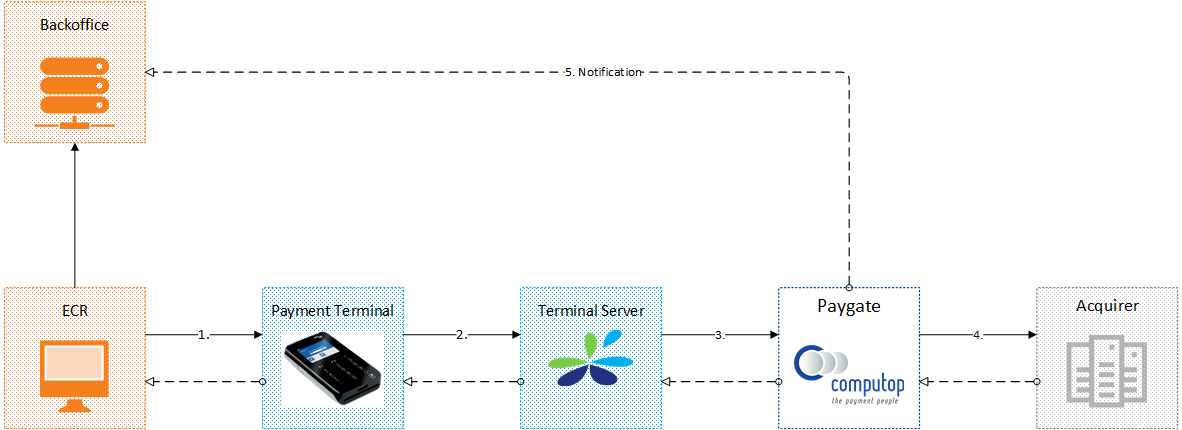
Process narrative
(1) ECR submits estimated amount and a Reference Number via OPI message protocol to the POI device
(2) POI device performs cardholder authentication, encrypts the PIN block and the PAN with the Computop encryption key and forwards the authorization request via SSL through a central proxy server to CCV acCEPT
(3) CCV acCEPT routes the transaction to Computop Paygate via VPN connection
(4) Paygate submits authorization request to the acquirer
(5) Authorization result are transferred via notification request
Please note that authorization and notification are two distinct asynchronous processes.
Notification request
Computop Paygate will submit a notification request via HTTP POST in order to transfer the authorization status and transaction details to the server URL as stored in the merchant configuration.
The request will be sent in real-time. If no response Paygate will retry the notification once after 2 seconds of the first submission. In case that the retry fails Merchant System may actively request the status of the transaction once the system is available again.
| Key | Format | CND | Description |
|---|---|---|---|
ans..30 | M | MerchantID, assigned by Computop |
| Key | Format | CND | Description |
|---|---|---|---|
| PayID | an32 | M | ID assigned by Paygate for the payment, e.g. for referencing in batch files as well as for capture or credit request. |
| Key | Format | CND | Description |
|---|---|---|---|
| XID | an32 | M | ID for all single transactions (authorisation, capture, credit note) for one payment assigned by Paygate |
| Key | Format | CND | Description |
|---|---|---|---|
| TransID | ans..64 | M | TransactionID provided by you which should be unique for each payment |
Key | Format | CND | Description | |||
|---|---|---|---|---|---|---|
| RefNr | ans..30 | M | Unique reference number | |||
| Key | Format | CND | Description |
|---|---|---|---|
| Status | a..50 | M | OK or AUTHORIZED (URLSuccess) as well as FAILED (URLFailure) |
| Key | Format | CND | Description |
|---|---|---|---|
| Description | ans..1024 | M | Further details in the event that payment is rejected. Please do not use the Description but the Code parameter for the transaction status analysis! |
| Key | Format | CND | Description |
|---|---|---|---|
| Code | an8 | M | Error code according to Paygate Response Codes (A4 Error codes) |
| Key | Format | CND | Description |
|---|---|---|---|
an64 | M | Hash Message Authentication Code (HMAC) with SHA-256 algorithm. Details can be found here: |
Key | Format | CND | Description | |||
|---|---|---|---|---|---|---|
| POSTerminalID | an..20 | M | Terminal Identification Number assigned and linked to a specific point-of-sale (POS) terminal | |||
| MessageType | n2 | M | Message Type describing the performed action: 01=Sale, 02=Reversal, 03=Credit, 05=Authorisation/Reservation, 06=Incremental Authorisation, F0=Autoreversal | |||
| DMACKSN | an..20 | M | Serial Number of the key (DUKPT) that was used to generate the DMAC | |||
| DMAC | an16 | M | Message Authentication Code | |||
| CodeExt | an..10 | O | Original code from external payment system | |||
| AQ | a..5 | O | Acquirer | |||
| EMVData | an..2028 | O | EMV Data | |||
| CCNr | n12..19 | O | Credit card number at least 12-digit, numerical without spaces | |||
| PCNr | n16 | O | Paygate card token | |||
| CCBrand | a..22 | O | Credit card brand (e.g. Visa, MasterCard, Maestro etc.) | |||
| CCExpiry | n6 | O | Card expiry date | |||
| MaskedPan | an12..19 | M | Masked card number (6X4) | |||
| IBANEMVfield | an..64 | C | IBAN, hex-coded, only available with Girocard | |||
| baseAmount | n..10 | M | Amount in its smallest currency unit of merchant’s local currency at the Point of Sale (POS) | |||
| baseCurrency | a3 | M | Merchant’s local currency at the Point of Sale (POS) | |||
| Amount | n..10 | C | Amount in its smallest currency unit of card currency | |||
| Currency | a3 | C | Cardholder’s currency | |||
| dccRateValue | ans13 | C | Applicable FX rate with 4 decimal places (e.g. ‘3.0245’) | |||
| dccMargin | ans..5 | C | DCC margin/markup percentage. Only present when DCC was used. | |||
| dccCommission | ans..12 | C | DCC commission percentage. Only present when DCC was used. | |||
| dccSource | ans..32 | C | Exchange rate source (e.g., "REUTERS WHOLESALE INTERBANK"). Only present when DCC was used. | |||
| dccForeignAmount | n..10 | C | Amount in cardholder's foreign currency (smallest unit). Only present when DCC was used. | |||
| dccForeignCurrencyCode | n3 | C | ISO 4217 numeric currency code of cardholder's currency. Only present when DCC was used. | |||
| schemeReferenceID | ans..64 | C | Card scheme specific transaction ID required for subsequent credential-on-file payments, delayed authorizations and resubmssions. | |||
| FormFactor | ans..64 | O | Defines the form / device which has been used for payment. Currently possible values:
| |||
| Device | an..20 | O | Serial number of POS device | |||
| Key | Format | CND | Description |
|---|---|---|---|
| TransactionId | ans..64 | C | Card scheme specific transaction ID required for subsequent credential-on-file payments, delayed authorizations and resubmissions. Mandatory: CredentialOnFile – initial false – unscheduled MIT / recurring TransactionId is a value used with 3DS1 payments. Pls. ensure that you are prepared for 3DS2 payments where schemeReferenceID is returned instead. |
Key | Format | CND | Description | |||
|---|---|---|---|---|---|---|
| VUNr | an..12 | O | Contract partner number | |||
| ApprovalCode | an..6 | O | Authorising code of transaction | |||
| additionalresponsedata | an..128 | O | Additional text which the operator’s processing system can send optionally in replies to payment/cutover requests. | |||
| TerminalID | a..20 | O | ID of the terminal | |||
| IBAN | an..34 | O | International Bank Account Number | |||
| TrxTime | ans21 | O | Time stamp of transaction in the format dd.MM.yyyy HH:mm:ssff | |||
Notice: The parameters baseAmount, baseCurrency, and dccRateValue will be only present when DCC was used. In this case the Amount and the Currency parameter correspond to the foreign values. For transaction that have been carried out without DCC the parameter Amount will refer to the amount in the merchant's local currency as given in the parameter Currency.
Notice: The parameters AQ, EMVData, CCNr, CCBrand, CCExpiry can be used only after only after configuration by Merchant Services (Computop Helpdesk).
References
Paygate supports two external references, TransID and RefNr. For POS environments the parameter TransID holds a unique identifier from CCV acCEPT. Thus, the merchant may submit a unique reference via RefNr to Computop Paygate.
For reconciliation purposes, Computop maps the parameter RefNr against suitable elements in the corresponding acquirer protocol in order to make sure that values are shown in the electronic merchant statements (e.g. EPA file). As RefNr is an optional element, Computop automatically reverts to the TransID if RefNr is not given in the request message.

Merchant may transfer his Reference Number in the OPI protocol to the acCEPT server. CCV will map this element against the Paygate parameter RefNr.
Please note that acquirers do have different size limits for references that can be submitted depending on the message protocol and host capabilities.
Acquirer | Protocol | Size limit | |||
|---|---|---|---|---|---|
ConCardis | GICC | 30 | |||
JPMorgan Chase | ISO8583 | 22 | |||
American Express | GICC | 30 | |||
| AirPlus | GICC | 30 | |||
| Worldpay | APACS | 20 | |||
Status inquiry
In order to inquire about the status of a payment via a Server-to-Server connection, please use the following URL:
https://www.computop-paygate.com/getStatus.aspx |
Notice: For security reasons, Computop Paygate rejects all payment requests with formatting errors. Therefore, please use the correct data type for each parameter. The following table describes the encrypted payment request parameters:
| Key | Format | CND | Description |
|---|---|---|---|
ans..30 | M | MerchantID, assigned by Computop. Additionally this parameter has to be passed in plain language too. |
Key | Format | CND | Description |
|---|---|---|---|
| RefNr | ans..30 | M | Merchant’s unique reference number. Reference used at the Point of Sale (POS) |
| Key | Format | CND | Description |
|---|---|---|---|
an64 | M | Hash Message Authentication Code (HMAC) with SHA-256 algorithm. Details can be found here: |
The following table describes the result parameters with which the Computop Paygate responds to your system pls. be prepared to receive additional parameters at any time and do not check the order of parameters the key (e.g. mid, RefNr) should not be checked case-sentive
| Key | Format | CND | Description |
|---|---|---|---|
ans..30 | M | MerchantID, assigned by Computop |
| Key | Format | CND | Description |
|---|---|---|---|
| PayID | an32 | M | ID assigned by Paygate for the payment, e.g. for referencing in batch files as well as for capture or credit request. |
| Key | Format | CND | Description |
|---|---|---|---|
| Status | a..50 | M | OK (URLSuccess) or FAILED (URLFailure) |
| Key | Format | CND | Description |
|---|---|---|---|
| Description | ans..1024 | M | Further details in the event that payment is rejected. Please do not use the Description but the Code parameter for the transaction status analysis! |
| Key | Format | CND | Description |
|---|---|---|---|
| Code | an8 | M | Error code according to Paygate Response Codes (A4 Error codes) |
Key | Format | CND | Description | |||
|---|---|---|---|---|---|---|
| LastStatus | an32 | M | Payment status which can be either of the following: AUTHORIZED, FAILED, CAPTURE_REQUEST, CREDIT_REQUEST, OK (=captured) | |||
| LastXCode | n8 | O | Response code of the most recent payment action | |||
| LastXAmount | n..10 | O | Amount of the most recent payment action | |||
| XID | an32 | O | Identifier of the most recent payment action assigned by Paygate | |||
| AmountAuth | n..10 | M | Sum of authorized amounts | |||
| AmountCap | n..10 | M | Sum of captured amounts | |||
| AmountCred | n..10 | M | Sum of refunded amounts | |||
| CCNr | n12..19 | O | Credit card number at least 12-digit, numerical without spaces | |||
| CCBrand | a..22 | O | Credit card brand (e.g. Visa, MasterCard, Maestro etc.) | |||
| CCExpiry | n6 | O | Card expiry date | |||
| MaskedPan | an12..19 | M | Masked card number (6X4) | |||
| IBANEMVfield | an..64 | C | IBAN, hex-coded, only available with Girocard | |||
| baseAmount | n..10 | C | Amount in its smallest currency unit of merchant’s local currency at the Point of Sale (POS) | |||
| baseCurrency | a3 | C | Merchant’s local currency at the Point of Sale (POS) | |||
| dccRateValue | ans13 | C | Applicable FX rate with 4 decimal places (e.g. ‘3.0245’) | |||
| schemeReferenceID | ans..64 | C | Card scheme specific transaction ID required for subsequent credential-on-file payments, delayed authorizations and resubmssions. | |||
Notice: The parameters LastXCode, LastXAmount, XID, CCNr, CCBrand, CCExpiry are returned only after configuration by Merchant Services (Computop Helpdesk).
Code Listings
Brands
Code | Brand | |||
|---|---|---|---|---|
VISA | Visa | |||
| MasterCard | MasterCard | |||
| Maestro | Maestro | |||
| AMEX | American Express | |||
| Diners | Diners Club | |||
| Discover | Discover | |||
| AirPlus | AirPlus Corporate Accounts (UATP) | |||
Acquirer
Code | Acquirer | |||
|---|---|---|---|---|
CON | Concardis | |||
| CHASE | Chase Paymentech | |||
| AME | American Express | |||
| AIR | AirPlus | |||
| WLP | Worldpay | |||