
Sequence Diagram
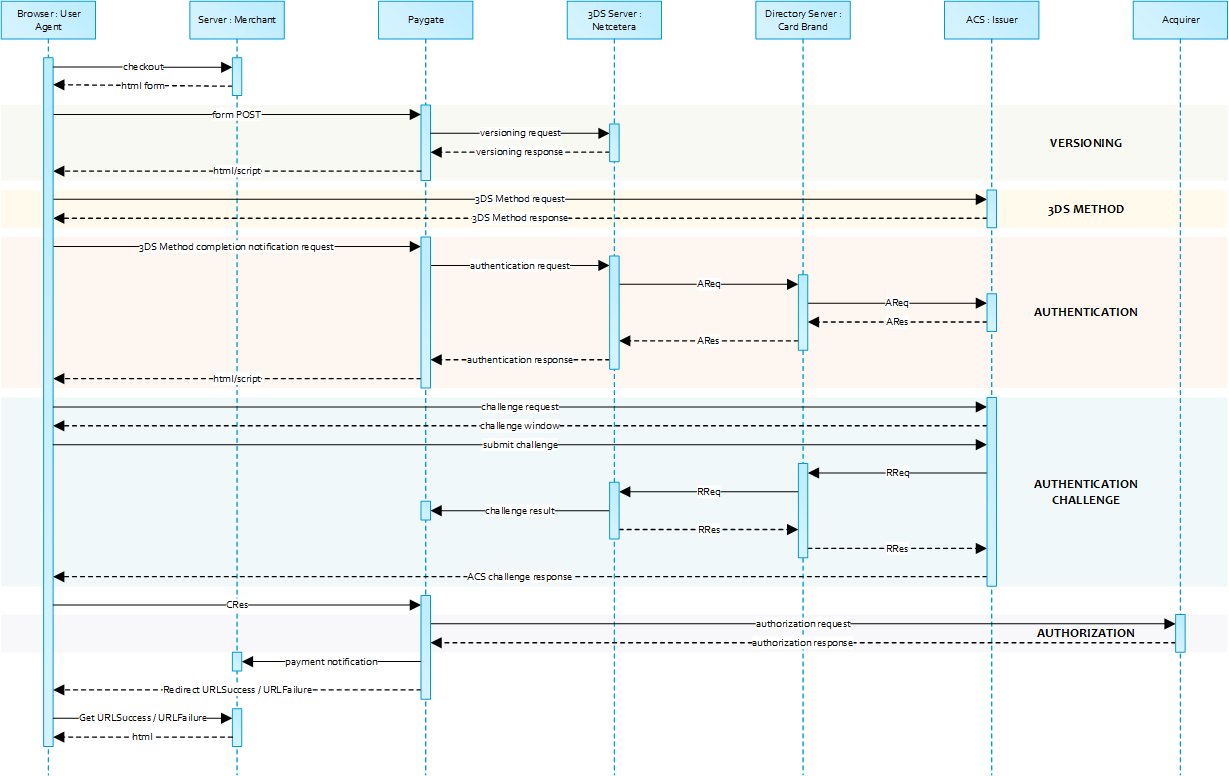
Payment Request
Please POST the form data as outlined in table below to https://www.computop-paygate.com/payNow.aspx.
Form Elements
| Data Element | Legacy Element | Description |
|---|---|---|
MerchantID | -- | Merchant identifier assigned by Computop |
Len | -- | The length of the original encrypted with Blowfish |
Data | -- | Blowfish encrypted data |
number | CCNr | Card number |
securityCode | CCCVC | Card security value |
expiryDate | CCExpiry | Card expiry in format YYYYMM |
brand | CCBrand | Card network |
cardholder | CreditCardHolder | Name of the cardholder as printed on the card. Notice: Alphanumeric special characters, listed in EMV Book 4, “Appendix B”. Special characters have been added with EMV 3DS Version 2.3, but not all participants (banks) already support that standard. |
(- Computop will continue to support the legacy form data fields that are currently in use. -)
Data
| Key | Format | CND | Description |
|---|---|---|---|
ans..30 | M | MerchantID, assigned by Computop. Additionally this parameter has to be passed in plain language too. |
| Key | Format | CND | Description |
|---|---|---|---|
| TransID | ans..64 | M | TransactionID provided by you which should be unique for each payment |
| Key | Format | CND | Description |
|---|---|---|---|
MsgVer | ans..5 | M | Message version. Accepted values:
|
RefNr | O | Merchant’s unique reference number, which serves as payout reference in the acquirer EPA file. Please note, without the own shop reference delivery you cannot read out the EPA transaction and regarding the additional Computop settlement file (CTSF) we cannot add the additional payment data.
Only ASCII characters allowed, special characters ("Umlaute", diacritics) are not allowed and must be replaced by their ASCII-representation (e.g. ü → ue, é → e, ...). |
| Key | Format | CND | Description |
|---|---|---|---|
| Amount | n..10 | M | Amount in the smallest currency unit (e.g. EUR Cent). Please contact the Computop Helpdesk, if you want to capture amounts <100 (smallest currency unit). |
| Key | Format | CND | Description |
|---|---|---|---|
| Currency | a3 | M | Currency, three letters DIN / ISO 4217, e.g. EUR, USD, GBP. Please find an overview here: A1 Currency table |
| Key | Format | CND | Description | ||||||||
|---|---|---|---|---|---|---|---|---|---|---|---|
| Capture | an..6 | OM | Determines the type and time of capture.
|
| Key | Format | CND | Description |
|---|---|---|---|
ans..22 | O | A descriptor to be printed on a cardholder’s statement. Please also refer to the additional comments made elswhere for more information about rules and regulations. | |
OrderDesc | ans..768 | O | Order description |
a3 | O | Indicator to request an account verification (aka zero value authorization). If an account verification is requested the submitted amount will be optional and ignored for the actual payment transaction (e.g. authorization). Values accepted:
| |
JSON | O | Object specifying authentication policies and excemption handling strategies | |
JSON | O | Prior Transaction Authentication Information contains optional information about a 3DS cardholder authentication that occurred prior to the current transaction. | |
JSON | M | Accurate browser information are needed to deliver an optimized user experience. Required for 3DS 2.0 transactions. | |
JSON | O | The account information contains optional information about the customer account with the merchant. | |
JSON | C | The customer that is getting billed for the goods and / or services. Required unless market or regional mandate restricts sending this information. | |
JSON | C | The customer that the goods and / or services are sent to. Required if different from billToCustomer. | |
JSON | C | Billing address. Required (if available) unless market or regional mandate restricts sending this information. | |
JSON | C | Shipping address. If different from billingAddress, required (if available) unless market or regional mandate restricts sending this information. | |
JSON | C | Object specifying type and series of transactions using payment account credentials (e.g. account number or payment token) that is stored by a merchant to process future purchases for a customer. Required if applicable. | |
JSON | O | The Merchant Risk Indicator contains optional information about the specific purchase by the customer. If no |
| Key | Format | CND | Description |
|---|---|---|---|
| URLSuccess | ans..256 | M | Complete URL which calls up Platform if payment has been successful. The URL may be called up only via port 443. This URL may not contain parameters: In order to exchange values between Platform and shop, please use the parameter UserData.
|
| Key | Format | CND | Description |
|---|---|---|---|
| URLFailure | ans..256 | M | Complete URL which calls up Platform if payment has been unsuccessful. The URL may be called up only via port 443. This URL may not contain parameters: In order to exchange values between Platform and shop, please use the parameter UserData.
|
| Key | Format | CND | Description |
|---|---|---|---|
| URLNotify | ans..256 | M | Complete URL which Platform calls up in order to notify the shop about the payment result. The URL may be called up only via port 443. It may not contain parameters: Use the UserData parameter instead.
|
| Key | Format | CND | Description |
|---|---|---|---|
an64 | M | Hash Message Authentication Code (HMAC) with SHA-256 algorithm. Details can be found here: |
| Key | Format | CND | Description |
|---|---|---|---|
| UserData | ans..1024 | O | If specified at request, Platform forwards the parameter with the payment result to the shop. |
Sample HTML Form
 BASEURL= https://www.computop-paygate.com/
<!DOCTYPE html>
<html>
	<head>
		<title>Merchant Checkout</title>
	</head>
	<body>
		<form name="card form" action="BASEURLpayNow.aspx" method="post">
			<input type="hidden" name="MerchantID" value="MerchantID">
			<input type="hidden" name="Len" value="Length of the Blowfish encrypted data">
			<input type="hidden" name="Data" value="Blowfish encrypted data">
			Cardholder:
			<input type="text" name="cardholder"><br>
			Card number:
			<input type="text" name="number"><br>
			Expiry date:
			<input type="text" name="expiryDate"><br>
			CVV2:
			<input type="text" name="securityCode"><br>
			Card brand:
			<input type="text" name="brand"><br>
			<input type="submit" value="Submit">
		</form>
	</body>
</html>
When the payment is completed Computop Paygate will send a notification to the merchant server (i.e. URLNotify) and redirect the browser to the URLSuccess respectively to the URLFailure.
The blowfish encrypted data elements as listed in the following table are transferred via HTTP POST request method to the URLNotify and URLSuccess/URLFailure.
HTTP POST to URLSuccess / URLFailure / URLNotify
| Key | Format | CND | Description |
|---|---|---|---|
ans..30 | M | MerchantID, assigned by Computop |
| Key | Format | CND | Description | ||||
|---|---|---|---|---|---|---|---|
| msgver | ans..5 | M | Computop Paygate Message version. Valid values:
|
| Key | Format | CND | Description |
|---|---|---|---|
| PayID | an32 | M | ID assigned by Platform for the payment, e.g. for referencing in batch files as well as for capture or credit request. |
| Key | Format | CND | Description |
|---|---|---|---|
| XID | an32 | M | ID for all single transactions (authorisation, capture, credit note) for one payment assigned by Platform |
| Key | Format | CND | Description |
|---|---|---|---|
| TransID | ans..64 | M | TransactionID provided by you which should be unique for each payment |
| Key | Format | CND | Description |
|---|---|---|---|
| schemeReferenceID | ans..64 | C | Card scheme specific transaction ID required for subsequent credential-on-file payments, delayed authorizations and resubmissions. Mandatory: CredentialOnFile – initial false – unscheduled MIT / recurring schemeReferenceID is returned for 3DS2-payments. In case of fallback to 3DS1 you will also need to check for TransactionId. The schemeReferenceID is a unique identifier generated by the card brands and as a rule Computop merchants can continue to use the SchemeReferenceIDs for subscription plans that were created while using another PSP environment / Platform MerchantID / Acquirer ContractID / Acquirer. |
| Key | Format | CND | Description |
|---|---|---|---|
| refnr | O | Reference number taken from request | |
Status | a..20 | M | Status of the transaction. Values accepted:
In case of Authentication-only the Status will be either |
| Key | Format | CND | Description |
|---|---|---|---|
| Description | ans..1024 | M | Further details in the event that payment is rejected. Please do not use the Description but the Code parameter for the transaction status analysis! |
| Key | Format | CND | Description |
|---|---|---|---|
| Code | an8 | M | Error code according to Platform Response Codes (A4 Error codes) |
| Key | Format | CND | Description |
|---|---|---|---|
JSON | M | Card response data | |
JSON | C | Object containing IP information. Presence depends on the configuration for the merchant. | |
JSON | M | Authentication data | |
JSON | C | In case the authentication process included a cardholder challenge additional information about the challenge result will be provided. | |
| externalPaymentData | JSON | O | Optional additional data from acquirer/issuer/3rd party for authorization |
| Key | Format | CND | Description |
|---|---|---|---|
| UserData | ans..1024 | O | If specified at request, Platform forwards the parameter with the payment result to the shop. |
| Key | Format | CND | Description |
|---|---|---|---|
an64 | M | Hash Message Authentication Code (HMAC) with SHA-256 algorithm. Details can be found here: |