
About Bluecode
General information about Bluecode
What is Bluecode?
Bluecode is the first pan-European mobile payment solution that enables cashless payments via Android smartphone, iPhone and Apple Watch combined with value-added services in a single technology platform. In accordance with European data protection standards, no personal data is ever exchanged with participating banks or merchants thus none is stored or transmitted on the mobile phone during the payment process. The highly secure, TAN-based payment system works with all checking accounts and is independent from the transmission technology (barcode, QR code, bluetooth).
Bluecode started in 2017 in Austria. Since 2018, Alipay users have also been benefiting from a cooperation between Bluecode and Alipay. The expansion into the German market took place in the same year.
How do customers link Bluecode to their bank account?
With Bluecode there are two ways app users can link their bank account:
With partner banks, they can register immediately and directly in their bank’s app or online banking. This registration is particularly fast and possible at all Bluecode partner banks.
At all other banks, you can register using a SEPA direct debit procedure. The direct debit mandate is stored and the payment processed by SIX Payment Services Ltd. SIX is a company audited by the Financial Market Authority and one of the largest direct debit processors in the German-speaking countries.
Are there payment limits when paying with Bluecode?
For security reasons Bluecode limits the number of payments to four payments per hour and ten payments per day with a transaction limit of 400€. This may vary depending on the issuer.
How does the Bluecode QR code payment work?
Bluecode QR Code Payment is a variant of eCommerce Payment. The checkout system (merchant's shop) produces a QR Code according to the payment data by calling a Bluecode API via Paygate, and then the customer scans the QR Code with his mobile device to finish the payment.
Logo |
|
|---|---|
Info | Bluecode is the first pan-European mobile payment solution that enables cashless payments via Android smartphone, iPhone and Apple Watch combined with value-added services in a single technology platform. In accordance with European data protection standards, no personal data is ever exchanged with participating banks or merchants thus none is stored or transmitted on the mobile phone during the payment process. The highly secure, TAN-based payment system works with all checking accounts and is independent from the transmission technology (barcode, QR code, bluetooth). |
Type |

Further information you will find also on the website of Bluecode (https://bluecode.com/de-de/b2b/haendler/, https://bluecode.com/en/b2b/merchants/).
Use cases
Supported use cases | Supported interfaces | |||||||
|---|---|---|---|---|---|---|---|---|
Use case | Description | Simple process | S-2-S | Form-based | Batch | Analytics | HPP | CTSF |
Authorization + Capture | Merchant wants to authorize payment and capture on delivery |
| ||||||
Sale | Merchant wants to collect money from customer via Bluecode |
|  | | ||||
full or partial Credit | Merchant wants to credit some money back to customer after a payment has been successfully completed |
|
|
| ||||
| CTSF | CTSF for reconcilliation |
| ||||||
Process flow charts
Sale, Client-to-Server
Reversal / Credit, Server-to-Server
On this page
Paygate interface
Format Description a alphabetical as alphabetical with special characters n numeric an alphanumeric ans alphanumeric with special characters ns numeric with special characters bool boolean expression (true or false) 3 fixed length with 3 digits/characters ..3 variable length with maximum 3 digits/characters enum enumeration of allowed values dttm ISODateTime (YYYY-MM-DDThh:mm:ss) Abbreviation Description CND condition M mandatory O optional C conditional Notice: Please note that the names of parameters can be returned in upper or lower case.Definitions
Data formats
Abbreviations
Comment If a parameter is mandatory, then it must be present If a parameter is optional, then it can be present, but it is not required If a parameter is conditional, then there is a conditional rule which specifies whether it is mandatory or optional
Calling the interface for a Bluecode Website payment with QR Code (Sale)
Cancellations and credits are available for Bluecode payments as described in the sections below. Only credits are available in batch mode. For point-of-sale transactions please use connection for Bluecode QR Code payment.
Use the following URL to process an Bluecode QR Code payment via redirect to the Bluecode form:
https://www.computop-paygate.com/Bluecode.aspx |
Use the following URL to process an Bluecode QR Code payment via Server-to-Server connection – you have to transform the Bluecode URL into a QR Code:
https://www.computop-paygate.com/BluecodeS2S.aspx |
Notice: For security reasons, Computop Paygate rejects all payment requests with formatting errors. Therefore, please use the correct data type for each parameter. The following table describes the encrypted payment request parameters:
| Key | Format | CND | Description |
|---|---|---|---|
ans..30 | M | MerchantID, assigned by Computop. Additionally this parameter has to be passed in plain language too. |
| Key | Format | CND | Description |
|---|---|---|---|
| TransID | ans..64 | M | TransactionID provided by you which should be unique for each payment |
Key | Format | CND | Description |
|---|---|---|---|
RefNr | ans..30 | O | Reference which must be unique for each payment - if present; this value may be printed on the consumers bank account (depending on the consumers bank). |
| Key | Format | CND | Description |
|---|---|---|---|
| Amount | n..10 | M | Amount in the smallest currency unit (e.g. EUR Cent). Please contact the Computop Helpdesk, if you want to capture amounts <100 (smallest currency unit). |
Key | Format | CND | Description |
|---|---|---|---|
Currency | A3 | M | Three digits DIN / ISO 4217. Currently only EUR is supported. Please find an overview here: A1 Currency table EN |
| Key | Format | CND | Description |
|---|---|---|---|
an64 | M | Hash Message Authentication Code (HMAC) with SHA-256 algorithm. Details can be found here: |
Key | Format | CND | Description |
|---|---|---|---|
OrderDesc | ans..26 | O | An optional further identifier for this transaction. Assumed to be printed on customer receipt and used to identify the transaction given the slip. The format of this ID can be freely chosen by the caller and is not validated. |
| ShopURL | an..128 | O | URL of web shop, for example: https://testmerchant.com |
| AccOwner | ans..50 | M | Name of account holder |
| IBAN | an..34 | O | IBAN of the user which appears predefined in the transfer window (only possible for DE) |
| BIC | an..11 | O | BIC of the user which appears predefined in the transfer window |
| AddrCountryCode | a2 | M | Two characters country code according to ISO 3166. Presently DE, AT, BE, NL, ES, CH, PL, IT permitted. |
| Language | a2 | O | Language: de – German, en – English, fr – French, nl – Dutch, pl – Polish |
| Key | Format | CND | Description |
|---|---|---|---|
| URLSuccess | ans..256 | M | Complete URL which calls up Paygate if payment has been successful. The URL may be called up only via port 443. This URL may not contain parameters: In order to exchange values between Paygate and shop, please use the parameter UserData.
|
| Key | Format | CND | Description |
|---|---|---|---|
| URLFailure | ans..256 | M | Complete URL which calls up Paygate if payment has been unsuccessful. The URL may be called up only via port 443. This URL may not contain parameters: In order to exchange values between Paygate and shop, please use the parameter UserData.
|
| Key | Format | CND | Description |
|---|---|---|---|
| Response | a7 | O | Status response sent by Paygate to URLSuccess and URLFailure, should be encrypted. For this purpose, transmit Response=encrypt parameter. |
| Key | Format | CND | Description |
|---|---|---|---|
| URLNotify | ans..256 | M | Complete URL which Paygate calls up in order to notify the shop about the payment result. The URL may be called up only via port 443. It may not contain parameters: Use the UserData parameter instead.
|
| Key | Format | CND | Description |
|---|---|---|---|
| UserData | ans..1024 | O | If specified at request, Paygate forwards the parameter with the payment result to the shop. |
| Key | Format | CND | Description |
|---|---|---|---|
| ReqId | ans..32 | O | To avoid double payments or actions (e.g. by ETM), enter an alphanumeric value which identifies your transaction and may be assigned only once. If the transaction or action is submitted again with the same ReqID, Computop Paygate will not carry out the payment or new action, but will just return the status of the original transaction or action. Please note that the Computop Paygate must have a finalized transaction status for the first initial action (authentication/authorisation). This does not apply to 3-D Secure authentications that are terminated by a timeout. The 3-D Secure Timeout status does not count as a completed status in which the ReqID functionality on Paygate does not take effect. Submissions with identical ReqID for an open status will be processed regularly. Notice: Please note that a ReqID is only valid for 12 month, then it gets deleted at the Paygate. |
Key | Format | CND | Description |
|---|---|---|---|
Channel | a9 | O | Either value "ecommerce" or "mcommerce"
|
| Key | Format | CND | Description |
|---|---|---|---|
| Plain | ans..50 | O | A single value to be set by the merchant to return some information unencrypted in response/notify, e.g. the MID. "Plain"-parameter is part of encrypted "Data" in Computop Paygate and therefore protected against manipulation. |
| Key | Format | CND | Description |
|---|---|---|---|
| Custom | ans..1024 | O | "Custom"-parameter is added to the request data before encryption and is part of encrypted "Data" in Computop Paygate request. By this they are protected against manipulation by a consumer. The Custom-value is added to the Computop Paygate response in plain text and the "|" is replaced by a "&". By this you can put a single value into Custom-parameter and get multiple key-value-pairs back in response for your own purpose. |
Key | Format | CND | Description |
|---|---|---|---|
TotalAmount | n..10 | O | The total price of the purchase before tip and discount |
| Discount | n..10 | O | Discount offered on the TotalAmount – is a positive integer and may be zero. |
| TransactionDate | ans20 | O | UTC time of transaction in format "YYYY-MM-DDThh:mm:ssZ" |
The following table gives the result parameters which Computop Paygate transmits to URLSuccess or URLFailure and URLNotify. If you have specified the Response=encrypt parameter, the following parameters are sent Blowfish encrypted to your system: pls. be prepared to receive additional parameters at any time and do not check the order of parameters the key (e.g. mid, RefNr) should not be checked case-sentive
| Key | Format | CND | Description |
|---|---|---|---|
ans..30 | M | MerchantID, assigned by Computop |
| Key | Format | CND | Description |
|---|---|---|---|
| PayID | an32 | M | ID assigned by Paygate for the payment, e.g. for referencing in batch files as well as for capture or credit request. |
| Key | Format | CND | Description |
|---|---|---|---|
| XID | an32 | M | ID for all single transactions (authorisation, capture, credit note) for one payment assigned by Paygate |
Key | Format | CND | Description |
|---|---|---|---|
TransID | ans..30 | M | Unique reference number for your accounts - it is the unique reference with Bluecode, too. It must be printed in consumers invoice/receipt. |
| RefNr | ans..30 | O | Unique reference number. It must be printed in consumers invoice/receipt, if value present. |
| TransactionID | ans..64 | M | Unique transaction number returned by Bluecode (acquirer_tx_id): must be printed on the customer's invoice; customer can find the acqurier_tx_id in his Bluecode-App-history, too. |
| InvoiceText | ans..400 | O | Optional text to the consumers invoice/receipt; it must be printed, if value is present. |
| Key | Format | CND | Description |
|---|---|---|---|
| Status | a..50 | M | OK or AUTHORIZED (URLSuccess) as well as FAILED (URLFailure) |
| Key | Format | CND | Description |
|---|---|---|---|
| Description | ans..1024 | M | Further details in the event that payment is rejected. Please do not use the Description but the Code parameter for the transaction status analysis! |
| Key | Format | CND | Description |
|---|---|---|---|
| Code | an8 | M | Error code according to Paygate Response Codes (A4 Error codes) |
| Key | Format | CND | Description |
|---|---|---|---|
| UserData | ans..1024 | O | If specified at request, Paygate forwards the parameter with the payment result to the shop. |
| Key | Format | CND | Description |
|---|---|---|---|
an64 | M | Hash Message Authentication Code (HMAC) with SHA-256 algorithm. Details can be found here: |
| Key | Format | CND | Description |
|---|---|---|---|
| Plain | ans..50 | O | A single value to be set by the merchant to return some information unencrypted in response/notify, e.g. the MID. "Plain"-parameter is part of encrypted "Data" in Computop Paygate and therefore protected against manipulation. |
| Key | Format | CND | Description |
|---|---|---|---|
| Custom | ans..1024 | O | "Custom"-parameter is added to the request data before encryption and is part of encrypted "Data" in Computop Paygate request. By this they are protected against manipulation by a consumer. The Custom-value is added to the Computop Paygate response in plain text and the "|" is replaced by a "&". By this you can put a single value into Custom-parameter and get multiple key-value-pairs back in response for your own purpose. |
Key | Format | CND | Description | |
|---|---|---|---|---|
CodeExt | ans..30 | O | Bluecode error Code | |
| QRCodeUrl | ans..128 | C | Only when calling BluecodeS2S.aspx: if request processed successfully, QR Code URL will be returned, which can be converted to QR Code | |
Reversal (if a payment process has not been completed successfully)
Reversals of a payment with Bluecode QR Code payment are possible via a Server-to-Server connection. The Paygate permits reversals that reference an authorisation previously made via Paygate. If you reference a payment in a cancellation, the whole payment is cancelled. A cancellation is not possible for successful completed payment processes. To refund money to the consumer use "credit".
To carry out a Reversal for Bluecode QR Code payment via a Server-to-Server connection please use the following URL:
https://www.computop-paygate.com/reverse.aspx |
Notice: For security reasons, Computop Paygate rejects all payment requests with formatting errors. Therefore, please use the correct data type for each parameter. The following table describes the encrypted payment request parameters:
| Key | Format | CND | Description |
|---|---|---|---|
ans..30 | M | MerchantID, assigned by Computop. Additionally this parameter has to be passed in plain language too. |
| Key | Format | CND | Description |
|---|---|---|---|
| PayID | an32 | M | ID assigned by Paygate for the payment to be reversed |
| Key | Format | CND | Description |
|---|---|---|---|
| TransID | ans..64 | M | TransactionID provided by you which should be unique for each payment |
Key | Format | CND | Description |
|---|---|---|---|
RefNr | ans..30 | O | Unique reference number for your accounts. The value is not sent to Bluecode with a reverse. |
| Key | Format | CND | Description |
|---|---|---|---|
| Amount | n..10 | M | Amount in the smallest currency unit (e.g. EUR Cent). Please contact the Computop Helpdesk, if you want to capture amounts <100 (smallest currency unit). |
| Key | Format | CND | Description |
|---|---|---|---|
| Currency | a3 | M | Currency, three letters DIN / ISO 4217, e.g. EUR, USD, GBP. Please find an overview here: A1 Currency table |
| Key | Format | CND | Description |
|---|---|---|---|
an64 | M | Hash Message Authentication Code (HMAC) with SHA-256 algorithm. Details can be found here: |
| Key | Format | CND | Description |
|---|---|---|---|
| UserData | ans..256 | O | If specified at request, Paygate forwards the parameter with the payment result to the shop. |
| Key | Format | CND | Description |
|---|---|---|---|
| ReqId | ans..32 | O | To avoid double payments or actions (e.g. by ETM), enter an alphanumeric value which identifies your transaction and may be assigned only once. If the transaction or action is submitted again with the same ReqID, Computop Paygate will not carry out the payment or new action, but will just return the status of the original transaction or action. Please note that the Computop Paygate must have a finalized transaction status for the first initial action (authentication/authorisation). This does not apply to 3-D Secure authentications that are terminated by a timeout. The 3-D Secure Timeout status does not count as a completed status in which the ReqID functionality on Paygate does not take effect. Submissions with identical ReqID for an open status will be processed regularly. Notice: Please note that a ReqID is only valid for 12 month, then it gets deleted at the Paygate. |
The following table describes the result parameters with which the Computop Paygate responds to your system pls. be prepared to receive additional parameters at any time and do not check the order of parameters the key (e.g. mid, RefNr) should not be checked case-sentive
| Key | Format | CND | Description |
|---|---|---|---|
ans..30 | M | MerchantID, assigned by Computop |
| Key | Format | CND | Description |
|---|---|---|---|
| PayID | an32 | M | ID assigned by Paygate for the payment, e.g. for referencing in batch files as well as for capture or credit request. |
| Key | Format | CND | Description |
|---|---|---|---|
| XID | an32 | M | ID for all single transactions (authorisation, capture, credit note) for one payment assigned by Paygate |
| Key | Format | CND | Description |
|---|---|---|---|
| TransID | ans..64 | M | TransactionID provided by you which should be unique for each payment |
Key | Format | CND | Description |
|---|---|---|---|
RefNr | ans..30 | O | Unique reference number for your accounts. The value is not sent to Bluecode with a credit. |
| Key | Format | CND | Description |
|---|---|---|---|
| Status | a..50 | M | OK (URLSuccess) or FAILED (URLFailure) |
| Key | Format | CND | Description |
|---|---|---|---|
| Description | ans..1024 | M | Further details in the event that payment is rejected. Please do not use the Description but the Code parameter for the transaction status analysis! |
| Key | Format | CND | Description |
|---|---|---|---|
| Code | an8 | M | Error code according to Paygate Response Codes (A4 Error codes) |
| Key | Format | CND | Description |
|---|---|---|---|
| UserData | ans..256 | O | If specified at request, Paygate forwards the parameter with the payment result to the shop. |
Key | Format | CND | Description |
|---|---|---|---|
CodeExt | ans..30 | O | Bluecode error Code |
Credit with reference
Credits for a payment with all Bluecode payment scenarios can be made via server-to-server communication. Paygate permits credits that reference on a capture previously made via Paygate. The amount of the credit is limited to the amount of the previous capture.
To carry out a credit with a reference transaction, please use the following URL:
https://www.computop-paygate.com/credit.aspx |
Notice: For security reasons, Computop Paygate rejects all payment requests with formatting errors. Therefore, please use the correct data type for each parameter. The following table describes the encrypted payment request parameters:
| Key | Format | CND | Description |
|---|---|---|---|
ans..30 | M | MerchantID, assigned by Computop. Additionally this parameter has to be passed in plain language too. |
| Key | Format | CND | Description |
|---|---|---|---|
| PayID | an32 | M | ID assigned by Paygate for the payment to be credited |
| Key | Format | CND | Description |
|---|---|---|---|
| TransID | ans..64 | M | TransactionID provided by you which should be unique for each payment |
Key | Format | CND | Description |
|---|---|---|---|
RefNr | ans..30 | O | Unique reference number for your accounts. The value is not sent to Bluecode with a credit. |
| Key | Format | CND | Description |
|---|---|---|---|
| Amount | n..10 | M | Amount in the smallest currency unit (e.g. EUR Cent). Please contact the Computop Helpdesk, if you want to capture amounts <100 (smallest currency unit). |
| Key | Format | CND | Description |
|---|---|---|---|
| Currency | a3 | M | Currency, three letters DIN / ISO 4217, e.g. EUR, USD, GBP. Please find an overview here: A1 Currency table |
Key | Format | CND | Description |
|---|---|---|---|
OrderDesc2 | O | Optional reason for refund / credit, e.g. "Warranty" |
| Key | Format | CND | Description |
|---|---|---|---|
an64 | M | Hash Message Authentication Code (HMAC) with SHA-256 algorithm. Details can be found here: |
| Key | Format | CND | Description |
|---|---|---|---|
| UserData | ans..256 | O | If specified at request, Paygate forwards the parameter with the payment result to the shop. |
| Key | Format | CND | Description |
|---|---|---|---|
| ReqId | ans..32 | O | To avoid double payments or actions (e.g. by ETM), enter an alphanumeric value which identifies your transaction and may be assigned only once. If the transaction or action is submitted again with the same ReqID, Computop Paygate will not carry out the payment or new action, but will just return the status of the original transaction or action. Please note that the Computop Paygate must have a finalized transaction status for the first initial action (authentication/authorisation). This does not apply to 3-D Secure authentications that are terminated by a timeout. The 3-D Secure Timeout status does not count as a completed status in which the ReqID functionality on Paygate does not take effect. Submissions with identical ReqID for an open status will be processed regularly. Notice: Please note that a ReqID is only valid for 12 month, then it gets deleted at the Paygate. |
Key | Format | CND | Description |
|---|---|---|---|
Reason | ans..256 | O | Reason of refund |
The following table describes the result parameters with which the Computop Paygate responds to your system pls. be prepared to receive additional parameters at any time and do not check the order of parameters the key (e.g. mid, RefNr) should not be checked case-sentive
| Key | Format | CND | Description |
|---|---|---|---|
ans..30 | M | MerchantID, assigned by Computop |
| Key | Format | CND | Description |
|---|---|---|---|
| PayID | an32 | M | ID assigned by Paygate for the payment, e.g. for referencing in batch files as well as for capture or credit request. |
| Key | Format | CND | Description |
|---|---|---|---|
| XID | an32 | M | ID for all single transactions (authorisation, capture, credit note) for one payment assigned by Paygate |
| Key | Format | CND | Description |
|---|---|---|---|
| TransID | ans..64 | M | TransactionID provided by you which should be unique for each payment |
Key | Format | CND | Description |
|---|---|---|---|
RefNr | ans..30 | O | Unique reference number for your accounts. The value is not sent to Bluecode with a credit. |
| TransactionID | ans..64 | M | Unique transaction number with Bluecode (acquirer_tx_id): is printed on the customer's invoice |
| Key | Format | CND | Description |
|---|---|---|---|
| Status | a..50 | M | OK (URLSuccess) or FAILED (URLFailure) |
| Key | Format | CND | Description |
|---|---|---|---|
| Description | ans..1024 | M | Further details in the event that payment is rejected. Please do not use the Description but the Code parameter for the transaction status analysis! |
| Key | Format | CND | Description |
|---|---|---|---|
| Code | an8 | M | Error code according to Paygate Response Codes (A4 Error codes) |
| Key | Format | CND | Description |
|---|---|---|---|
| UserData | ans..256 | O | If specified at request, Paygate forwards the parameter with the payment result to the shop. |
Key | Format | CND | Description |
|---|---|---|---|
CodeExt | ans..30 | O | Bluecode error Code |
Batch processing via the interface
Basic information about using Batch files and about their structure can be found in the Batch Manager manual. Within batch processing not alle functions are available which are usually available for the online interface.
This section describes the parameters which must be transferred within the data set (Record) for executing an Bluecode payment and information can be found within the response file about the payment status
For Batch calls there must be considered batch versions, from which optional parameters depend. All version designations starting with „2.“ pertain calls for a group of enterprises. That means within a batch file for a particular MerchantID can be transferred transactions for other merchants with a separate Sub-MID
Following table gives an overview of all batch versions that are possible for a specific action an their specialities:
Action | Version | Description |
|---|---|---|
Credit | 1.0 / 2.0 | Standard version without return of parameter Code |
1.x / 2.x | with RefNr (valid for all versions other than 1.0) |
The structure for a Bluecode credit within a Batch file to be submitted is as follows:
HEAD,<MerchantID>,<Date>,<Version>
Bluecode,Credit,<Amount>,<Currency>,<TransID>,(<RefNr>,)<PayID>
FOOT,<CountRecords>,<SumAmount>
Example for Master MID function:
HEAD,[Master]MerchantID,Date,2.x
Type,Action,[Slave]MID,Amount,Currency,TransID,Data (depends on Action)
FOOT,CountRecords,SumAmount
The following table describes the individual fields and values used within the data set (record) in the batch file:
Key | Format | CND | Description |
|---|---|---|---|
Type | a..11 | M | HEAD for Header, FOOT for Footer, Bluecode for Bluecode |
Action | a..20 | M | The parameter Action defines the type of transaction: Credit |
| Key | Format | CND | Description |
|---|---|---|---|
| Amount | n..10 | M | Amount in the smallest currency unit (e.g. EUR Cent). Please contact the Computop Helpdesk, if you want to capture amounts <100 (smallest currency unit). |
| Key | Format | CND | Description |
|---|---|---|---|
| Currency | a3 | M | Currency, three letters DIN / ISO 4217, e.g. EUR, USD, GBP. Please find an overview here: A1 Currency table |
| Key | Format | CND | Description |
|---|---|---|---|
| TransID | ans..64 | M | TransactionID provided by you which should be unique for each payment |
Key | Format | CND | Description |
|---|---|---|---|
RefNr | ans..30 | O | Unique reference number for your accounts. The value is not sent to Bluecode with a credit. |
| Key | Format | CND | Description |
|---|---|---|---|
| PayID | an32 | M | ID assigned by Paygate for this transaction |
The record area within the response file for Batch transactions looks as follows:
HEAD,<MerchantID>,<Date>,<Version>
Bluecode,Credit,<Amount>,<Currency>,<TransID>,(<RefNr>,)<PayID>,<Status>,<Code>
FOOT,<CountRecords>,<SumAmount>
Key | Format | CND | Description |
|---|---|---|---|
Action | a..20 | M | The parameter Action defines the type of transaction: Credit |
| Key | Format | CND | Description |
|---|---|---|---|
| PayID | an32 | M | ID assigned by Paygate for this transaction |
| Key | Format | CND | Description |
|---|---|---|---|
| Status | a..50 | M | OK (URLSuccess) or FAILED (URLFailure) |
| Key | Format | CND | Description |
|---|---|---|---|
| Code | an8 | M | Error code according to Paygate Response Codes (A4 Error codes) |
Test data
Bluecode provides a special Sandbox-App to provide test functionality. This Sandbox-App is not available in the official Appstores, but is available here:
| Smartphone | Link and remarks | QR-Code for easy download of Bluecode Sandbox-App |
|---|---|---|
| iOS | Note on iOS: When installing the sandbox app for the first time, the company app "bluesource" must be trusted once on iOS devices under "Settings> General> Profiles & device management". Only then the sandbox app can be used on iOS. | |
| Android | https://install.appcenter.ms/orgs/bluecode-organization/apps/com.spt.bluecode.sandbox-android/distribution_groups/public |
|
Please note:
After installation of Bluecode Sandbox-App the Bluecode has to be connected to a bank account:
- After installation of Bluecode Sandbox-App you have to setup a PIN for the App.
- Then click on "Connect bank account" and enter "test" in the bank search.
- The entry "Activate a test user" is then displayed. A test account can be added by clicking on it.
- To do this, select the first entry "Hypo Tirol".
- A blue code for payment is then displayed.
- To scan a QR code with your smartphone, tap the QR symbol in the top left of the app to activate the camera.
- The amount is then displayed on the smartphone for confirmation. You confirm this by "swiping".
In the Bluecode Sandbox app, no "real" payments are made, they are only simulated!
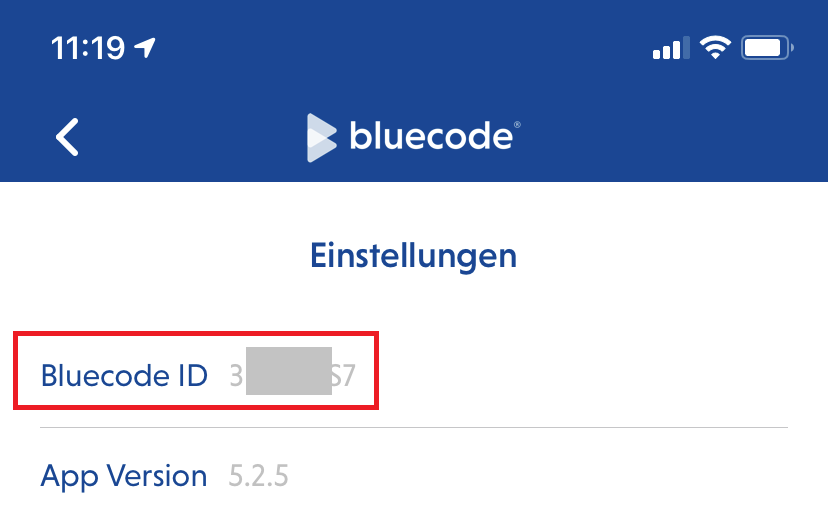
The Bluecode Sandbox App also has some transaction limits (per hour / per day). In case you need to disable the transaction limits please send an email together with your Bluecode Sandbox App "Bluecode ID" to devsupport@bluecode.com.
You will find the Bluecode ID here:
|
|

Important notes when switching to live payments
Computop itself has a certified Bluecode implementation. However, when switching from test to production mode a merchant has to ensure:
- Use Computop URL "Bluecode.aspx" to initiate a Bluecode payment with redirect to Bluecode page containing the QR code
- Use Computop URL "BluecodeS2S.aspx" to retrieve a Bluecode URL which has to be transformed into a QR code by the merchant system
- Values for request parameter "RefNr" are unique per payment process – duplicate values will be rejected
- Values from response parameter "TransactionID" must be printed on customer's invoice / receipt
- Values from response parameter "TransID" must be printed on customer's invoice / receipt if not empty