
About Be2bill
General information about Be2bill
With the connection of the French acquirer be2bill, merchants who are active in France have a powerful alternative for the selection of acquirer. As well as VISA and Mastercard credit cards, Paygate also handles payments made with the extremely widespread Cartes Bancaires via this partner. Be2bill offers online merchants a “3-in-1” solution for the management of its online payments including bank and payment services, internet-based marketing and solutions for increasing customer loyalty.
Credit card payments via be2bill can be made with or without 3D-Secure. For 3DS transactions, be2bill offers its own fraud prevention service which determines whether 3D authentication is needed. Along with one-off payments, be2bill also offers payment by instalment, recurring payments and one-click payments.
| Logo |
|
|---|---|
| Info | Be2bill is specially optimized for the “Cartes Bancaires” credit cards which is widely used in France. |
| Type | Payments by Credit Card |

| Card Scheme |
|---|
| VISA |
| MasterCard |
| Cartes Bancaires |
Process flow charts
Configuration for Be2bill
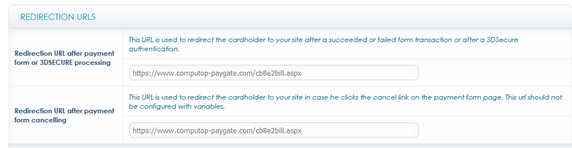
To set up Be2bill the merchant needs to save the required Paygate interface URLs in the backend. Each of these is a “Transaction feedback URL”:
https://www.computop-paygate.com/Be2billComplete.aspx
and for “Redirection URL after payment form or 3DSECURE processing” and “Redireciton URL after payment form cancelling” respectively:
https://www.computop-paygate.com/cbBe2bill.aspx

Paygate interface
Format Description a alphabetical as alphabetical with special characters n numeric an alphanumeric ans alphanumeric with special characters ns numeric with special characters bool boolean expression (true or false) 3 fixed length with 3 digits/characters ..3 variable length with maximum 3 digits/characters enum enumeration of allowed values dttm ISODateTime (YYYY-MM-DDThh:mm:ss) Abbreviation Description CND condition M mandatory O optional C conditional Notice: Please note that the names of parameters can be returned in upper or lower case.Definitions
Data formats
Abbreviations
Comment If a parameter is mandatory, then it must be present If a parameter is optional, then it can be present, but it is not required If a parameter is conditional, then there is a conditional rule which specifies whether it is mandatory or optional
Credit card payment with Be2bill via Paygate form interface
Payments with Be2bill are made via the standard Paygate form interface for credit card payments. In order to execute an SSL credit card payment with Be2bill via a Paygate form, visit the following URL:
https://www.computop-paygate.com/payssl.aspx |
Notice: For security reasons, Computop Paygate rejects all payment requests with formatting errors. Therefore, please use the correct data type for each parameter. The following table describes the encrypted payment request parameters:
| Key | Format | CND | Description |
|---|---|---|---|
ans..30 | M | MerchantID, assigned by Computop. Additionally this parameter has to be passed in plain language too. |
Key | Format | CND | Description |
|---|---|---|---|
TransID | ans..40 | M | ID assigned by Merchant for the payment process to be credited. Matches the Be2bill OrderID. |
Key | Format | CND | Description |
|---|---|---|---|
RefNr | ans..30 | M | Unique reference number. The RefNr is submitted together with the PayID and separated by | to Be2bill within the parameter ExtraData: PayID|RefNr. |
| Key | Format | CND | Description |
|---|---|---|---|
| Amount | n..10 | M | Amount in the smallest currency unit (e.g. EUR Cent). Please contact the Computop Helpdesk, if you want to capture amounts <100 (smallest currency unit). |
| Key | Format | CND | Description |
|---|---|---|---|
| Currency | a3 | M | Currency, three letters DIN / ISO 4217, e.g. EUR, USD, GBP. Please find an overview here: A1 Currency table |
| Key | Format | CND | Description |
|---|---|---|---|
an64 | M | Hash Message Authentication Code (HMAC) with SHA-256 algorithm. Details can be found here: |
| Key | Format | CND | Description |
|---|---|---|---|
| URLSuccess | ans..256 | M | Complete URL which calls up Paygate if payment has been successful. The URL may be called up only via port 443. This URL may not contain parameters: In order to exchange values between Paygate and shop, please use the parameter UserData.
|
| Key | Format | CND | Description |
|---|---|---|---|
| URLFailure | ans..256 | M | Complete URL which calls up Paygate if payment has been unsuccessful. The URL may be called up only via port 443. This URL may not contain parameters: In order to exchange values between Paygate and shop, please use the parameter UserData.
|
| Key | Format | CND | Description |
|---|---|---|---|
| Response | a7 | O | Status response sent by Paygate to URLSuccess and URLFailure, should be encrypted. For this purpose, transmit Response=encrypt parameter. |
| Key | Format | CND | Description |
|---|---|---|---|
| URLNotify | ans..256 | M | Complete URL which Paygate calls up in order to notify the shop about the payment result. The URL may be called up only via port 443. It may not contain parameters: Use the UserData parameter instead.
|
Key | Format | CND | Description |
|---|---|---|---|
CreditCardHolder | an..255 | M | Name of the card holder |
| Key | Format | CND | Description | ||||||||
|---|---|---|---|---|---|---|---|---|---|---|---|
| Capture | an..6 | OM | Determines the type and time of capture.
|
Key | Format | CND | Description |
|---|---|---|---|
OrderDesc | ans..768 | M | Description of purchased goods, unit prices etc. |
| Key | Format | CND | Description |
|---|---|---|---|
| UserData | ans..1024 | O | If specified at request, Paygate forwards the parameter with the payment result to the shop. |
| Key | Format | CND | Description |
|---|---|---|---|
| ReqId | ans..32 | O | To avoid double payments or actions (e.g. by ETM), enter an alphanumeric value which identifies your transaction and may be assigned only once. If the transaction or action is submitted again with the same ReqID, Computop Paygate will not carry out the payment or new action, but will just return the status of the original transaction or action. Please note that the Computop Paygate must have a finalized transaction status for the first initial action (authentication/authorisation). This does not apply to 3-D Secure authentications that are terminated by a timeout. The 3-D Secure Timeout status does not count as a completed status in which the ReqID functionality on Paygate does not take effect. Submissions with identical ReqID for an open status will be processed regularly. Notice: Please note that a ReqID is only valid for 12 month, then it gets deleted at the Paygate. |
Key | Format | CND | Description |
|---|---|---|---|
Language | a2 | O | Language: FR / EN / DE / ES / IT / NL / CN / RU / PT / CZ |
| CustomerID | ans..255 | M | Unique ID of card holder on the merchant's webpage (e.g. the ID inside the customer database or the email address of the customer) |
| ans..255 | M | Email address of the card holder | |
| ChDesc | ans..255 | O | Source URL of the merchant or the shop system |
| DateOfBirth | dttm10 | O | Date of birth of the card holder: YYYY-MM-DD |
| InstallmentAmount | ans..1024 | O | Amount of single instalments. The rate values are to be separated by comma and the first rate must have the highest value. e.g.: 200,100,100 |
| InstallmentDate | ans..1024 | C | In combination with InstallmentAmount: Date when the rates are to be collected. The date details must be comma-separated and specified in the UTC time zone (coordinated universal time). The time period from the first instalment to the last instalment also needs to be within a maximum 90 days. e.g.: YYYY-MM-DD,YYYY-MM-DD,YYYY-MM-DD |
| UserAgent | ans..128 | O | Browser type of the purchaser who requests the page. For example: IE Mozilla/4. 0 (compatible; MSIE 6.0; Windows NT 5.0; NET CLR 1.0.3705) |
| Key | Format | CND | Description |
|---|---|---|---|
| Plain | ans..50 | O | A single value to be set by the merchant to return some information unencrypted in response/notify, e.g. the MID. "Plain"-parameter is part of encrypted "Data" in Computop Paygate and therefore protected against manipulation. |
| Key | Format | CND | Description |
|---|---|---|---|
| Custom | ans..1024 | O | "Custom"-parameter is added to the request data before encryption and is part of encrypted "Data" in Computop Paygate request. By this they are protected against manipulation by a consumer. The Custom-value is added to the Computop Paygate response in plain text and the "|" is replaced by a "&". By this you can put a single value into Custom-parameter and get multiple key-value-pairs back in response for your own purpose. |
Key | Format | CND | Description |
|---|---|---|---|
| Delivery address | |||
sdFirstName | as..15 | O | First name in the delivery address |
sdLastName | as..30 | O | Last name in the delivery address |
sdStreet | ans..50 | O | Number and street in the delivery address |
sdZIP | ans..9 | O | Postcode in the delivery address |
sdCity | ans..255 | O | Town/city in the delivery address |
sdCountryCode | a..3 | O | Country code in the delivery address, 2 or 3 characters according to ISO 3166 |
sdPhone | ans..32 | O | Telephone number in the delivery address |
| Invoicing address | |||
bdFirstName | as..15 | O | First name in the invoicing address |
bdLastName | as..30 | O | Last name in the invoicing address |
bdStreet | ans..50 | O | Number and street in the invoicing address |
bdZIP | ans..9 | O | Postcode in the invoicing address |
bdCity | ans..255 | O | Town/city in the invoicing address |
bdCountryCode | a..3 | O | Country code in the invoicing address, 2 or 3 characters according to ISO 3166 |
bdPhone | ans..32 | O | Phone number in the billing address |
| Subscriptions | |||
RTF | a1 | O | For recurring payments: I = Initial payment of a new subscription |
TokenExt | an..32 | OC | In connection with RTF=R TokenExt must be transmitted for referencing the credit card data |
| Fraud prevention (please notice also the further optional parameters and response values for Fraud prevention) | |||
| IPAddr | ans..39 | M | IP address. With this parameter Paygate can determine in which country and in which town your customer has connected with the Internet (see also IPZone). Format: 123.456.789.012 |
To adapt the layout of the SSL-page to your shop you can use the following unencrypted parameters to configure colours, fonts and images.
| Key | Format | CND | Description |
|---|---|---|---|
| Template | ans..20 | O | Name of XSLT-file with your own layout for the pay form. If you want to use the redesigned and downwards compatible Computop template, please transfer the template name “ct_compatible”. If you want to use the responsive Computop template for mobile devices, please transfer the template name “ct_responsive”. |
| Key | Format | CND | Description |
|---|---|---|---|
| Background | ans..256 | O | Background ambiance of form: URL for a background image - HTML-colour value for background colour as HEX value or - HTML-colour name |
| Key | Format | CND | Description |
|---|---|---|---|
| BGColor | ans..7 | O | Form background colour: - HTML-colour value for background colour as HEX value or - HTML-colour name |
| Key | Format | CND | Description |
|---|---|---|---|
| BGImage | ans..256 | O | Form background image: URL for a background image Please note that this value supersedes “BGColor”. |
| Key | Format | CND | Description |
|---|---|---|---|
| FColor | ans..7 | O | Text colour: - HTML-colour value as HEX value or - HTML-colour name |
| Key | Format | CND | Description |
|---|---|---|---|
| FFace | a..10 | O | HTML-name for the font |
| Key | Format | CND | Description | Beschreibung |
|---|---|---|---|---|
| FSize | n2 | O | Number for font size | Zahl für die Schriftgröße |
| Key | Format | CND | Description |
|---|---|---|---|
Language | a2 (enum) | M | Language code: <de> German, <al> Albanian, <at> Austrian, <cz/cs> Czech, <dk> Danish, <en> English, <fi> Finish, <fr> French, <gr> Greek, <hu> Hungarian, <it> Italian, <jp> Japanese, <nl> Dutch, <no> Norwegian, <pl> Polish, <pt> Portuguese, <ro> Romanian, <ru> Russian, <sp> Spanish, <se> Swedish, <sk> Slovakian, <sl> Slovenian, <tr> Turkey, <zh> Simplified Chinese. No details means the language is German. |
CCSelect | a..10 | M | Determines preselected card type in the form: VISA, MasterCard, AMEX, DINERS, JCB, CBN, Hipercard, Elo, Aura, Dankort, Airplus, ComfortCard, CUP |
| Key | Format | CND | Description |
|---|---|---|---|
| URLBack | ans..256 | O | Complete URL which Paygate calls in case that Cancel is clicked by the customer. The parameter "URLBack" can be sent
In order to exchange values between Paygate and shop you may use something like this:
When user cancels payment this URL is called exactly like this and you may use URL Decode to extract parameter and values. |
| Key | Format | CND | Description |
|---|---|---|---|
| Center | n1 | O | By default the form is centered vertically and horizontally. The value <1> centres the form at the top. |
| Key | Format | CND | Description |
|---|---|---|---|
| tWidth | ans..4 | O | Width of table for input in the form as percent- (50%) or pixel values (320). |
| Key | Format | CND | Description |
|---|---|---|---|
| tHeight | ans..4 | O | Height of table for input of the payment data in the form as percent- (70%) or pixel values (480). |
The following table gives the result parameters which Computop Paygate transmits to URLSuccess or URLFailure and URLNotify. If you have specified the Response=encrypt parameter, the following parameters are sent Blowfish encrypted to your system: pls. be prepared to receive additional parameters at any time and do not check the order of parameters the key (e.g. mid, RefNr) should not be checked case-sentive
| Key | Format | CND | Description |
|---|---|---|---|
ans..30 | M | MerchantID, assigned by Computop |
Key | Format | CND | Description |
|---|---|---|---|
PayID | an32 | M | ID assigned by Paygate for the payment, e.g. for referencing in batch files. The PayID is submitted together with the RefNr and separated by | to Be2bill within the parameter ExtraData: PayID|RefNr. |
| Key | Format | CND | Description |
|---|---|---|---|
| XID | an32 | M | ID for all single transactions (authorisation, capture, credit note) for one payment assigned by Paygate |
Key | Format | CND | Description |
|---|---|---|---|
TransID | ans..40 | M | ID assigned by Merchant for the payment process to be credited. Matches the Be2bill OrderID. |
| Key | Format | CND | Description |
|---|---|---|---|
| Status | a..50 | M | OK or AUTHORIZE_REQUEST (URLSuccess) as well as FAILED (URLFailure) |
| Key | Format | CND | Description |
|---|---|---|---|
| Description | ans..1024 | M | Further details in the event that payment is rejected. Please do not use the Description but the Code parameter for the transaction status analysis! |
| Key | Format | CND | Description |
|---|---|---|---|
| Code | an8 | M | Error code according to Paygate Response Codes (A4 Error codes) |
| Key | Format | CND | Description |
|---|---|---|---|
an64 | M | Hash Message Authentication Code (HMAC) with SHA-256 algorithm. Details can be found here: |
Key | Format | CND | Description |
|---|---|---|---|
RefNr | ans..30 | O | Unique reference number. The RefNr is submitted together with the PayID and separated by | to Be2bill within the parameter ExtraData: PayID|RefNr. |
| Key | Format | CND | Description |
|---|---|---|---|
| UserData | ans..1024 | O | If specified at request, Paygate forwards the parameter with the payment result to the shop. |
Key | Format | CND | Description |
|---|---|---|---|
ErrorText | ans..128 | O | Detailed Be2bill error message. Notice: Is returned only if Status=FAILED. Use is possible only in agreement with Computop Helpdesk. |
| Key | Format | CND | Description |
|---|---|---|---|
| PCNr | n16 | O | Pseudo Card Number: Random number generated by Computop Paygate which represents a genuine credit card number. The pseudo card number (PCN) starts with 0 and the last 3 digits correspond to those of the real card number. The PCN can be used like a genuine card number for authorisation, capture and credits. PCNr is a response value from Computop Paygate and is sent as CCNr in Request or part of card-JSON. |
| Key | Format | CND | Description |
|---|---|---|---|
| PCNr | n16 | O | Pseudo Card Number: Random number generated by Computop Paygate which represents a genuine credit card number. The pseudo card number (PCN) starts with 0 and the last 3 digits correspond to those of the real card number. The PCN can be used like a genuine card number for authorisation, capture and credits. PCNr is a response value from Computop Paygate and is sent as CCNr in Request or part of card-JSON. |
Key | Format | CND | Description | |
|---|---|---|---|---|
| CCBrand | a..22 | O | In combination with PCNr: Name of credit card brand, e.g. Visa, MasterCard, Cartes Bancaires | |
| CCExpiry | n6 | O | In combination with PCNr: Expiry date of the credit card in the format YYYYMM | |
| TokenExt | an..32 | O | For recurring payments (RTF=I) the TokenExt is transmitted for referencing the credit card data | |
TransactionID | an..32 | O | Transaction ID from Be2bill | |
| Key | Format | CND | Description |
|---|---|---|---|
| Plain | ans..50 | O | A single value to be set by the merchant to return some information unencrypted in response/notify, e.g. the MID. "Plain"-parameter is part of encrypted "Data" in Computop Paygate and therefore protected against manipulation. |
| Key | Format | CND | Description |
|---|---|---|---|
| Custom | ans..1024 | O | "Custom"-parameter is added to the request data before encryption and is part of encrypted "Data" in Computop Paygate request. By this they are protected against manipulation by a consumer. The Custom-value is added to the Computop Paygate response in plain text and the "|" is replaced by a "&". By this you can put a single value into Custom-parameter and get multiple key-value-pairs back in response for your own purpose. |
Credit card payment via Server-to-Server connection
In order to execute an SSL credit card payment with Be2bill via a server-to-server connection, call the following URL:
https://www.computop-paygate.com/direct.aspx |
Notice: For security reasons, Computop Paygate rejects all payment requests with formatting errors. Therefore, please use the correct data type for each parameter. The following table describes the encrypted payment request parameters:
| Key | Format | CND | Description |
|---|---|---|---|
ans..30 | M | MerchantID, assigned by Computop. Additionally this parameter has to be passed in plain language too. |
Key | Format | CND | Description |
|---|---|---|---|
TransID | ans..40 | M | ID assigned by Merchant for the payment process to be credited. Matches the Be2bill OrderID. |
Key | Format | CND | Description |
|---|---|---|---|
RefNr | ans..30 | M | Unique reference number. The RefNr is submitted together with the PayID and separated by | to Be2bill within the parameter ExtraData: PayID|RefNr. |
| Key | Format | CND | Description |
|---|---|---|---|
| Amount | n..10 | M | Amount in the smallest currency unit (e.g. EUR Cent). Please contact the Computop Helpdesk, if you want to capture amounts <100 (smallest currency unit). |
| Key | Format | CND | Description |
|---|---|---|---|
| Currency | a3 | M | Currency, three letters DIN / ISO 4217, e.g. EUR, USD, GBP. Please find an overview here: A1 Currency table |
| Key | Format | CND | Description | ||||||||
|---|---|---|---|---|---|---|---|---|---|---|---|
| Capture | an..6 | OM | Determines the type and time of capture.
|
Key | Format | CND | Description |
|---|---|---|---|
OrderDesc | ans..510 | M | Description of purchased goods, unit prices etc. |
| Key | Format | CND | Description |
|---|---|---|---|
an64 | M | Hash Message Authentication Code (HMAC) with SHA-256 algorithm. Details can be found here: |
| Key | Format | CND | Description |
|---|---|---|---|
| UserData | ans..1024 | O | If specified at request, Paygate forwards the parameter with the payment result to the shop. |
| Key | Format | CND | Description |
|---|---|---|---|
| ReqId | ans..32 | O | To avoid double payments or actions (e.g. by ETM), enter an alphanumeric value which identifies your transaction and may be assigned only once. If the transaction or action is submitted again with the same ReqID, Computop Paygate will not carry out the payment or new action, but will just return the status of the original transaction or action. Please note that the Computop Paygate must have a finalized transaction status for the first initial action (authentication/authorisation). This does not apply to 3-D Secure authentications that are terminated by a timeout. The 3-D Secure Timeout status does not count as a completed status in which the ReqID functionality on Paygate does not take effect. Submissions with identical ReqID for an open status will be processed regularly. Notice: Please note that a ReqID is only valid for 12 month, then it gets deleted at the Paygate. |
Key | Format | CND | Description |
|---|---|---|---|
| CCNr | n..19 | M | Credit card number at least 12-digit, numerical without spaces. You can optionally transmit also a pseudo card number (PCN) |
| CCCVC | n..4 | C | Card verification number: The last 3 digits on the signature strip of the credit card. 4 characters in the case of AMEX. Optional if pseudo card number is used. |
| CCExpiry | n6 | M | Credit card expiry date (YYYYMM), e.g. 202607 |
| CCBrand | a..22 | M | Card type: VISA, MasterCard, Cartes Bancaires. Please note the spelling! |
CreditCardHolder | an..255 | M | Name of the card holder |
Key | Format | CND | Description |
|---|---|---|---|
Language | a2 | O | Language: FR / EN / DE / ES / IT / NL / CN / RU / PT / CZ |
| CustomerID | ans..255 | M | Unique ID of card holder on the merchant's webpage (e.g. the ID inside the customer database or the email address of the customer) |
| ans..255 | M | Email address of the card holder | |
| ChDesc | ans..255 | O | Source URL of the merchant or the shop system |
| DateOfBirth | dttm10 | O | Date of birth of the card holder: YYYY-MM-DD |
| InstallmentAmount | ans..1024 | O | Amount of single instalments. The rate values are to be separated by comma and the first rate must have the highest value. e.g.: 200,100,100 |
| InstallmentDate | ans..1024 | C | In combination with InstallmentAmount: Date when the rates are to be collected. The date details must be comma-separated and specified in the UTC time zone (coordinated universal time). The time period from the first instalment to the last instalment also needs to be within a maximum 90 days. e.g.: YYYY-MM-DD,YYYY-MM-DD,YYYY-MM-DD |
| UserAgent | ans..128 | O | Browser type of the purchaser who requests the page. For example: IE Mozilla/4. 0 (compatible; MSIE 6.0; Windows NT 5.0; NET CLR 1.0.3705) |
Key | Format | CND | Description |
|---|---|---|---|
| Delivery address | |||
sdFirstName | as..15 | O | First name in the delivery address |
sdLastName | as..30 | O | Last name in the delivery address |
sdStreet | ans..50 | O | Number and street in the delivery address |
sdZIP | ans..9 | O | Postcode in the delivery address |
sdCity | ans..255 | O | Town/city in the delivery address |
sdCountryCode | a..3 | O | Country code in the delivery address, 2 or 3 characters according to ISO 3166 |
sdPhone | ans..32 | O | Telephone number in the delivery address |
| Invoicing address | |||
bdFirstName | as..15 | O | First name in the invoicing address |
bdLastName | as..30 | O | Last name in the invoicing address |
bdStreet | ans..50 | O | Number and street in the invoicing address |
bdZIP | ans..9 | O | Postcode in the invoicing address |
bdCity | ans..255 | O | Town/city in the invoicing address |
bdCountryCode | a..3 | O | Country code in the invoicing address, 2 or 3 characters according to ISO 3166 |
bdPhone | ans..32 | O | Phone number in the billing address |
| Subscriptions | |||
RTF | a1 | O | For recurring payments: I = Initial payment of a new subscription |
TokenExt | an..32 | OC | In connection with RTF=R TokenExt must be transmitted for referencing the credit card data |
| Fraud prevention (please notice also the further optional parameters and response values for Fraud prevention) | |||
| IPAddr | ans..39 | M | IP address. With this parameter Paygate can determine in which country and in which town your customer has connected with the Internet (see also IPZone). Format: 123.456.789.012 |
The following table describes the result parameters with which the Computop Paygate responds to your system pls. be prepared to receive additional parameters at any time and do not check the order of parameters the key (e.g. mid, RefNr) should not be checked case-sentive
| Key | Format | CND | Description |
|---|---|---|---|
ans..30 | M | MerchantID, assigned by Computop |
Key | Format | CND | Description |
|---|---|---|---|
PayID | an32 | M | ID assigned by Paygate for the payment, e.g. for referencing in batch files The PayID is submitted together with the RefNr and separated by | to Be2bill within the parameter ExtraData: PayID|RefNr. |
| Key | Format | CND | Description |
|---|---|---|---|
| XID | an32 | M | ID for all single transactions (authorisation, capture, credit note) for one payment assigned by Paygate |
Key | Format | CND | Description |
|---|---|---|---|
TransID | ans..40 | M | ID assigned by Merchant for the payment process to be credited. Matches the Be2bill OrderID. |
| Key | Format | CND | Description |
|---|---|---|---|
| Status | a..50 | M | OK or AUTHORIZE_REQUEST (URLSuccess) as well as FAILED (URLFailure) |
| Key | Format | CND | Description |
|---|---|---|---|
| Description | ans..1024 | M | Further details in the event that payment is rejected. Please do not use the Description but the Code parameter for the transaction status analysis! |
| Key | Format | CND | Description |
|---|---|---|---|
| Code | an8 | M | Error code according to Paygate Response Codes (A4 Error codes) |
Key | Format | CND | Description |
|---|---|---|---|
RefNr | ans..30 | O | Unique reference number. The RefNr is submitted together with the PayID and separated by | to Be2bill within the parameter ExtraData: PayID|RefNr. |
| Key | Format | CND | Description |
|---|---|---|---|
| UserData | ans..1024 | O | If specified at request, Paygate forwards the parameter with the payment result to the shop. |
Key | Format | CND | Description |
|---|---|---|---|
ErrorText | ans..128 | O | Detailed Be2bill error message. Notice: Is returned only if Status=FAILED. Use is possible only in agreement with Computop Helpdesk. |
| Key | Format | CND | Description |
|---|---|---|---|
| PCNr | n16 | O | Pseudo Card Number: Random number generated by Computop Paygate which represents a genuine credit card number. The pseudo card number (PCN) starts with 0 and the last 3 digits correspond to those of the real card number. The PCN can be used like a genuine card number for authorisation, capture and credits. PCNr is a response value from Computop Paygate and is sent as CCNr in Request or part of card-JSON. |
| Key | Format | CND | Description |
|---|---|---|---|
| PCNr | n16 | O | Pseudo Card Number: Random number generated by Computop Paygate which represents a genuine credit card number. The pseudo card number (PCN) starts with 0 and the last 3 digits correspond to those of the real card number. The PCN can be used like a genuine card number for authorisation, capture and credits. PCNr is a response value from Computop Paygate and is sent as CCNr in Request or part of card-JSON. |
Key | Format | CND | Description | |
|---|---|---|---|---|
| CCBrand | a..22 | O | In combination with PCNr: Name of credit card brand, e.g. Visa, MasterCard, Cartes Bancaires | |
| CCExpiry | n6 | O | In combination with PCNr: Expiry date of the credit card in the format YYYYMM. | |
| TokenExt | an..32 | O | For recurring payments (RTF=I) the TokenExt is transmitted for referencing the credit card data | |
TransactionID | an..32 | O | Transaction ID from Be2bill | |
Capture of a credit card payment with Be2bill
Captures are possible via a Server-to-Server connection. To carry out a Capture for a Be2bill credit card payment via a Server-to-Server connection please use the following URL:
https://www.computop-paygate.com/capture.aspx |
Notice: For security reasons, Computop Paygate rejects all payment requests with formatting errors. Therefore, please use the correct data type for each parameter. The following table describes the encrypted payment request parameters:
| Key | Format | CND | Description |
|---|---|---|---|
ans..30 | M | MerchantID, assigned by Computop. Additionally this parameter has to be passed in plain language too. |
| Key | Format | CND | Description |
|---|---|---|---|
| PayID | an32 | M | ID assigned by Paygate for the payment to be captured |
Key | Format | CND | Description |
|---|---|---|---|
TransID | ans..40 | M | ID assigned by Merchant for the payment process to be credited. Matches the Be2bill OrderID. |
| Key | Format | CND | Description |
|---|---|---|---|
an64 | M | Hash Message Authentication Code (HMAC) with SHA-256 algorithm. Details can be found here: |
| Key | Format | CND | Description |
|---|---|---|---|
| Amount | n..10 | M | Amount in the smallest currency unit (e.g. EUR Cent). Please contact the Computop Helpdesk, if you want to capture amounts <100 (smallest currency unit). |
| Key | Format | CND | Description |
|---|---|---|---|
| Currency | a3 | M | Currency, three letters DIN / ISO 4217, e.g. EUR, USD, GBP. Please find an overview here: A1 Currency table |
| Key | Format | CND | Description |
|---|---|---|---|
| ReqId | ans..32 | O | To avoid double payments or actions (e.g. by ETM), enter an alphanumeric value which identifies your transaction and may be assigned only once. If the transaction or action is submitted again with the same ReqID, Computop Paygate will not carry out the payment or new action, but will just return the status of the original transaction or action. Please note that the Computop Paygate must have a finalized transaction status for the first initial action (authentication/authorisation). This does not apply to 3-D Secure authentications that are terminated by a timeout. The 3-D Secure Timeout status does not count as a completed status in which the ReqID functionality on Paygate does not take effect. Submissions with identical ReqID for an open status will be processed regularly. Notice: Please note that a ReqID is only valid for 12 month, then it gets deleted at the Paygate. |
The following table describes the result parameters with which the Computop Paygate responds to your system pls. be prepared to receive additional parameters at any time and do not check the order of parameters the key (e.g. mid, RefNr) should not be checked case-sentive
| Key | Format | CND | Description |
|---|---|---|---|
ans..30 | M | MerchantID, assigned by Computop |
| Key | Format | CND | Description |
|---|---|---|---|
| PayID | an32 | M | ID assigned by Paygate for the payment, e.g. for referencing in batch files as well as for capture or credit request. |
| Key | Format | CND | Description |
|---|---|---|---|
| XID | an32 | M | ID for all single transactions (authorisation, capture, credit note) for one payment assigned by Paygate |
Key | Format | CND | Description |
|---|---|---|---|
TransID | ans..40 | M | ID assigned by Merchant for the payment process to be credited. Matches the Be2bill OrderID. |
| Key | Format | CND | Description |
|---|---|---|---|
| Status | a..50 | M | OK (URLSuccess) or FAILED (URLFailure) |
| Key | Format | CND | Description |
|---|---|---|---|
| Description | ans..1024 | M | Further details in the event that payment is rejected. Please do not use the Description but the Code parameter for the transaction status analysis! |
| Key | Format | CND | Description |
|---|---|---|---|
| Code | an8 | M | Error code according to Paygate Response Codes (A4 Error codes) |
Credit with reference
Credits (refunds) are possible via a Server-to-Server connection. For a Credit with reference to a capture the amount of the Credit is limited to the amount of the previous capture. To carry out a credit with a reference transaction, please use the following URL:
https://www.computop-paygate.com/credit.aspx |
Notice: For security reasons, Computop Paygate rejects all payment requests with formatting errors. Therefore, please use the correct data type for each parameter. The following table describes the encrypted payment request parameters:
| Key | Format | CND | Description |
|---|---|---|---|
ans..30 | M | MerchantID, assigned by Computop. Additionally this parameter has to be passed in plain language too. |
| Key | Format | CND | Description |
|---|---|---|---|
| PayID | an32 | M | ID assigned by Paygate for the payment to be credited |
Key | Format | CND | Description |
|---|---|---|---|
TransID | ans..40 | M | ID assigned by Merchant for the payment process to be credited. Matches the Be2bill OrderID. |
| Key | Format | CND | Description |
|---|---|---|---|
| Amount | n..10 | M | Amount in the smallest currency unit (e.g. EUR Cent). Please contact the Computop Helpdesk, if you want to capture amounts <100 (smallest currency unit). |
| Key | Format | CND | Description |
|---|---|---|---|
| Currency | a3 | M | Currency, three letters DIN / ISO 4217, e.g. EUR, USD, GBP. Please find an overview here: A1 Currency table |
| Key | Format | CND | Description |
|---|---|---|---|
an64 | M | Hash Message Authentication Code (HMAC) with SHA-256 algorithm. Details can be found here: |
| Key | Format | CND | Description |
|---|---|---|---|
| ReqId | ans..32 | O | To avoid double payments or actions (e.g. by ETM), enter an alphanumeric value which identifies your transaction and may be assigned only once. If the transaction or action is submitted again with the same ReqID, Computop Paygate will not carry out the payment or new action, but will just return the status of the original transaction or action. Please note that the Computop Paygate must have a finalized transaction status for the first initial action (authentication/authorisation). This does not apply to 3-D Secure authentications that are terminated by a timeout. The 3-D Secure Timeout status does not count as a completed status in which the ReqID functionality on Paygate does not take effect. Submissions with identical ReqID for an open status will be processed regularly. Notice: Please note that a ReqID is only valid for 12 month, then it gets deleted at the Paygate. |
The following table describes the result parameters with which the Computop Paygate responds to your system pls. be prepared to receive additional parameters at any time and do not check the order of parameters the key (e.g. mid, RefNr) should not be checked case-sentive
| Key | Format | CND | Description |
|---|---|---|---|
ans..30 | M | MerchantID, assigned by Computop |
| Key | Format | CND | Description |
|---|---|---|---|
| PayID | an32 | M | ID assigned by Paygate for the payment, e.g. for referencing in batch files as well as for capture or credit request. |
| Key | Format | CND | Description |
|---|---|---|---|
| XID | an32 | M | ID for all single transactions (authorisation, capture, credit note) for one payment assigned by Paygate |
Key | Format | CND | Description |
|---|---|---|---|
TransID | ans..40 | M | ID assigned by Merchant for the payment process to be credited. Matches the Be2bill OrderID. |
| Key | Format | CND | Description |
|---|---|---|---|
| Status | a..50 | M | OK (URLSuccess) or FAILED (URLFailure) |
| Key | Format | CND | Description |
|---|---|---|---|
| Description | ans..1024 | M | Further details in the event that payment is rejected. Please do not use the Description but the Code parameter for the transaction status analysis! |
| Key | Format | CND | Description |
|---|---|---|---|
| Code | an8 | M | Error code according to Paygate Response Codes (A4 Error codes) |
Reversal
Reversals of an instalment payment are possible via a Server-to-Server connection. The Paygate permits only reversals that reference on a capture previously made via Paygate. Only instalment payments can be cancelled. The reversal of a simple authorization is not possible.
To carry out a reversal with a reference transaction, please use the following URL:
https://www.computop-paygate.com/reverse.aspx |
Notice: For security reasons, Computop Paygate rejects all payment requests with formatting errors. Therefore, please use the correct data type for each parameter. The following table describes the encrypted payment request parameters:
| Key | Format | CND | Description |
|---|---|---|---|
ans..30 | M | MerchantID, assigned by Computop. Additionally this parameter has to be passed in plain language too. |
| Key | Format | CND | Description |
|---|---|---|---|
| PayID | an32 | M | ID assigned by Paygate for the payment to be reversed |
Key | Format | CND | Description |
|---|---|---|---|
TransID | ans..40 | M | ID assigned by Merchant for the payment process to be credited. Matches the Be2bill OrderID. |
| Key | Format | CND | Description |
|---|---|---|---|
| Amount | n..10 | M | Amount in the smallest currency unit (e.g. EUR Cent). Please contact the Computop Helpdesk, if you want to capture amounts <100 (smallest currency unit). |
| Key | Format | CND | Description |
|---|---|---|---|
| Currency | a3 | M | Currency, three letters DIN / ISO 4217, e.g. EUR, USD, GBP. Please find an overview here: A1 Currency table |
| Key | Format | CND | Description |
|---|---|---|---|
an64 | M | Hash Message Authentication Code (HMAC) with SHA-256 algorithm. Details can be found here: |
| Key | Format | CND | Description |
|---|---|---|---|
| ReqId | ans..32 | O | To avoid double payments or actions (e.g. by ETM), enter an alphanumeric value which identifies your transaction and may be assigned only once. If the transaction or action is submitted again with the same ReqID, Computop Paygate will not carry out the payment or new action, but will just return the status of the original transaction or action. Please note that the Computop Paygate must have a finalized transaction status for the first initial action (authentication/authorisation). This does not apply to 3-D Secure authentications that are terminated by a timeout. The 3-D Secure Timeout status does not count as a completed status in which the ReqID functionality on Paygate does not take effect. Submissions with identical ReqID for an open status will be processed regularly. Notice: Please note that a ReqID is only valid for 12 month, then it gets deleted at the Paygate. |
The following table describes the result parameters with which the Computop Paygate responds to your system pls. be prepared to receive additional parameters at any time and do not check the order of parameters the key (e.g. mid, RefNr) should not be checked case-sentive
| Key | Format | CND | Description |
|---|---|---|---|
ans..30 | M | MerchantID, assigned by Computop |
| Key | Format | CND | Description |
|---|---|---|---|
| PayID | an32 | M | ID assigned by Paygate for the payment, e.g. for referencing in batch files as well as for capture or credit request. |
| Key | Format | CND | Description |
|---|---|---|---|
| XID | an32 | M | ID for all single transactions (authorisation, capture, credit note) for one payment assigned by Paygate |
Key | Format | CND | Description |
|---|---|---|---|
TransID | ans..40 | M | ID assigned by Merchant for the payment process to be credited. Matches the Be2bill OrderID. |
| Key | Format | CND | Description |
|---|---|---|---|
| Status | a..50 | M | OK (URLSuccess) or FAILED (URLFailure) |
| Key | Format | CND | Description |
|---|---|---|---|
| Description | ans..1024 | M | Further details in the event that payment is rejected. Please do not use the Description but the Code parameter for the transaction status analysis! |
| Key | Format | CND | Description |
|---|---|---|---|
| Code | an8 | M | Error code according to Paygate Response Codes (A4 Error codes) |
Batch processing via the interface
Basic information about using Batch files and about their structure can be found in the Batch Manager manual. Within batch processing not alle functions are available which are usually available for the online interface.
This section describes the parameters which must be transferred within the data set (Record) for executing payments / credits with Be2bill and which information can be found within the response file about the payment status.
For Batch calls there must be considered batch versions, from which optional parameters depend. All version designations starting with „2.“ pertain calls for a group of enterprises. That means within a batch file for a particular MerchantID can be transferred transactions for other merchants with a separate Sub-MID.
Following table gives an overview of all batch versions that are possible for a specific action and their specialities:
Action | Version | Description |
|---|---|---|
Credit | 1.0 / 2.0 | Standard version without return of parameter Code |
1.x / 2.x | with RefNr (valid for all versions other than 1.0) |
The structure for a Be2bill payment within a Batch file to be submitted is the following:
HEAD,<MerchantID>,<Date>,<Version>
CC,Capture,<Amount>,<Currency>,<TransID>,(<RefNr>,)<PayID>
CC,Credit,<Amount>,<Currency>,<TransID>,(<RefNr>,)<PayID>
CC,Reverse,<Amount>,<Currency>,<TransID>,(<RefNr>,)<PayID>
FOOT,<CountRecords>,<SumAmount>
Example for Master MID function:
HEAD,[Master]MerchantID,Date,2.x
Type,Action,[Slave]MID,Amount,Currency,TransID,Data (depends on Action)
FOOT,CountRecords,SumAmount
The following table describes the individual fields and values used within the data set (record) in the batch file:
Key | Format | CND | Description |
|---|---|---|---|
Type | a..11 | M | HEAD for Header, FOOT for Footer, CC for Be2bill |
Action | a..20 | M | The parameter Action defines the type of transaction: Capture Credit Reverse (cancellation) |
| Key | Format | CND | Description |
|---|---|---|---|
| Amount | n..10 | M | Amount in the smallest currency unit (e.g. EUR Cent). Please contact the Computop Helpdesk, if you want to capture amounts <100 (smallest currency unit). |
| Key | Format | CND | Description |
|---|---|---|---|
| Currency | a3 | M | Currency, three letters DIN / ISO 4217, e.g. EUR, USD, GBP. Please find an overview here: A1 Currency table |
Key | Format | CND | Description |
|---|---|---|---|
| TransID | ans..40 | M | ID assigned by Merchant for the payment process to be credited. Matches the Be2bill OrderID. |
| Key | Format | CND | Description |
|---|---|---|---|
| refnr | ans..30 | O | Merchant’s unique reference number |
| Key | Format | CND | Description |
|---|---|---|---|
| PayID | an32 | M | ID assigned by Paygate for this transaction |
The record area within the response file for Batch transactions looks as follows:
HEAD,<MerchantID>,<Date>,<Version>
CC,Capture,<Amount>,<Currency>,<TransID>,(<RefNr>,)<PayID>,<Status>,<Code>
CC,Credit,<Amount>,<Currency>,<TransID>,(<RefNr>,)<PayID>,<Status>,<Code>
CC,Reverse,<Amount>,<Currency>,<TransID>,(<RefNr>,)<PayID>,<Status>,<Code>
FOOT,<CountRecords>,<SumAmount>
The following table describes the response parameters which the Batch Manager saves in the Record area for each transaction (standard parameters not explained here, such as <TransID> or <RefNR> and request parameters are returned unchanged and correspond to the call as specified before):
Key | Format | CND | Description |
|---|---|---|---|
Action | a..20 | M | The parameter Action defines the type of transaction: Capture Credit Reverse (cancellation) |
| Key | Format | CND | Description |
|---|---|---|---|
| PayID | an32 | M | ID assigned by Paygate for this transaction |
| Key | Format | CND | Description |
|---|---|---|---|
| Status | a..50 | M | OK (URLSuccess) or FAILED (URLFailure) |
| Key | Format | CND | Description |
|---|---|---|---|
| Code | an8 | M | Error code according to Paygate Response Codes (A4 Error codes) |
Test data
Be2bill provides specific Sandbox test data: Test Be2Bill Sandbox