About Apple Pay
What is Apple Pay
|

Computop’s Apple Pay solution supports following scenarios:
- In-application payments (also part of the Computop SDK)
- Web payments
Notice: Regarding the liability shift in case of the card processing, please contact your Acquirer directly. Because Computop is not a direct contract partner, your Acquirer should specify the liability shift rules for each card brand.
Web payment
Apple Pay on the Web enables purchases while using Safari web browser. For shopping on iPhone or iPad, after selecting checkout with Apple Pay, a payment sheet appears, prompting the customer to confirm payment via Touch ID. For shopping on Mac, customers need to have an iOS device in close range, and they'll be prompted on that device to authorize the payment, which will then synchronize to the browser. The latest Mac Book Pro allows customers to authorize payment directly on the Mac Book.
Apple Pay requirements:
- iOS 10. Apple Pay Web payments are supported on all iOS devices with a Secure Element.
- macOS 10.12. Apple Pay Web payments are supported in Safari.
- The user must have an iPhone or Apple Watch that can authorize the payment.
- On the latest Mac Book Pro payments can be authorized directly via Touch ID
- All pages that incorporate Apple Pay must be served over HTTPS.
- Your website must comply with the Apple Pay guidelines. For more information, see Apple Pay on the Web Acceptable Use Guidelines
- Server requirements
In-app payment
Apple Pay can be used for payments within the iOS applications. The main advantage of Apple Pay is that it is frictionless process with no need to re-type credit card data, shipping or billing address, which can be cumbersome on the smaller iPhone screens. Customer just choose to checkout with Apple Pay and confirms the payment with Touch ID.
Merchants can also use Computop’s SDK for facilitating the in-app payment integration, making it easier and faster.
Apple Pay requirements:
- Apple Pay in-app payments are supported on all iOS devices with a Secure Element.
Process flow chart

Apple Pay process flow
Presenting the Apple Pay button
Within apps, PassKit provides the API’s that your app will use to determine if it is running on a device with a Secure Element and if the device has been provisioned with payment cards that you support. On websites, WebKit provides APIs that allow your website to check if the individual has an Apple Pay capable device and if it is set up.
If the device is Apple Pay enabled you should present the Buy with Apple Pay button using APIs supplied within PassKit within apps and Webkit within Safari.
Presenting the Payment Sheet
When your user selects goods or services to buy, and selects Apple Pay as the payment method, you create a payment request and ask PassKit in apps or Webkit on your website to present the payment sheet to the user. The payment sheet must immediately follow the user tapping the Apple Pay button, without any interim screens or pop-ups except to prompt for necessary product details, such as size or quantity.
Your app specifies the contents of the payment sheet but it does not control the user’s interaction with the sheet. You must decide if it makes sense to present shipping and billing information, shipping method, and other line items to the user. You should only request the information necessary to process the transaction.
Processing Payments
Once authorized by the user with Touch ID (and bank PIN code in China), your app receives a payment token from PassKit. The payment token encapsulates the information needed to complete a payment transaction, including the device-specific account number, the amount, and a unique, one-time-use cryptogram. The encrypted payment bundle will be decrypted by Computop, which then handles the whole processing of the transaction.
On this page
Step by Step Set-Up Guide for Apple Pay
Once you have decided to support Apple Pay, there is a set of steps that need to be completed:
- Validate if the Acquirer supports Apple Pay
- Not all Acquirers are supporting Apple Pay for in-app and web payments
- Computop can provide information about supporting Acquirers
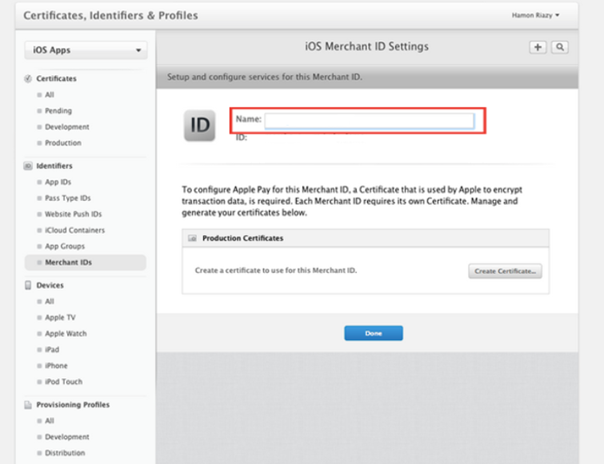
- Create Merchant ID, unique identifier that represents a merchant for Apple Pay
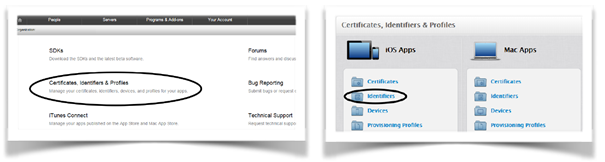
- Access your Apple Developer Account and visit the Certificates, Identifiers & Profiles section of the Apple member center. You can then navigate to Merchant IDs and click add.
- Set your Merchant ID. The identifier you enter should be a reverse DNS style identifier prefixed with the word
- Create Payment Processing Certificate, used to securely transfer payment data. Apple Pay servers use the payment processing certificate’s public key to encrypt the payment data.
- Obtaining Certificate Signing Request (CSR) from Computop
- Contact helpdesk@computop.com and ask for Apple Pay CSR. Provide us with information about your Apple Merchant ID.
- CSR will be needed by Apple to generate actual certificate for signing Payment Token
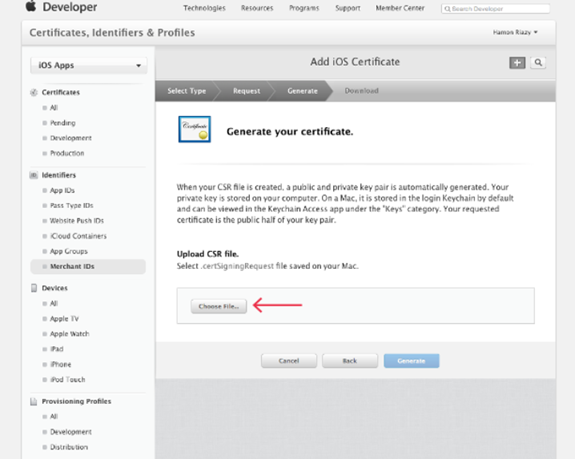
- Upload CSR at Apple
- In Member Center, select Certificates, Identifiers & Profiles. Under Identifiers, select Merchant IDs. Select the merchant ID from the list, and click Edit.
- Click Choose File, select the CSR received from Computop, and click Generate.
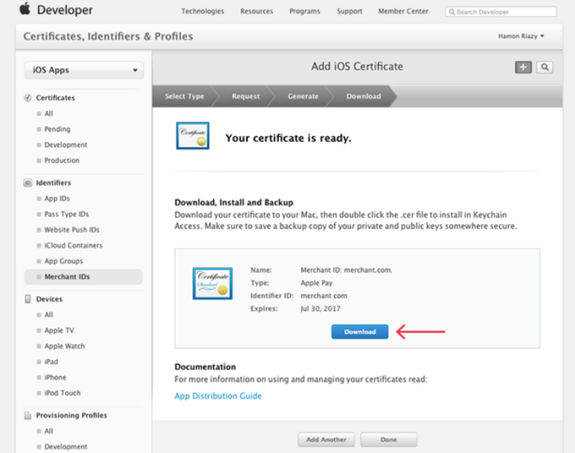
- Download the certificate by clicking Download, and click Done.
- Return Certificate to Computop
- Send the downloaded Certificate (CER file) together with your Apple Merchant ID to helpdesk@computop.com
- Obtaining Certificate Signing Request (CSR) from Computop
- Enable Apple Pay for your app in Xcode
- Open Capabilities pane
- Select the switch in the Apple Pay row, and then select the merchant IDs you want the app to use.
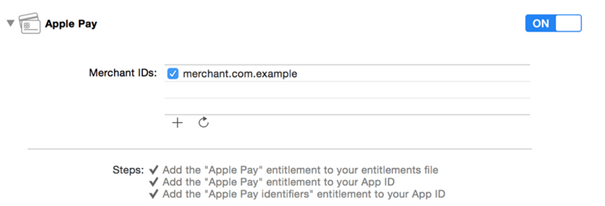
- (WEB ONLY) Create Merchant Identity Certificate. A Transport Layer Security (TLS) certificate used to authenticate your merchant sessions with the Apple Pay servers.
To register and verify your domain, and create your Merchant Identity Certificate:
- In Member Center, select Certificates, Identifiers and Profiles.
- Under Identifiers, select Merchant IDs.
- Select the merchant ID from the list, and click Edit.
- In the Apple Pay on the Web section, click the Add Domain
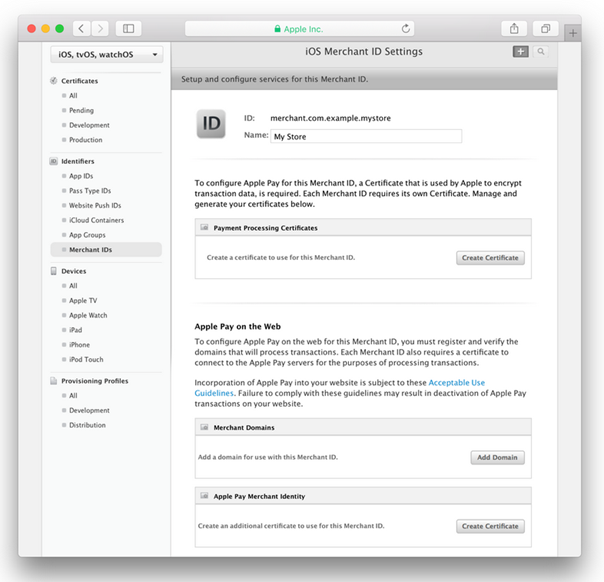
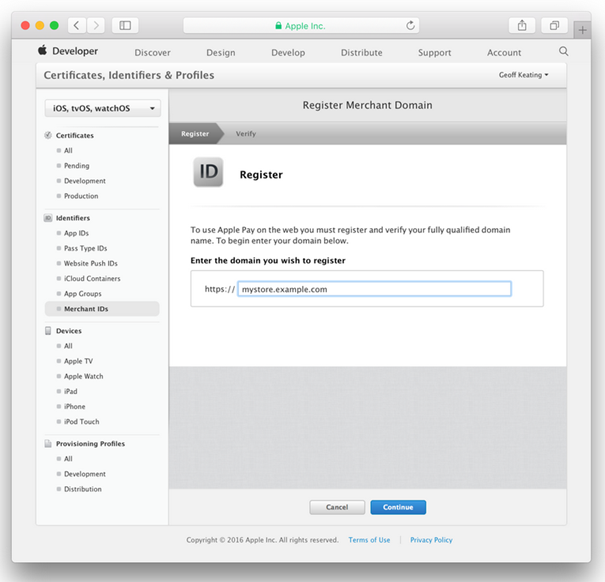
- Enter your fully qualified domain name, and click Continue.
- The site creates a file and makes it available to download. Download this file and host it at the provided location.
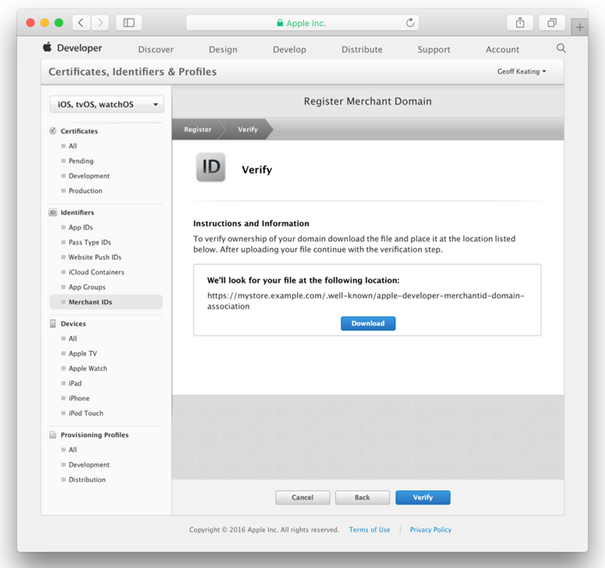
- As soon as the file is available on your server, click the Verify button. If the verification succeeds, the site returns to the iOS Merchant ID Settings page and shows a green Verified status label.
- In the Apple Pay on the Web section, click the Create Certificate Follow the instructions to create and download your Merchant Identity Certificate. Use this certificate when requesting a merchant session during payment validation. For more information, see Merchant Validation in ApplePaySession.
- Integrate Apple Pay at your application or web shop
- Follow guidelines: https://developer.apple.com/apple-pay
- Important: When creating PKPaymentRequest, request.merchantCapabilities = PKMerchantCapability3DS. Computop only supports 3DS types.
Paygate interface
Calling the interface
Two transactions are created when making a credit card payment via Apple Pay. In the Apple Pay transaction the required credit card data are determined first and the actual credit card transaction is then carried out automatically. This takes place via a server-to-server connection and supports all usual credit card transaction options. The difference here, however, is that you don't transmit the credit card information, which you don't know. Instead, you transmit the PKPaymentToken generated by Apple Pay, which contains the required credit card data in encrypted form.
In order to make a credit card payment with Apple Pay, go to the following URL:
Notice: For security reasons, Paygate rejects all payment requests with formatting errors. Therefore please use the correct data type for each parameter.
The following table describes the encrypted transfer parameters for Apple Pay. The table describes just basic parameters. It is also possible to include all credit card payment parameters (without credit card data). More information about this you can find within Card processing EN. If you are processing Recurring or stored Credential on File transactions, please make sure to review all the necessary information in "COF Mandate Integration Guide". If there are any specific parameters that are mandatory for credit card payment, these parameters are also mandatory for Apple Pay.
Parameter | Format | CND | Description |
|---|---|---|---|
MerchantID | ans..30 | M | MerchantID, assigned by Computop. Additionally this parameter has to be passed in plain language too. |
TransID | ans..64 | M | TransactionID which should be unique for each payment |
RefNr | ns..30 | C | Unique reference number. Mandatory in case that this parameter is mandatory for merchant's card processing. |
Amount | n..10 | M | Amount in the smallest currency unit (e.g. EUR Cent) Please contact the helpdesk, if you want to capture amounts < 100 (smallest currency unit). |
Currency | a3 | M | Currency, three digits DIN / ISO 4217 |
MAC | an64 | M | Hash Message Authentication Code (HMAC) with SHA-256 algorithm |
UserData | ans..1024 | O | If specified at request, Paygate forwards the parameter with the payment result to the shop. |
RTF | a1 | O | Establishment of Credential on File Agreement (Cardholder agrees that his card data can be stored for further transactions). |
Capture | ans..6 | O | Determines the type and time of capture. AUTO: capturing immediately after authorisation (default value). MANUAL: capturing made by the merchant. <Number>: Delay in hours until the capture (whole number; 1 to 696). |
OrderDesc | ans..64 | M | Description of purchased goods, unit prices etc. |
URLNotify | ans..256 | O | Complete URL which Paygate calls up in order to notify the shop about the payment result. The URL may be called up only via port 443 It may not contain parameters: Use the UserData parameter instead. |
MerchantIDExt | ans..128 | C | Merchant Identifier of Public Key Mandatory if more then one Merchant Identifiers are stored with Computop. |
TokenExt | ans..6000 | M | Apple Pay PKPaymentToken as JSON string in the Base64 format |
Channel | a..10 | O | Channel over which the order is processed. Allowed values are WEBSITE and MOBILE_APP |
Parameters for Apple Pay
The following table describes the result parameters with which the Paygate responds to your system:
Parameter | Format | CND | Description |
|---|---|---|---|
MID | ans..30 | M | MerchantID, assigned by Computop |
PayID | an32 | M | ID assigned by Paygate for the payment, e.g. for referencing in batch files This ID refers to the credit card transaction unless an error occurs already at the Apple Pay transaction. |
XID | an32 | M | ID for all single transactions (authorisation, capture, credit note) for one payment assigned by Paygate |
TransID | ans..64 | M | Merchant’s transaction number |
RefNr | ns..30 | O | Unique reference number |
UserData | ans..1024 | O | If specified at request, Paygate forwards the parameter with the payment result to the shop. |
Status | a..50 | M | OK or FAILED |
Description | ans..1024 | M | Further details in the event that payment is rejected. Please do not use the Description but the Code parameter for the transaction status analysis! |
Code | n8 | M | Error code according to Paygate Response Codes (A4 Error codes) |
| schemeReferenceID | ans..64 | C | Card scheme specific transaction ID required for subsequent credential-on-file payments, delayed authorizations and resubmssions. |
Result parameters for Apple Pay
Capture / Credit / Reversal
Captures, credits and reversals do not refer to the Apple Pay transaction but directly to the credit card transaction. More information about this you can find within Card processing EN.
Batch processing via the interface
Captures, credits and reversals via batch do not refer to the Apple Pay transaction but directly to the credit card transaction. More information about this you can find within the document Card processing EN.