
About Computop Pay by Bank
General information about Computop Pay by Bank
Computop Pay by Bank is based on the Standard Open Banking and belongs to payment category Online Bank Transfer.
The merchant initiates a payment, the customer is forwarded to an Open Banking Operator to allow country and bank selection and finally forwards the customer to their bank to approve and complete the payment.
Pay by Bank allows different modes:
| Mode | Description |
|---|---|
| sepa | Supported by all banks and is based on SEPA payments |
| sepaInstant | Supported by most banks and is based on SEPA Instant payments so money is transferred to merchant account typically within 10 seconds |
| fasterPayments | Used specially in the United Kingdom and is using AccountNumber and SortCode |
| Logo |  |
|---|---|
| Info | Pay by Bank is based on SEPA Instant Payment or Standard SEPA Payments and therefore widely supported and based on Open Banking Standards. The implementation is currently based on platform Token.io and Tink. |
| Type | Payments by Online Bank Transfer |
Use cases
Supported use cases | Supported interface via Token.io | Supported interface via Tink | ||||||
|---|---|---|---|---|---|---|---|---|
Use case | Description | Simple process | S-2-S | Form-based | HPP | S-2-S | Form-based | HPP |
Authorization + Capture | Merchant wants to authorize payment and capture on delivery |
| ||||||
Sale (one-shot) | Merchant wants to collect money from customer via OpenBanking |
|  |
|
| |
| |
full or partial Credit | Merchant wants to credit some money back to customer after a payment has been successfully completed |
| coming soon |
|
| |||
full or partial Reversal | Merchant wants to cancel a payment which has not been completed |
| ||||||
Process flow chart via Token.io
Process flow chart via Tink
Paygate interface
Format Description a alphabetical as alphabetical with special characters n numeric an alphanumeric ans alphanumeric with special characters ns numeric with special characters bool boolean expression (true or false) 3 fixed length with 3 digits/characters ..3 variable length with maximum 3 digits/characters enum enumeration of allowed values dttm ISODateTime (YYYY-MM-DDThh:mm:ss) Abbreviation Description CND condition M mandatory O optional C conditional Notice: Please note that the names of parameters can be returned in upper or lower case.Definitions
Data formats
Abbreviations
Comment If a parameter is mandatory, then it must be present If a parameter is optional, then it can be present, but it is not required If a parameter is conditional, then there is a conditional rule which specifies whether it is mandatory or optional
Calling the Pay by Bank interface via Token.io
To process a payment with online transfer with Pay by Bank, please use the following URL:
https://www.computop-paygate.com/OpenBanking.aspx |
Notice: For security reasons, Computop Paygate rejects all payment requests with formatting errors. Therefore, please use the correct data type for each parameter. The following table describes the encrypted payment request parameters:
| Key | Format | CND | Description |
|---|---|---|---|
ans..30 | M | MerchantID, assigned by Computop. Additionally this parameter has to be passed in plain language too. |
| Key | Format | CND | Description |
|---|---|---|---|
| TransID | ans..64 | M | TransactionID provided by you which should be unique for each payment |
Key | Format | CND | Description |
|---|---|---|---|
RefNr | an..18 | M | Reference is mandatory and must be unique for each payment. Allowed characters: A..Za..z0..9. |
| Key | Format | CND | Description |
|---|---|---|---|
| Amount | n..10 | M | Amount in the smallest currency unit (e.g. EUR Cent). Please contact the Computop Helpdesk, if you want to capture amounts <100 (smallest currency unit). |
| Key | Format | CND | Description |
|---|---|---|---|
| Currency | a3 | M | Currency, three letters DIN / ISO 4217. Only EUR and GBP permissible. Please find an overview here: A1 Currency table |
| Key | Format | CND | Description |
|---|---|---|---|
an64 | M | Hash Message Authentication Code (HMAC) with SHA-256 algorithm. Details can be found here: |
Key | Format | CND | Description | ||||||||
|---|---|---|---|---|---|---|---|---|---|---|---|
| PayType | a..11 | O | Defines type of Pay by Bank payment:
| ||||||||
| Account | an..30 | O | If you have multiple Bank Accounts configured at Open Banking Operator and setup in Computop Paygate, you may select another one than the default. The account can be named, e.g.
The naming for "account" needs to be agreed with Computop Helpdesk. | ||||||||
OrderDesc | ans..35 | O | Description of purchased goods, unit prices etc. That value is shown to the consumer in the OpenBanking payment form.
|
| Key | Format | CND | Description |
|---|---|---|---|
| UserData | ans..1024 | O | If specified at request, Paygate forwards the parameter with the payment result to the shop. |
| Key | Format | CND | Description |
|---|---|---|---|
| URLSuccess | ans..256 | M | Complete URL which calls up Paygate if payment has been successful. The URL may be called up only via port 443. This URL may not contain parameters: In order to exchange values between Paygate and shop, please use the parameter UserData.
|
| Key | Format | CND | Description |
|---|---|---|---|
| URLFailure | ans..256 | M | Complete URL which calls up Paygate if payment has been unsuccessful. The URL may be called up only via port 443. This URL may not contain parameters: In order to exchange values between Paygate and shop, please use the parameter UserData.
|
| Key | Format | CND | Description |
|---|---|---|---|
| Response | a7 | O | Status response sent by Paygate to URLSuccess and URLFailure, should be encrypted. For this purpose, transmit Response=encrypt parameter. |
| Key | Format | CND | Description |
|---|---|---|---|
| URLNotify | ans..256 | M | Complete URL which Paygate calls up in order to notify the shop about the payment result. The URL may be called up only via port 443. It may not contain parameters: Use the UserData parameter instead.
|
| Key | Format | CND | Description |
|---|---|---|---|
| ReqId | ans..32 | O | To avoid double payments or actions (e.g. by ETM), enter an alphanumeric value which identifies your transaction and may be assigned only once. If the transaction or action is submitted again with the same ReqID, Computop Paygate will not carry out the payment or new action, but will just return the status of the original transaction or action. Please note that the Computop Paygate must have a finalized transaction status for the first initial action (authentication/authorisation). This does not apply to 3-D Secure authentications that are terminated by a timeout. The 3-D Secure Timeout status does not count as a completed status in which the ReqID functionality on Paygate does not take effect. Submissions with identical ReqID for an open status will be processed regularly. Notice: Please note that a ReqID is only valid for 12 month, then it gets deleted at the Paygate. |
| Key | Format | CND | Description |
|---|---|---|---|
| Plain | ans..50 | O | A single value to be set by the merchant to return some information unencrypted in response/notify, e.g. the MID. "Plain"-parameter is part of encrypted "Data" in Computop Paygate and therefore protected against manipulation. |
| Key | Format | CND | Description |
|---|---|---|---|
| Custom | ans..1024 | O | "Custom"-parameter is added to the request data before encryption and is part of encrypted "Data" in Computop Paygate request. By this they are protected against manipulation by a consumer. The Custom-value is added to the Computop Paygate response in plain text and the "|" is replaced by a "&". By this you can put a single value into Custom-parameter and get multiple key-value-pairs back in response for your own purpose. |
The following table gives the result parameters which Computop Paygate transmits to URLSuccess or URLFailure and URLNotify. If you have specified the Response=encrypt parameter, the following parameters are sent Blowfish encrypted to your system: pls. be prepared to receive additional parameters at any time and do not check the order of parameters the key (e.g. mid, RefNr) should not be checked case-sentive
| Key | Format | CND | Description |
|---|---|---|---|
ans..30 | M | MerchantID, assigned by Computop |
| Key | Format | CND | Description |
|---|---|---|---|
| PayID | an32 | M | ID assigned by Paygate for the payment, e.g. for referencing in batch files as well as for capture or credit request. |
| Key | Format | CND | Description |
|---|---|---|---|
| XID | an32 | M | ID for all single transactions (authorisation, capture, credit note) for one payment assigned by Paygate |
| Key | Format | CND | Description |
|---|---|---|---|
| TransID | ans..64 | M | TransactionID provided by you which should be unique for each payment |
Key | Format | CND | Description |
|---|---|---|---|
a..50 | M | OK (URLSuccess) or FAILED (URLFailure). Please note that in the case of SEPA transfers it is possible that banks do not provide immediate payment confirmation to TOKEN.IO and therefore the customer will be redirected to the URLSuccess with the subsequent open status in the first step. In addition, this open status is also initially reported via URLNotify. After receipt of the final status (hours or days later) the merchant receives a further, additional notification and only this is then the final payment confirmation. URLSuccess / URLNotify – Parameters/values of the open status: “Status=AUTHORIZE_REQUEST&Code=00000000&Description=PENDING” Based on this response, the payment must be defined as open and no goods may be delivered, only after receipt of the final Notify. |
| Key | Format | CND | Description |
|---|---|---|---|
| Description | ans..1024 | M | Further details in the event that payment is rejected. Please do not use the Description but the Code parameter for the transaction status analysis! |
| Key | Format | CND | Description |
|---|---|---|---|
| Code | an8 | M | Error code according to Paygate Response Codes (A4 Error codes) |
Key | Format | CND | Description |
|---|---|---|---|
RefNr | ans..30 | M | Reference is mandatory and must be unique for each payment. Allowed characters: A..Za..z. Digits are not allowed! |
| TransactionID | ans..64 | M | Unique transaction id returned by Pay by Bank (transfer-id) |
| ExtCode | n..3 | O | External Response Code from Open Banking Operator |
| Key | Format | CND | Description |
|---|---|---|---|
| UserData | ans..1024 | O | If specified at request, Paygate forwards the parameter with the payment result to the shop. |
| Key | Format | CND | Description |
|---|---|---|---|
an64 | M | Hash Message Authentication Code (HMAC) with SHA-256 algorithm. Details can be found here: |
| Key | Format | CND | Description |
|---|---|---|---|
| Plain | ans..50 | O | A single value to be set by the merchant to return some information unencrypted in response/notify, e.g. the MID. "Plain"-parameter is part of encrypted "Data" in Computop Paygate and therefore protected against manipulation. |
| Key | Format | CND | Description |
|---|---|---|---|
| Custom | ans..1024 | O | "Custom"-parameter is added to the request data before encryption and is part of encrypted "Data" in Computop Paygate request. By this they are protected against manipulation by a consumer. The Custom-value is added to the Computop Paygate response in plain text and the "|" is replaced by a "&". By this you can put a single value into Custom-parameter and get multiple key-value-pairs back in response for your own purpose. |
Calling the Pay by Bank interface via Tink
Creating Payment Request
To process a payment with online transfer with Pay by Bank, please use the following URL:
https://www.computop-paygate.com/OpenBanking.aspx |
Notice: For security reasons, Computop Paygate rejects all payment requests with formatting errors. Therefore, please use the correct data type for each parameter. The following table describes the encrypted payment request parameters:
| Key | Format | CND | Description |
|---|---|---|---|
ans..30 | M | MerchantID, assigned by Computop. Additionally this parameter has to be passed in plain language too. |
| Key | Format | CND | Description |
|---|---|---|---|
| TransID | ans..64 | M | TransactionID provided by you which should be unique for each payment |
Key | Format | CND | Description |
|---|---|---|---|
RefNr | an..18 | M | Reference is mandatory and must be unique for each payment. Allowed characters: A..Za..z0..9. |
| Key | Format | CND | Description |
|---|---|---|---|
| Amount | n..10 | M | Amount in the smallest currency unit (e.g. EUR Cent). Please contact the Computop Helpdesk, if you want to capture amounts <100 (smallest currency unit). |
| Key | Format | CND | Description |
|---|---|---|---|
| Currency | a3 | M | Currency, three letters DIN / ISO 4217. Only EUR and GBP permissible. Please find an overview here: A1 Currency table |
| Key | Format | CND | Description |
|---|---|---|---|
| UserData | ans..1024 | O | If specified at request, Paygate forwards the parameter with the payment result to the shop. |
| Key | Format | CND | Description |
|---|---|---|---|
an64 | M | Hash Message Authentication Code (HMAC) with SHA-256 algorithm. Details can be found here: |
Key | Format | CND | Description |
|---|---|---|---|
| OrderDesc | ans..140 | M | Remittance information. For the DE market, only the following characters are permitted: a-z, A-Z, 0-9, ,, ., (, ), +, :, ?, and [space]. Warning: The hyphen (-) character is not supported by German payment providers and will cause payment rejection. |
| EventToken | ans..4 | M | TWOC: Initiating payment without obtain a consent |
| CountryCode | a2 | M | The country code (in ISO 3166-1 alpha-2 format) of the primary market of the payer. Possible values: |
| Key | Format | CND | Description |
|---|---|---|---|
| URLSuccess | ans..256 | M | Complete URL which calls up Paygate if payment has been successful. The URL may be called up only via port 443. This URL may not contain parameters: In order to exchange values between Paygate and shop, please use the parameter UserData.
|
| Key | Format | CND | Description |
|---|---|---|---|
| URLFailure | ans..256 | M | Complete URL which calls up Paygate if payment has been unsuccessful. The URL may be called up only via port 443. This URL may not contain parameters: In order to exchange values between Paygate and shop, please use the parameter UserData.
|
| Key | Format | CND | Description |
|---|---|---|---|
| Response | a7 | O | Status response sent by Paygate to URLSuccess and URLFailure, should be encrypted. For this purpose, transmit Response=encrypt parameter. |
| Key | Format | CND | Description |
|---|---|---|---|
| URLNotify | ans..256 | M | Complete URL which Paygate calls up in order to notify the shop about the payment result. The URL may be called up only via port 443. It may not contain parameters: Use the UserData parameter instead.
|
| Key | Format | CND | Description |
|---|---|---|---|
| Plain | ans..50 | O | A single value to be set by the merchant to return some information unencrypted in response/notify, e.g. the MID. "Plain"-parameter is part of encrypted "Data" in Computop Paygate and therefore protected against manipulation. |
| Key | Format | CND | Description |
|---|---|---|---|
| Custom | ans..1024 | O | "Custom"-parameter is added to the request data before encryption and is part of encrypted "Data" in Computop Paygate request. By this they are protected against manipulation by a consumer. The Custom-value is added to the Computop Paygate response in plain text and the "|" is replaced by a "&". By this you can put a single value into Custom-parameter and get multiple key-value-pairs back in response for your own purpose. |
The following table gives the result parameters which Computop Paygate transmits to URLSuccess or URLFailure and URLNotify. If you have specified the Response=encrypt parameter, the following parameters are sent Blowfish encrypted to your system: pls. be prepared to receive additional parameters at any time and do not check the order of parameters the key (e.g. mid, RefNr) should not be checked case-sentive
| Key | Format | CND | Description |
|---|---|---|---|
ans..30 | M | MerchantID, assigned by Computop |
| Key | Format | CND | Description |
|---|---|---|---|
| PayID | an32 | M | ID assigned by Paygate for the payment, e.g. for referencing in batch files as well as for capture or credit request. |
| Key | Format | CND | Description |
|---|---|---|---|
| XID | an32 | M | ID for all single transactions (authorisation, capture, credit note) for one payment assigned by Paygate |
| Key | Format | CND | Description |
|---|---|---|---|
| TransID | ans..64 | M | TransactionID provided by you which should be unique for each payment |
| Key | Format | CND | Description |
|---|---|---|---|
| Status | a..50 | M | OK (URLSuccess) or FAILED (URLFailure) |
| Key | Format | CND | Description |
|---|---|---|---|
| Description | ans..1024 | M | Further details in the event that payment is rejected. Please do not use the Description but the Code parameter for the transaction status analysis! |
| Key | Format | CND | Description |
|---|---|---|---|
| Code | an8 | M | Error code according to Paygate Response Codes (A4 Error codes) |
Key | Format | CND | Description |
|---|---|---|---|
RefNr | ans..30 | M | Reference is mandatory and must be unique for each payment. Allowed characters: A..Za..z. Digits are not allowed! |
| TransactionID | ans..64 | M | Unique transaction id returned by Pay by Bank (transfer-id) |
| Key | Format | CND | Description |
|---|---|---|---|
| UserData | ans..1024 | O | If specified at request, Paygate forwards the parameter with the payment result to the shop. |
| Key | Format | CND | Description |
|---|---|---|---|
an64 | M | Hash Message Authentication Code (HMAC) with SHA-256 algorithm. Details can be found here: |
| Key | Format | CND | Description |
|---|---|---|---|
| Plain | ans..50 | O | A single value to be set by the merchant to return some information unencrypted in response/notify, e.g. the MID. "Plain"-parameter is part of encrypted "Data" in Computop Paygate and therefore protected against manipulation. |
| Key | Format | CND | Description |
|---|---|---|---|
| Custom | ans..1024 | O | "Custom"-parameter is added to the request data before encryption and is part of encrypted "Data" in Computop Paygate request. By this they are protected against manipulation by a consumer. The Custom-value is added to the Computop Paygate response in plain text and the "|" is replaced by a "&". By this you can put a single value into Custom-parameter and get multiple key-value-pairs back in response for your own purpose. |
Credit with reference
Credits (refunds) are possible via a Server-to-Server connection. The Computop Paygate permits only credits for Pay by Bank that reference a previously made transaction via Computop Paygate. The amount of the credit is limited to the amount of the sale transaction.
To carry out a credit with a reference transaction, please use the following URL:
https://www.computop-paygate.com/credit.aspx |
Notice: For security reasons, Computop Paygate rejects all payment requests with formatting errors. Therefore, please use the correct data type for each parameter. The following table describes the encrypted payment request parameters:
| Key | Format | CND | Description |
|---|---|---|---|
ans..30 | M | MerchantID, assigned by Computop. Additionally this parameter has to be passed in plain language too. |
| Key | Format | CND | Description |
|---|---|---|---|
| PayID | an32 | M | ID assigned by Paygate for the payment to be credited |
| Key | Format | CND | Description |
|---|---|---|---|
| TransID | ans..64 | M | TransactionID provided by you which should be unique for each payment |
| Key | Format | CND | Description |
|---|---|---|---|
an64 | M | Hash Message Authentication Code (HMAC) with SHA-256 algorithm. Details can be found here: |
| Key | Format | CND | Description |
|---|---|---|---|
| Amount | n..10 | M | Amount in the smallest currency unit (e.g. EUR Cent). Please contact the Computop Helpdesk, if you want to capture amounts <100 (smallest currency unit). |
| Key | Format | CND | Description |
|---|---|---|---|
| Currency | a3 | M | Currency, three letters DIN / ISO 4217. Only EUR and GBP permissible. Please find an overview here: A1 Currency table |
Key | Format | CND | Description |
|---|---|---|---|
RefNr | ans..30 | M | Reference is mandatory and must be unique for each payment. Allowed characters: A..Za..z. Digits are not allowed! |
The following table describes the result parameters with which the Computop Paygate responds to your system pls. be prepared to receive additional parameters at any time and do not check the order of parameters the key (e.g. mid, RefNr) should not be checked case-sentive
| Key | Format | CND | Description |
|---|---|---|---|
ans..30 | M | MerchantID, assigned by Computop |
| Key | Format | CND | Description |
|---|---|---|---|
| PayID | an32 | M | ID assigned by Paygate for the payment, e.g. for referencing in batch files as well as for capture or credit request. |
| Key | Format | CND | Description |
|---|---|---|---|
| XID | an32 | M | ID for all single transactions (authorisation, capture, credit note) for one payment assigned by Paygate |
| Key | Format | CND | Description |
|---|---|---|---|
| TransID | ans..64 | M | TransactionID provided by you which should be unique for each payment |
| Key | Format | CND | Description |
|---|---|---|---|
| Status | a..50 | M | OK (URLSuccess) or FAILED (URLFailure) |
| Key | Format | CND | Description |
|---|---|---|---|
| Description | ans..1024 | M | Further details in the event that payment is rejected. Please do not use the Description but the Code parameter for the transaction status analysis! |
| Key | Format | CND | Description |
|---|---|---|---|
| Code | an8 | M | Error code according to Paygate Response Codes (A4 Error codes) |
Setup with OpenBanking-provider Tink
As Computop does not have access to your Tink setup you need to send us the information required for setup in Computop Paygate.
You will have access to your Tink-Console after signing the contract.
Please login into your Tink Console (https://console.tink.com/login) then set up your account as described in https://docs.tink.com/resources/console/set-up-your-tink-account send the information to Computop Paygate – in clear text, not as a screenshot:
client_id: this is the unique ID for your app. This key is public and is instantly available once you create an app.client_secret: this is a secret key for your app. This key authenticates your app with the Tink API.
Notice: Please do not forget to add the callback URL when you create your credentials.Please Open Tink Console>Api Settings>API Client>Redirect URLs, then please add this “https://www.computop-paygate.com/cbOpenBanking.aspx” as your redirect URL.
Setup with OpenBanking-provider Token.io
As Computop does not have access to your Token.io setup you need to send us the information required for setup in Computop Paygate.
You will have access to your Token.io-Dashboard after signing the contract.
Please login into your Token.io dashboard (https://dashboard.token.io/) and send the information to Computop Paygate – in clear text, not as a screenshot:
- Company name → as defined in Account Settings -> Company Information
- MemberId, Alias, Token Public Key → taken from Settings -> Member Information
- API Key → taken from Settings -> Authentication Keys
- List of your merchant bank accounts (beneficiaries) → taken from Settings -> Beneficiary
A sample mail to Computop Paygate could look like:
My Token.io setup
| Category | Value | Comment | ||||||||||||||||||||
|---|---|---|---|---|---|---|---|---|---|---|---|---|---|---|---|---|---|---|---|---|---|---|
| Account Setting | ||||||||||||||||||||||
| Company Name | John Doe Limited | |||||||||||||||||||||
| Member Information | ||||||||||||||||||||||
| Member ID | m:YCkxxxxxxxxxxxxxxxxxxxxxxxv:5zKtXEAq | |||||||||||||||||||||
| Alias | {"type":"DOMAIN","value":"xxxxxxxxxxxxx"} | |||||||||||||||||||||
| Public Token Key | iYCC0wJXDO0Q-Bqqyi49mD_z-_IWqfmlP_jwGWWNKds | Should always be this value; Pls. let us know if it's a different one. | ||||||||||||||||||||
| Authentication Keys | ||||||||||||||||||||||
| API Key | bS1xxxxxxxxxxxxxxxxxxxxxxxxxxxxxxxxxxxxxxxxxxxxxxxxxxxxxxxxxxxxxxxxxxxxxxxxxxxxxxxxxxxxxxxxxxxxxxzJm | |||||||||||||||||||||
| Beneficiary Information | ||||||||||||||||||||||
| Beneficiary |
|
Customization and Testing with OpenBanking-provider Token.io
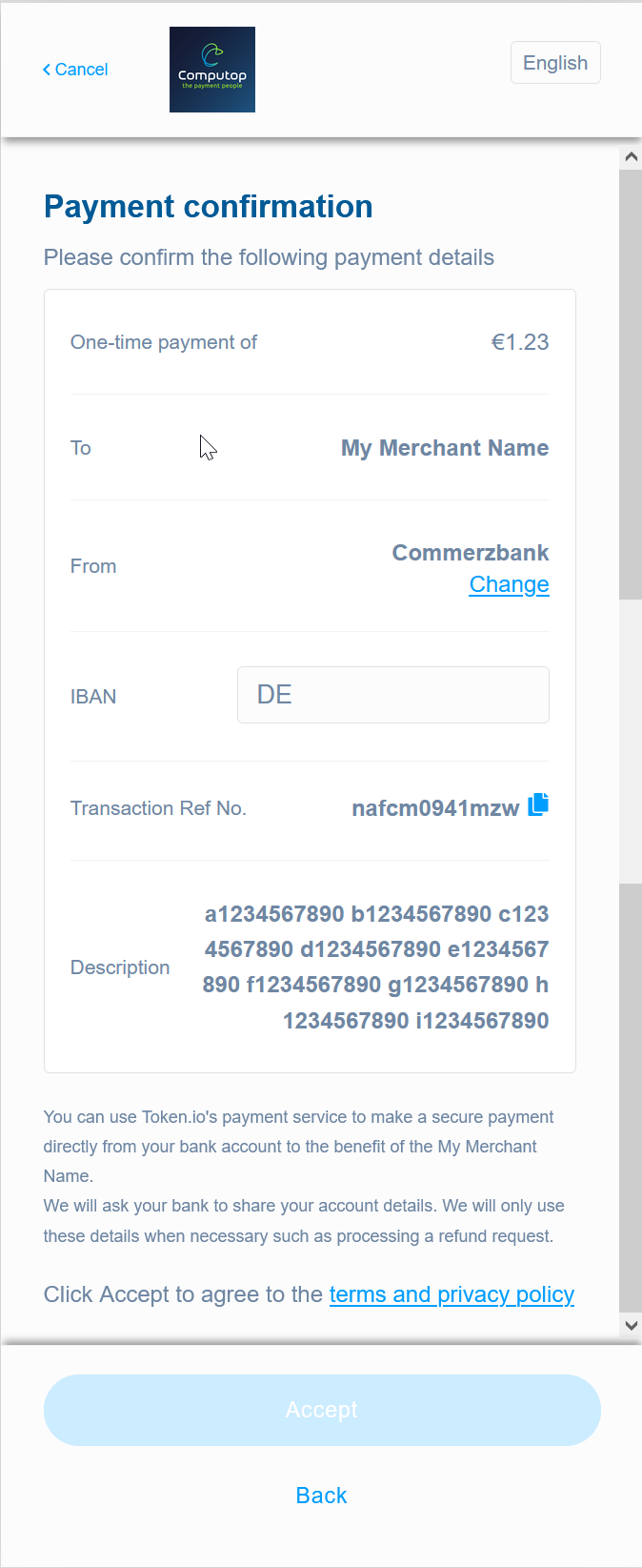
How a payment looks like
| English | Description |
|---|---|
| Static:
Dynamic / from API request:
Consumer:
|
How to customize your payment / Token.io-account
After signing your contract with the Open Bank Operator (Token.io) you will get access to their dashboard.
- Production-URL: https://dashboard.token.io/
There you can set up:
- your user details and company information (e.g. Company name, Billing details, ...)
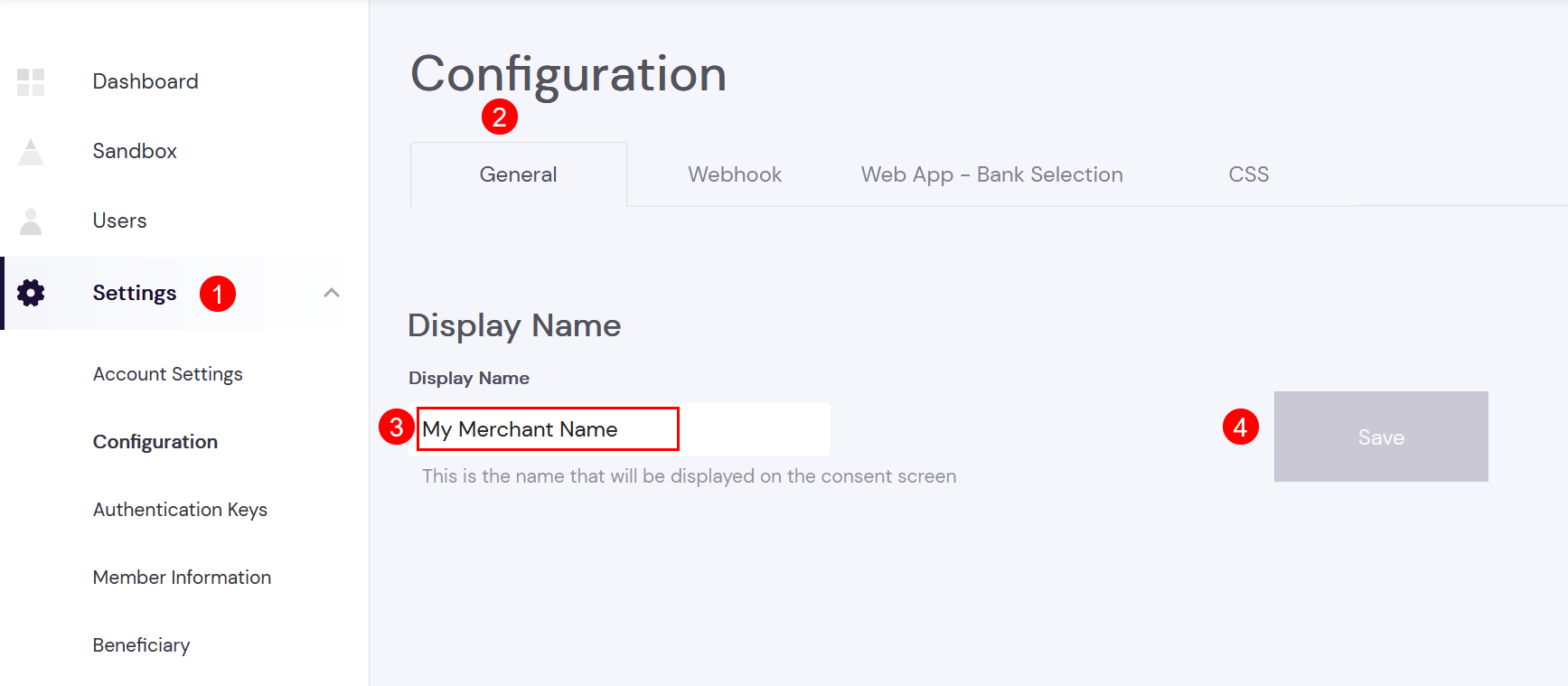
Settings → Configuration
General
Here the "Display Name" can be changed. This is the recipient shown to the consumer ("To" / "Empfänger"):
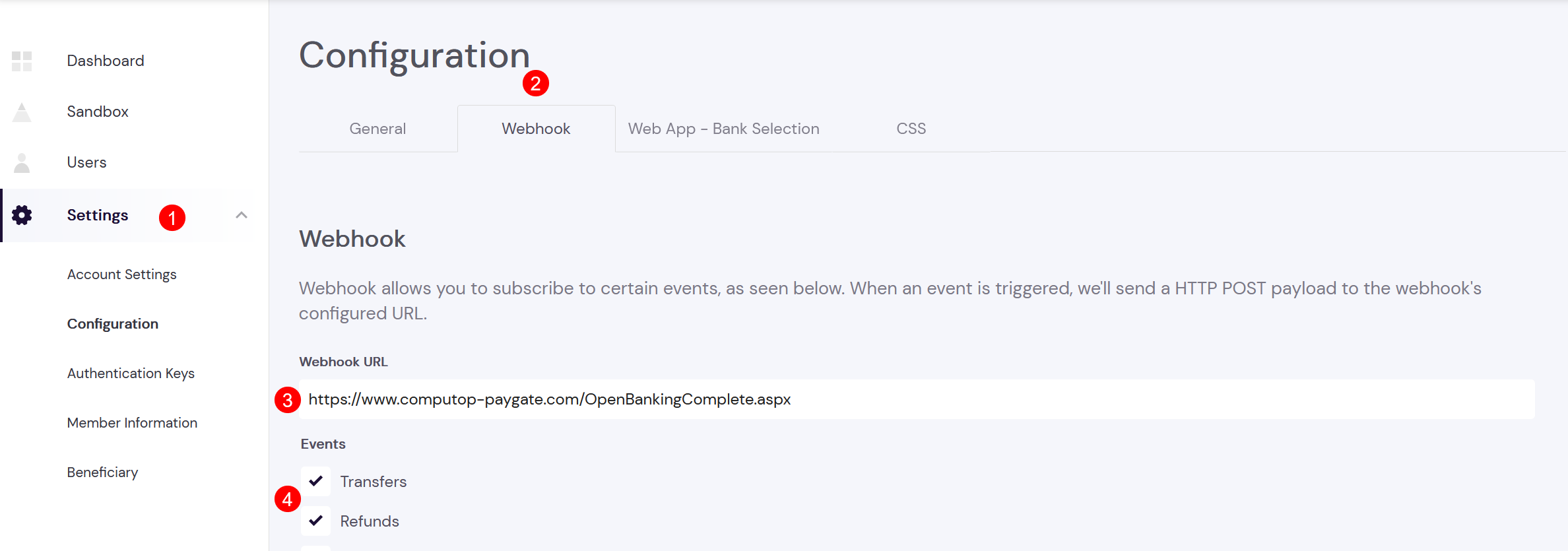
Webhook
Webhook must be set to technical Computop Paygate URL: https://www.computop-paygate.com//OpenBankingComplete.aspx
Web App Bank Selection
It's possible to limit bank selection for your consumers. It's recommended to allow "Enable all banks". The consumer can then select any supported bank.
CSS (styling of Token.io Web App (shown to your customer)
It's possible to upload your own merchant logo and customize CSS styling of Web App (shown to consumer):
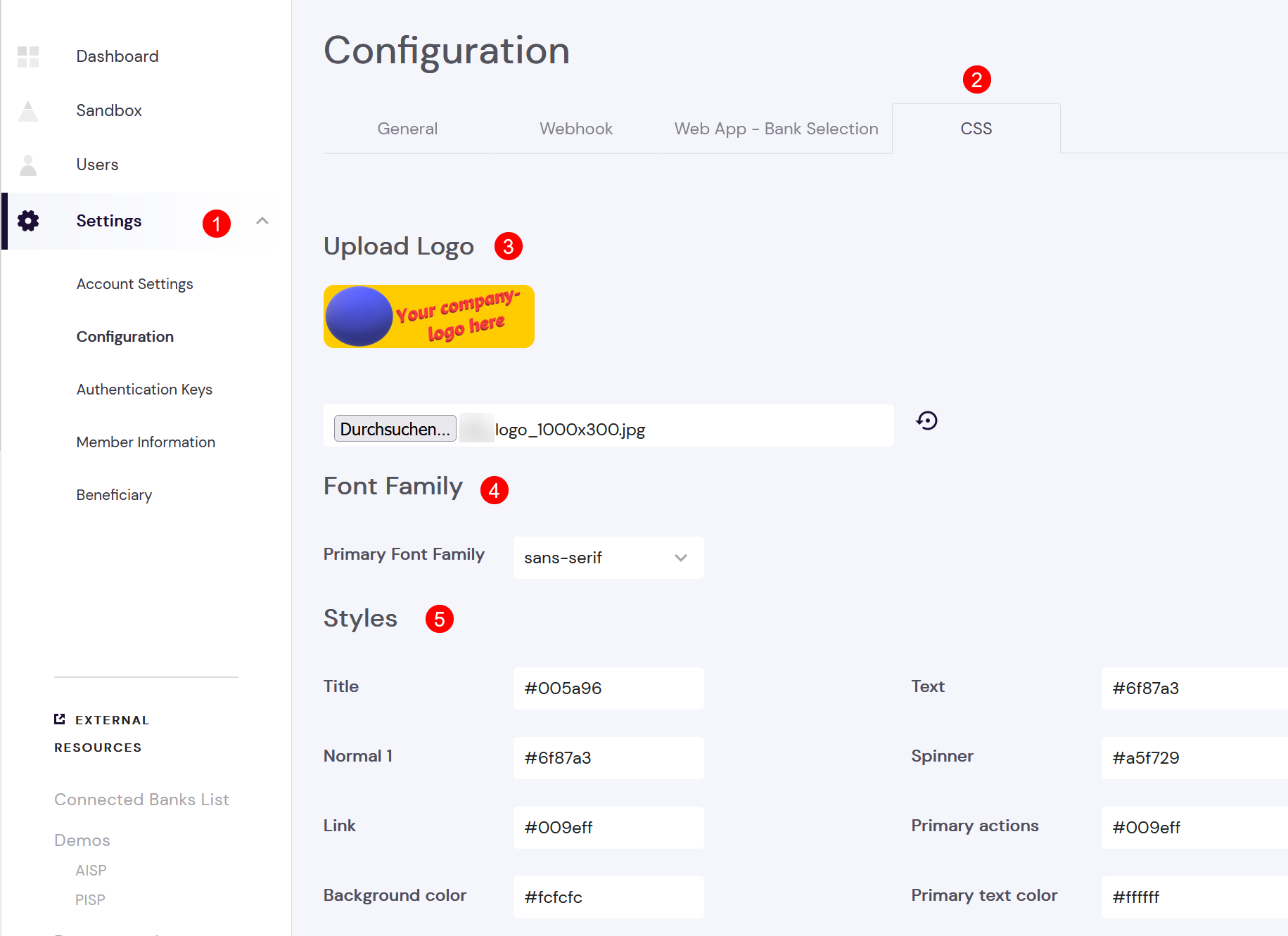
After you've uploaded your merchant logo and customized your CSS styles the new WebApp-layout can be tested via Payload Builder:
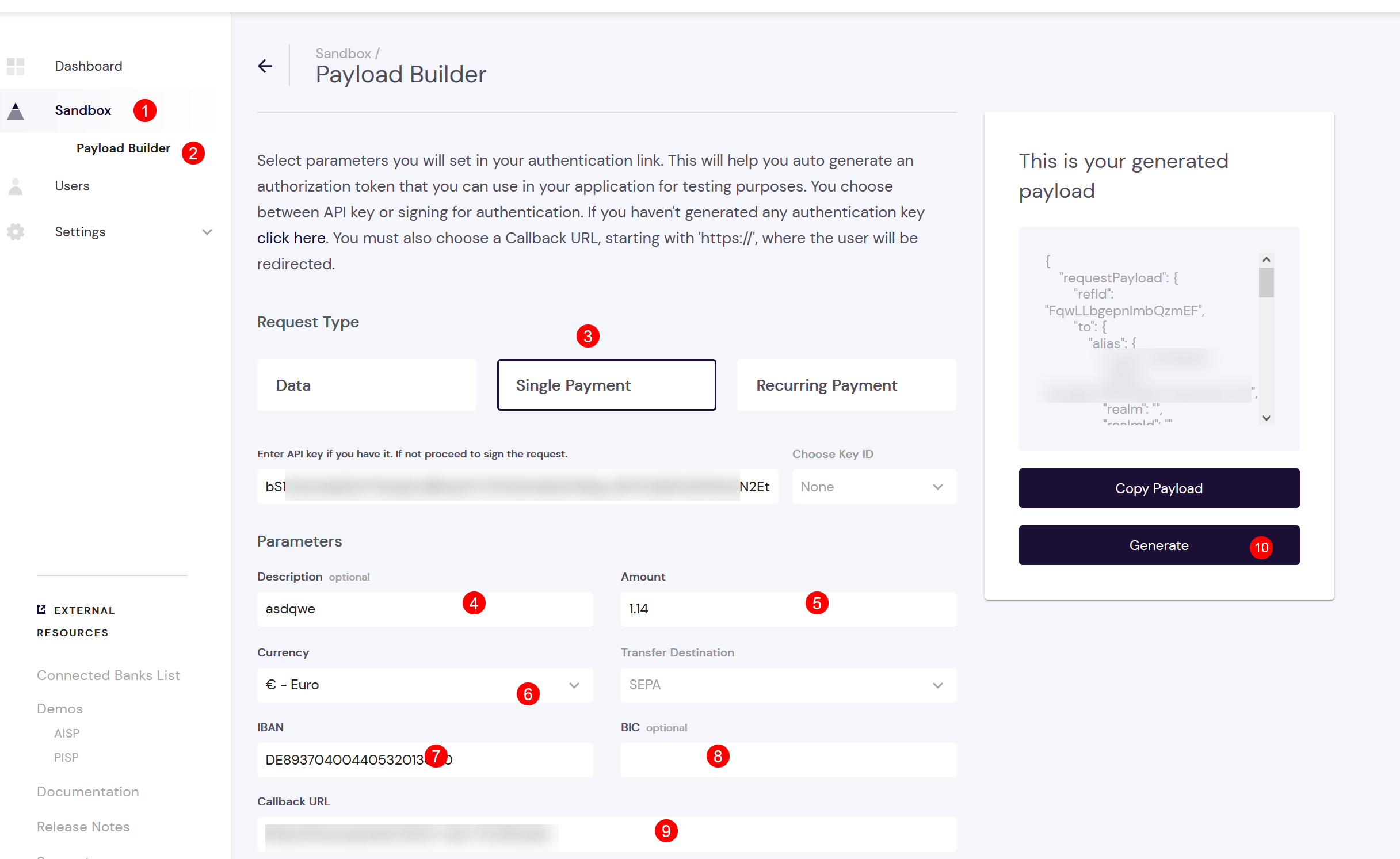
After doing CSS modification a test payment can be initiated to check design:
- API Key and MemberID are automatically set by Payload Builder
- (4) Description must be unique for each payment
- (5) Amount must be used with decimal point
- (6) Currency must be EUR
- (7) IBAN is merchant's IBAN, i.e.: any of your benificiary IBAN
- (8) merchant's BIC is optional → leave empty
- (9) for testing use any Url, e.g. https://www.google.com
- (10) click on "Generate"
Then click on Test (1)

A new tab/window will open with new design:

Settings → Authentication Keys
Please generate an API Key for your configuration and send it to Computop Helpdesk:
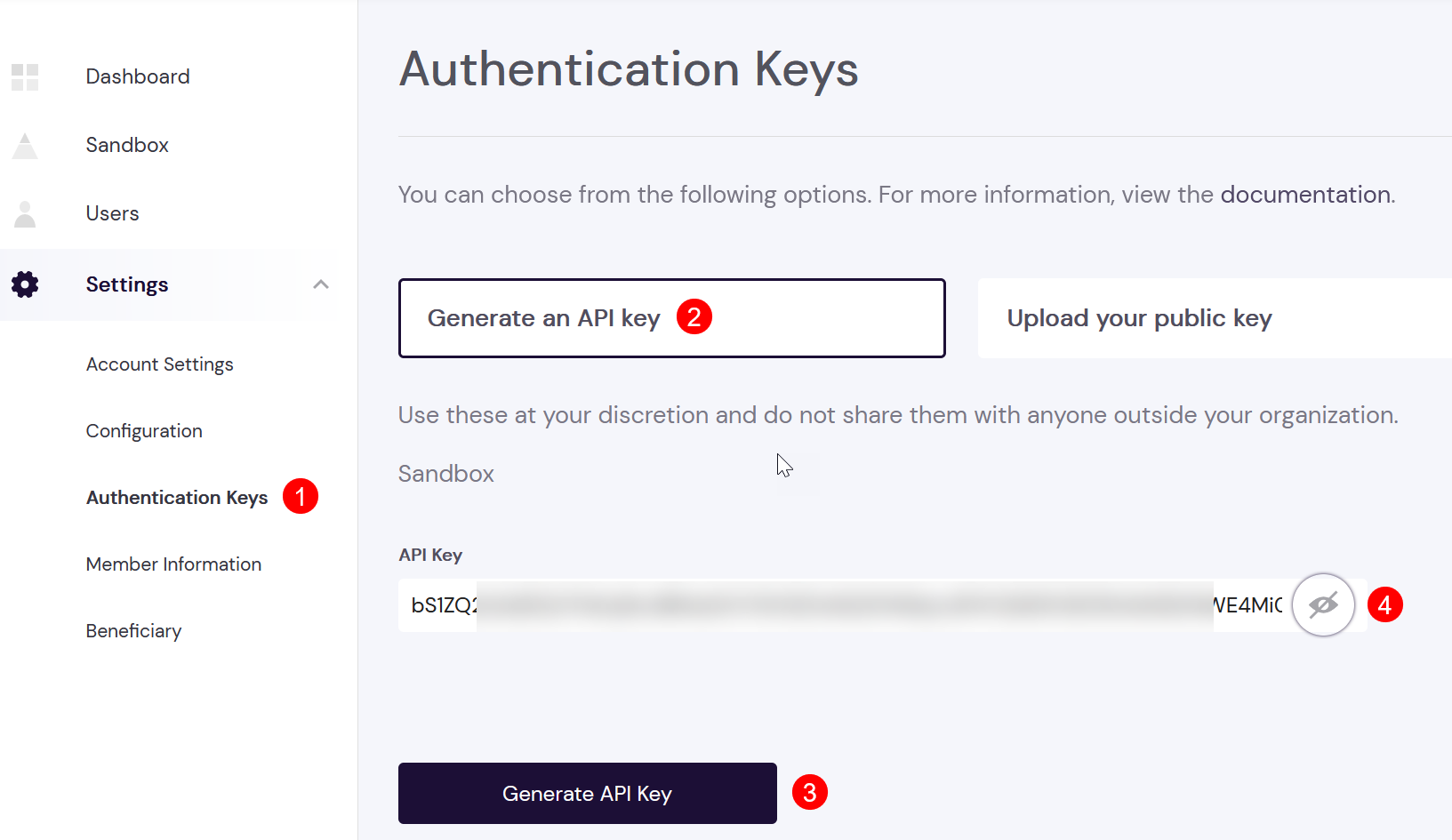
We also need your MemberID and other information which is shown in next section.
Settings → Member Information
The information shown here is also needed for setup in Computop Paygate:

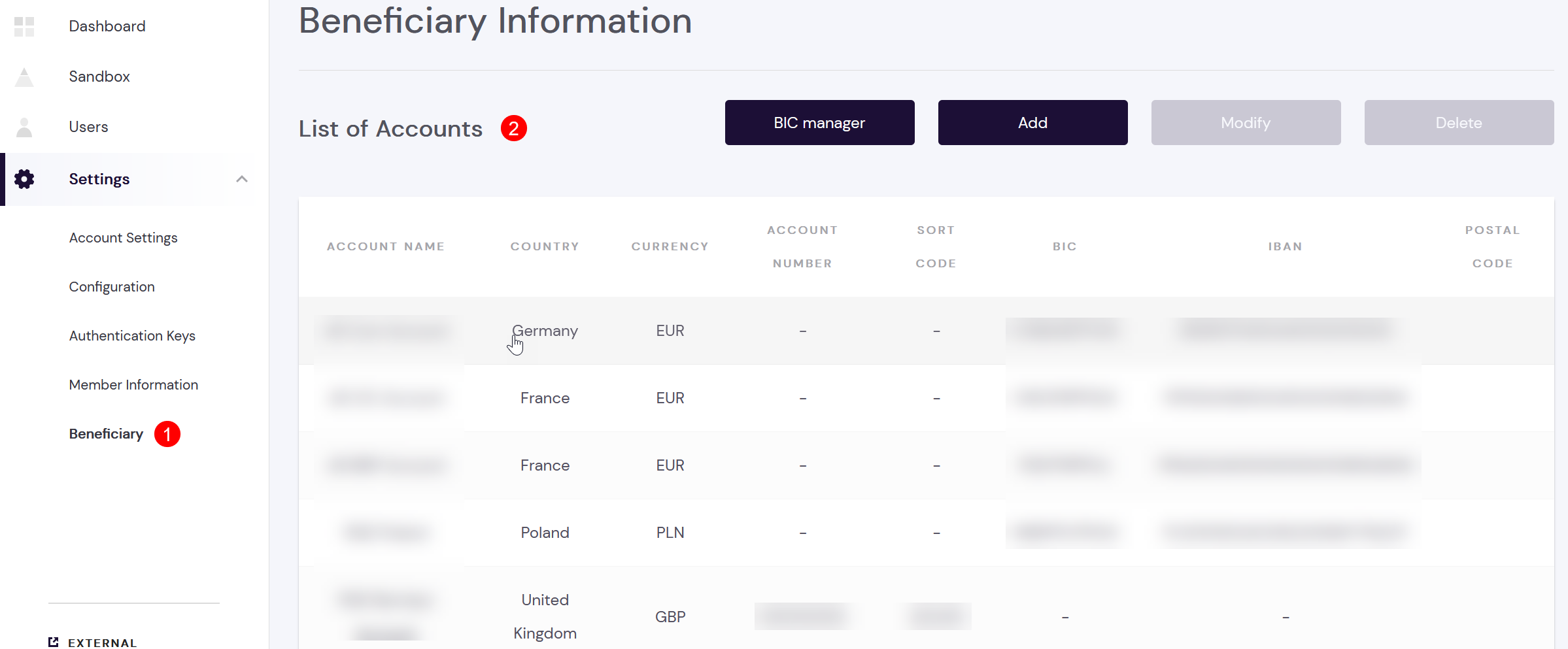
Settings → Beneficiary
Your merchant account may have multiple bank accounts configured. Each bank account can have an account name (assigned by you) and is defined
- either with IBAN/BIC (SEPA based)
- or with Account Number / Sort Code (FasterPayments / UK)
A sample setup may look like this:
Testing in Sandbox-mode
As long as your OpenBanking Setup is not setup in Production Mode you can test it in Sandbox Mode.
Therefore please use test data shown here: Test Pay by Bank.